Curated ToolThis tool is part of our curated AI directory. We only include tools that meet our standards for relevance, usability and real-world value.

WordPress

Builds WordPress sites using an AI website builder and AI tools

Website BuildersE-commerce Builders
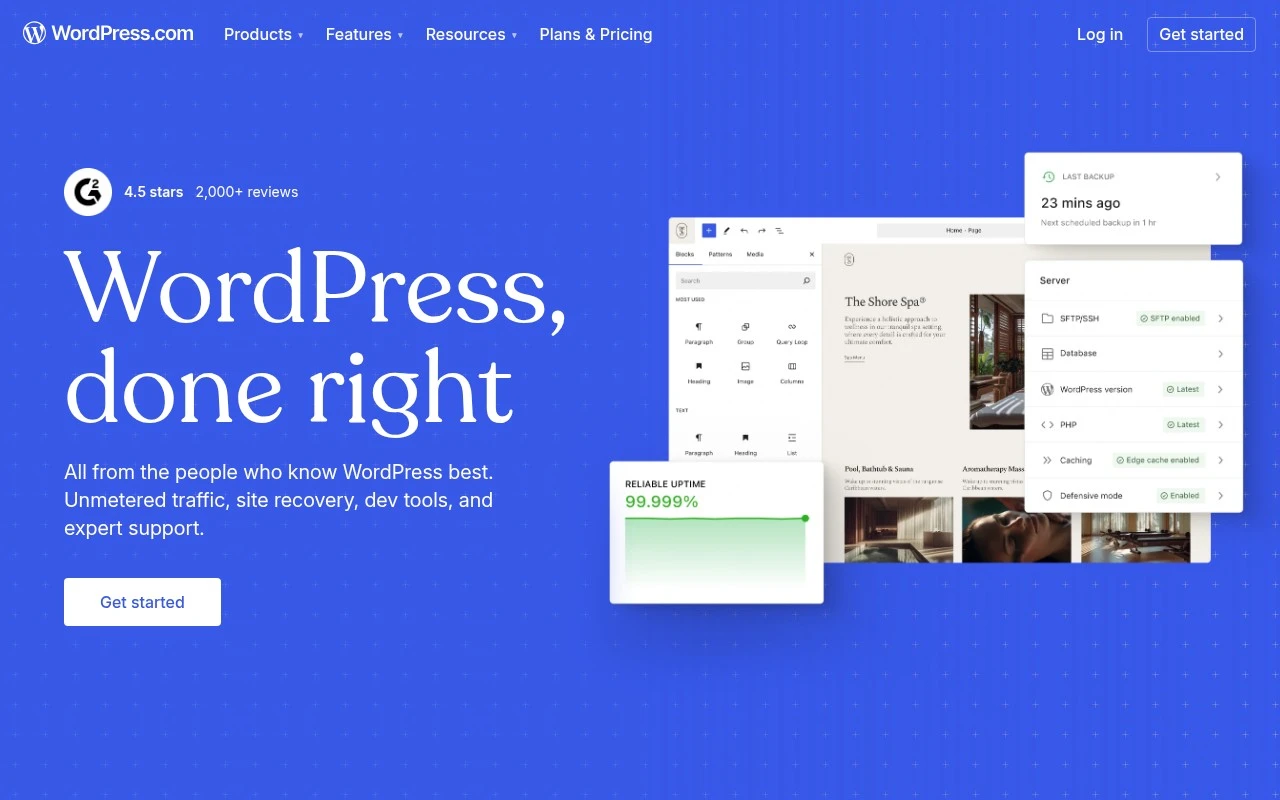
WordPress.com is a managed WordPress platform for creating, hosting, and publishing websites. It combines WordPress site-building tools with hosting, themes, domains, security, storage, support, and optional products such as ecommerce, newsletters, plugins, developer tools, and enterprise WordPress VIP. The site also promotes an AI Website Builder and WordPress AI features, though the provided page does not specify the exact AI capabilities in detail.

FYAI Score

8.8 / 10

Based on 14.986 reviews

Pricing:

Freemium

Best for:

Bloggers and small businesses building and growing a website

Score Breakdown

  • Ease of use7.4 / 10
  • Features9.3 / 10
  • Pricing9.1 / 10
  • Integrations9.4 / 10
  • Support9.0 / 10

PRODUCT PREVIEW

What this AI tool does

WordPress is a widely used content management system for building and maintaining websites without needing to write code for every change. It provides a structured way to create pages and posts, manage media, and organize site navigation, making it suitable for personal blogs, business sites, and basic online publications. On an AI tool page, wordpress typically refers to tools that help you work faster inside a WordPress site—such as drafting or rewriting content, generating page copy, or assisting with routine editing tasks—while keeping you in control of what gets published. This kind of tool is generally used to support content creation and site updates, with the final review and publishing decisions remaining with the site owner or editor.

Use cases

Best for

Website Hosting

Use WordPress.com to host a WordPress site with managed updates, security, storage, domains, and built in support.

Build Landing Page

Build a landing page on WordPress.com using block editor layouts, themes, and custom domains, then publish it to your site.

Website Generation

Generate a new website on WordPress.com with its AI Website Builder, which creates a starter site you can edit and publish.

ANALYSIS

Strengths & limitations

Strengths
  • Provides managed WordPress hosting, security, CDN-backed performance, site recovery, and expert support without requiring manual server setup.
  • Supports a wide range of site types, including blogs, newsletters, business websites, ecommerce sites, agency projects, and enterprise WordPress deployments.
  • Includes WordPress-specific design and publishing tools such as themes, patterns, plugins, domains, and developer resources.
Limitations
  • Advanced capabilities such as ecommerce, plugins, professional email, and enterprise hosting may depend on paid plans or separate products.
  • Users who want full control over their own server stack may prefer self-hosted WordPress rather than WordPress.com’s managed environment.
  • The official page mentions AI website-building features but does not provide enough detail to assess the depth or limits of those AI functions from the scrape alone.

Evaluation

FYAI score breakdown

Our structured evaluation across five key criteria

8.8 / 10

Overall score

Based on 14.986 reviews

  • Ease of use7.4 / 10
  • Features9.3 / 10
  • Pricing9.1 / 10
  • Integrations9.4 / 10
  • Support9.0 / 10

What users say

Findings from public reviews, documentation and community sources.

  • Ease of use

    WordPress.com says onboarding requires “No technical setup required” and offers a “Drag, drop” design experience. A Reddit r/webdev discussion includes sentiment that WordPress can become complex when plugins and maintenance enter the workflow.

  • Features

    The WordPress.com pricing page lists built-in hosting, premium themes, unmetered bandwidth, and ecommerce, and the product page references an AI website builder and enterprise options.

  • Pricing

    The WordPress.com pricing page shows a free plan plus paid plans at €4/month Personal, €8/month Premium, and €25/month Business when billed annually. The WordPress.com pricing page lists a free domain for one year, storage amounts, unlimited pages/posts/users/visitors, and support.

  • Integrations

    The WordPress.org plugin directory describes itself as “the largest directory of free” plugins and says it offers “thousands of free plugins to build, customize, and enhance” a site.

  • Support

    The WordPress.com pricing page lists “Free support” from its “expert, friendly Happiness team,” and the Business plan includes “Free 24/7 priority expert support.” WordPress.com surfaces a Support Center, guides, courses, forums, and contact options.

Who is this for?

Best for users who want a website builder that can extend into ecommerce and plugins, the WordPress.com pricing page lists ecommerce and plugin extension, and WordPress.org says there are “thousands of free plugins to build, customize, and enhance” a site. Less suited to users who want a near-zero-maintenance hosted builder, Reddit sentiment reflects that WordPress can become complex when plugins and maintenance enter the workflow.

PRODUCT PREVIEW

Feature highlights

Themes & Editor

Design pages with blocks, themes, and full-site editing—no code.

Secure Managed Hosting

Built-in security, backups, and updates to keep your site protected.

Managed Hosting Built-In

Build and publish with secure hosting, updates, backups, and support.

COMPARE

Discover curated alternatives worth comparing

Compare similar AI tools based on features, pricing and use cases

8.6/ 10Based on 28.442 reviews

Wix AI

Website BuildersE-commerce Builders
Generates a Wix website draft from user answers for editing.
Best for:
Small business owners
Pricing
Freemium

7.7/ 10Based on 35 reviews

WeWeb

Hosting & DeploymentApp / No-code Builders
Generates web app pages, databases, and logic from prompts
Best for:
Startup founders
Pricing
Freemium

7.9/ 10Based on 994 reviews

Webflow

Website BuildersLanding Page Builders
Build, publish, and optimize websites with AI workspace tools
Best for:
Marketing teams
Pricing
Freemium

Join millions building their online presence with WordPress. Launch a site you’re proud of and start growing your business today.

FAQ

Frequently asked
questions

Everything you need to know about this AI tool,
its features, pricing, use cases, and limitations.

Is WordPress a good fit for a small business site, blog, or online store?
WordPress works well for content-heavy sites (blogs, service pages, landing pages) and can scale to more complex builds with the right theme and plugins. For ecommerce, it’s viable with WooCommerce, but you’ll want to compare total cost and maintenance effort against hosted store builders. If your priority is maximum design control and extensibility, WordPress is usually a strong contender.
What do you get on WordPress.com for free, and when do you need a paid plan?
The free WordPress.com plan is fine for basic publishing, but it comes with notable limits around customization and monetization options. Paid plans typically unlock a custom domain, more storage, and advanced features like additional design tools and plugin support (depending on plan). If you need business-grade integrations or full control over functionality, expect to pay.
How does WordPress compare with Wix, Squarespace, and Webflow for building a site?
Compared with Wix and Squarespace, WordPress generally offers deeper extensibility via plugins and a larger theme ecosystem, but it can require more ongoing upkeep. Webflow often wins for visual design workflows and controlled front-end output, while WordPress tends to be stronger for editorial publishing and broad third-party compatibility. Your choice usually comes down to whether you value a managed, tightly integrated builder or an ecosystem-driven platform.
How quickly can you launch a site on WordPress, and what’s the onboarding effort like?
WordPress sites can get slower or harder to manage when too many plugins are installed or when themes are poorly optimized. You’ll also need a routine for updates, backups, and security, which may be handled for you on WordPress.com but still requires oversight. Costs can rise as you add premium themes, plugins, or higher-tier plans.
What should teams consider about data privacy, security, and compliance on WordPress.com?
With WordPress.com, your site data is hosted by Automattic, so review their data processing terms, retention policies, and where data may be stored to match your compliance needs. If you collect personal data (forms, analytics, ecommerce), you’ll still need proper consent flows, cookie controls, and a clear privacy policy. Also evaluate how third-party plugins and integrations handle user data, since they can introduce additional processors and risk.