Curated ToolThis tool is part of our curated AI directory. We only include tools that meet our standards for relevance, usability and real-world value.

Freepik

Generates and edits images using AI and stock design assets

AI Image GeneratorSocial Graphics
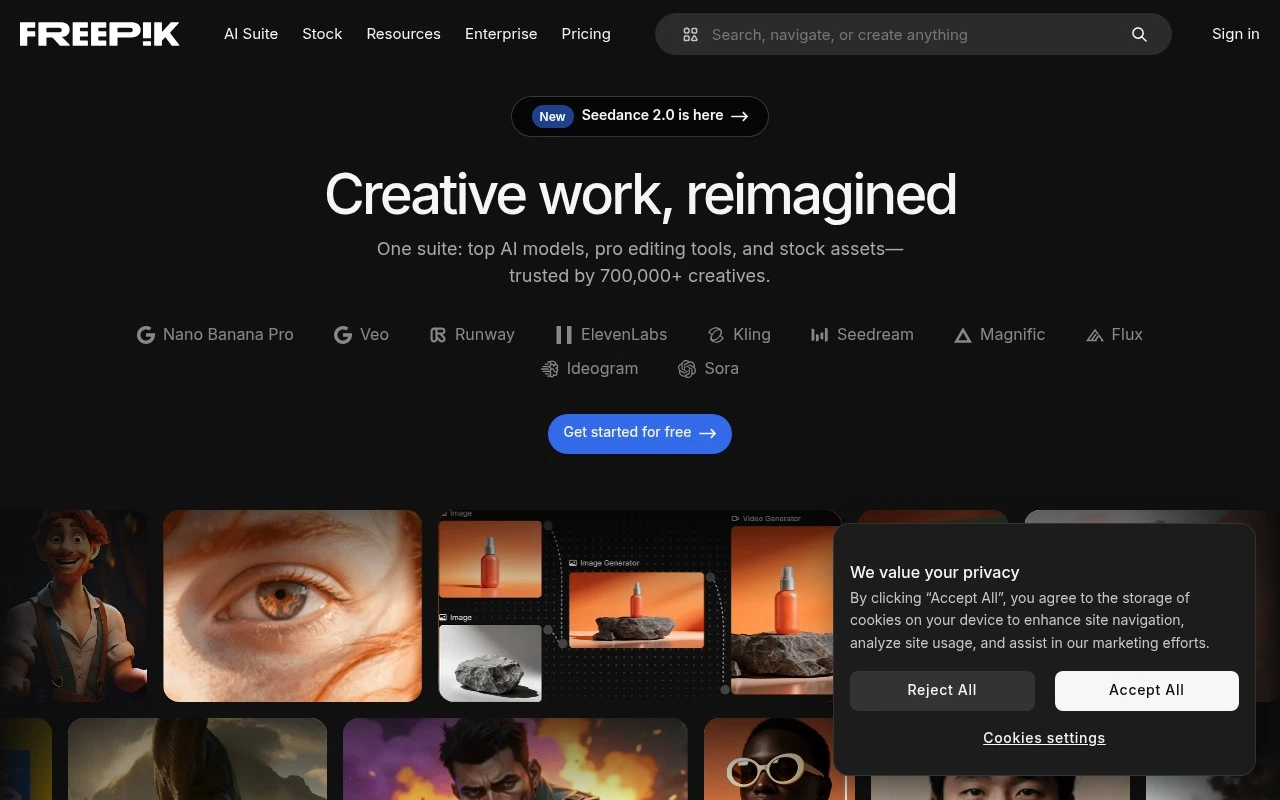
Freepik is best known as a large marketplace and library for visual design resources, with AI tools layered into its creative workflow. It helps users find ready-made assets or generate new visuals without starting from a blank canvas. Its main distinction is the combination of a broad stock-asset catalog with AI image creation and editing features in one platform.

FYAI Score

8.5 / 10

Based on 2.642 reviews

Pricing:

Freemium

Best for:

Designers and marketers needing fast, on-brand visuals

Score Breakdown

  • Ease of use7.3 / 10
  • Features9.1 / 10
  • Pricing9.2 / 10
  • Integrations8.4 / 10
  • Support8.5 / 10

PRODUCT PREVIEW

What this AI tool does

Freepik is a resource library for finding ready-made visual assets that can be used in design, marketing, and content creation. It’s commonly used when you need illustrations, icons, photos, or templates quickly, without starting from scratch. The platform is typically explored through search and filters to narrow results by style, format, or usage needs. Depending on the asset and license, files may be available for free or require a paid plan, and some uses may require attribution. For teams and individuals producing web pages, presentations, social posts, or print materials, Freepik can help speed up early drafts and final layouts by providing consistent visuals. As with any stock library, it’s a good idea to review licensing terms and confirm that an asset fits your project’s requirements before publishing.

Use cases

Best for

Design Templates

Browse and customize ready-made templates like posters and social posts using Freepik’s editable design files.

Generate Images

Generate new images from text prompts with Freepik’s AI image generator, then download or refine the results.

Create Brand Assets

Create brand assets by selecting matching logos, icons, and illustrations from the library and exporting them in consistent styles.

ANALYSIS

Strengths & limitations

Strengths
  • Large range of asset types, including photos, vectors, illustrations, icons, PSD files, templates, and video resources.
  • Useful for both traditional asset search and AI-assisted visual creation.
  • Well suited to fast production of marketing, social media, web, and presentation graphics.
Limitations
  • Free and premium assets may have different licensing, attribution, and usage conditions that users need to check carefully.
  • Asset quality and originality can vary because it includes a large marketplace-style catalog.
  • AI-generated or stock visuals may still require editing to match a specific brand style or avoid generic-looking results.

Evaluation

FYAI score breakdown

Our structured evaluation across five key criteria

8.5 / 10

Overall score

Based on 2.642 reviews

  • Ease of use7.3 / 10
  • Features9.1 / 10
  • Pricing9.2 / 10
  • Integrations8.4 / 10
  • Support8.5 / 10

What users say

Findings from public reviews, documentation and community sources.

  • Ease of use

    A Reddit heavy-user post says "if your animation needs are simple, freepik is great," while another Reddit community post says that after the Magnific change users "cant seem to find stuff."

  • Features

    The Freepik/Magnific pricing page lists "250M+ photos, videos, vectors & PSDs," access to "all image, video & audio models," "Pro editing tools," and upscalers.

  • Pricing

    The Freepik pricing page lists Premium at "£10.50 /month billed annually" with "240K credits /year," Premium+ at "£24 /month" with "600K credits /year," and Business at "£41.50 /seat/month." The Freepik pricing page also describes annual credit validity.

  • Integrations

    Make says users can "Connect Freepik to Make to automate your asset creation and distribution" and send outputs to "social media, CRM" tools.

  • Support

    A Reddit complaint says Freepik customer service "operates on public pressure" and describes a refund/service dispute. The Freepik pricing page positions dedicated priority support as an Enterprise-level benefit.

Who is this for?

Best for creators who want stock assets and generative tools in one workflow, the Freepik/Magnific pricing page lists "250M+ photos, videos, vectors & PSDs," access to "all image, video & audio models," and "Pro editing tools." Less suited to standard users who need dedicated support access, the Freepik pricing page positions dedicated priority support as an Enterprise-level benefit, and a Reddit complaint says customer service "operates on public pressure."

PRODUCT PREVIEW

Feature highlights

Stock asset search

Find vectors, photos, icons, and templates from a huge library.

AI image generator

Turn prompts into custom images to match your campaign or concept.

AI editing tools

Edit, enhance, and iterate visuals without starting from scratch.

COMPARE

Discover curated alternatives worth comparing

Compare similar AI tools based on features, pricing and use cases

7.2/ 10Based on 2.027 reviews

Pixa

AI Image Generator
Edits and creates pixel art images with drawing and animation tools.
Best for:
Designers
Pricing
Freemium

8.2/ 10Based on 193 reviews

Uizard

UI/UX Design
Generates editable UI prototypes from prompts, screenshots, or sketche
Best for:
Product teams
Pricing
Freemium

8.2/ 10Based on 56.265 reviews

Topaz Labs

Image UpscalerPhoto Editing
AI upscales, denoises, sharpens, and restores photos and videos
Best for:
Designers
Pricing
Paid only

Create standout campaigns faster with ready-to-use visuals. Join thousands of marketers and designers using freepik to bring ideas to life today.

FAQ

Frequently asked
questions

Everything you need to know about this AI tool,
its features, pricing, use cases, and limitations.

When is freepik a good fit for a marketing or design team?
freepik works well when you need a broad mix of stock photos, vectors, icons, and templates for ads, social posts, landing pages, and presentations. It’s a practical choice for teams that value speed and variety over highly exclusive visuals. If your brand requires unique, never-seen imagery for every campaign, you may need a tool with more exclusive or custom content options.
What are the main differences between freepik’s free plan and paid subscriptions?
The free tier typically has stricter daily download limits and may require attribution for certain assets, which can be a blocker for some commercial uses. Paid plans generally increase download limits and reduce or remove attribution requirements depending on the license. If you’re producing content at scale, the paid option is usually easier to manage operationally.
How does freepik compare with Shutterstock, Adobe Stock, or Envato Elements?
Compared with Shutterstock or Adobe Stock, freepik often wins on affordability and breadth of quick-use design resources like vectors and templates, but it may have less exclusive content. Envato Elements is strong for “all-you-can-use” bundles (e.g., video, fonts, templates), while freepik is more focused on core visual assets and a fast search/download workflow. Your best choice depends on whether you prioritize exclusivity, bundled media types, or cost per asset.
How fast can a team get started with freepik, and what onboarding is needed?
Some assets may require attribution, which can complicate workflows for client work, paid ads, or product packaging. Quality and consistency can vary more among free resources, so teams often need a review step to maintain brand standards. Popular visuals can be widely used across the market, increasing the risk of “seen it before” creative.
What should I consider about data handling, privacy, and compliance with freepik?
For typical use, freepik mainly processes account and billing information plus usage data needed to run the service; avoid uploading sensitive data unless a specific feature requires it. Compliance risk usually comes more from licensing than from data processing—ensure your intended use (commercial, editorial, redistribution) matches the asset’s license terms. If you operate under strict procurement rules, review freepik’s current privacy policy, DPA availability, and data retention terms before standardizing it across the organization.