Curated ToolThis tool is part of our curated AI directory. We only include tools that meet our standards for relevance, usability and real-world value.

Hemingway Editor

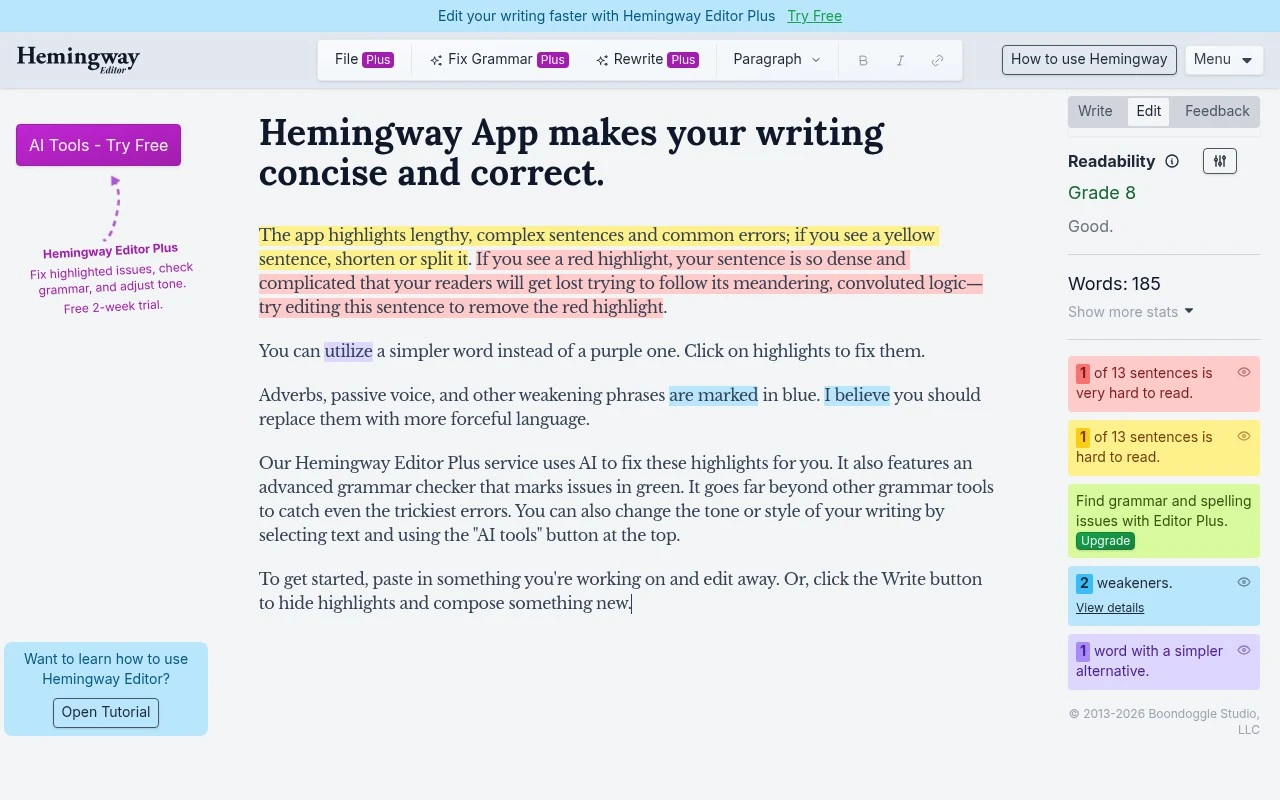
Highlights readability issues and suggests grammar and tone edits

Copy Optimization
Hemingway Editor Editor is a focused writing-revision tool for making text bold, clear, and readable. It is best suited to users who already have a draft and want help tightening sentences, improving readability, and correcting or refining language. The official site also promotes Hemingway Editor Plus, which adds AI tools for fixing highlighted issues, checking grammar, and adjusting tone.

FYAI Score

7.3 / 10

Based on 13 reviews + FYAI product analysis

Pricing:

Paid only

Best for:

Writers and editors polishing drafts for clarity and readability

Score Breakdown

  • Ease of use7.3 / 10
  • Features7.0 / 10
  • Pricing8.2 / 10
  • Integrations7.0 / 10
  • Support7.2 / 10

PRODUCT PREVIEW

What this AI tool does

Hemingway Editor is an AI writing tool designed to help you make text clearer and easier to read. It focuses on improving readability by drawing attention to wording that may be hard to follow, such as long sentences, dense phrasing, or unnecessary complexity. It’s useful when you’re revising drafts for emails, reports, articles, or any content where you want the message to come through quickly. You can paste in text, review suggested edits, and decide what to change based on your audience and purpose. Because it emphasizes clarity over style, it works best as a revision aid rather than a full writing assistant. It can help you spot patterns in your writing and make consistent improvements, while still leaving final tone and wording choices up to you.

Use cases

Best for

Readability Issue Highlighting

Hemingway Editor highlights hard to read sentences and dense passages so you can spot where rewriting is needed.

Conciseness and Clarity Checks

Flags wordy phrases, passive voice, and unclear construction to help you tighten sentences and make meaning clearer.

AI Fixes and Tone

Hemingway Editor Plus applies AI suggestions to fix highlights, run grammar checks, and adjust tone from the editor.

ANALYSIS

Strengths & limitations

Strengths
  • Focused on practical readability improvements rather than broad document management.
  • Useful for quickly spotting sentences or phrasing that may be difficult for readers.
  • Hemingway Editor Plus adds AI-assisted fixes, grammar checking, and tone adjustment.
Limitations
  • It is primarily an editing aid, not a full writing, research, or publishing platform.
  • Readability suggestions may not fit every style, genre, or expert audience.
  • The provided official page gives limited detail about advanced features, supported formats, or workflow integrations.

Evaluation

FYAI score breakdown

Our structured evaluation across five key criteria

7.3 / 10

Overall score

Based on 13 reviews + FYAI product analysis

  • Ease of use7.3 / 10
  • Features7.0 / 10
  • Pricing8.2 / 10
  • Integrations7.0 / 10
  • Support7.2 / 10

What users say

Findings from public reviews, documentation and community sources.

  • Ease of use

    A Reddit discussion in r/freelanceWriters includes one user saying they “like to pop something into it” and another saying they “hate it” and feel it is “dumbing down” their writing.

  • Features

    The cited r/writers discussion points to Hemingway Editor’s feature depth being reflected in the product itself rather than a dedicated overview page.

  • Pricing

    The Hemingway Editor Plus pricing page lists “$8.33 USD/month ($100 billed annually)” and advertises a “Free 2-week trial… no credit card required.”

  • Integrations

    GetApp’s indexed page lists “Hemingway Editor integrations (1).” Hemingway Editor appears to be a mostly standalone editor rather than a broad browser, document, CMS, API, or marketplace ecosystem.

  • Support

    The cited Reddit discussions focus on readability outcomes and writing style fit rather than support experiences or documentation quality.

Who is this for?

Best for writers who want a focused editor they can try before paying, the Hemingway Editor Plus pricing page advertises a “Free 2-week trial… no credit card required,” and a Reddit user described the workflow as “like to pop something into it.” Less suited to teams needing many connected publishing or workflow integrations, GetApp’s indexed page lists “Hemingway Editor integrations (1),” which points to a mostly standalone editor experience.

PRODUCT PREVIEW

Feature highlights

Readability highlights

Flags hard-to-read sentences, passive voice, and dense paragraphs.

Concise rewriting

Spot wordy phrases and tighten copy for bold, clear writing.

AI fixes (Plus)

Auto-fix highlights, check grammar, and adjust tone with AI.

COMPARE

Discover curated alternatives worth comparing

Compare similar AI tools based on features, pricing and use cases

7.4/ 10Based on 5 reviews

Chapterly

Copy OptimizationBlog & Article Writing
AI writing assistant for refining narrative, characters, and settings
Best for:
Content creators
Pricing
Freemium

7.7/ 10Based on 5.772 reviews

Writesonic

Copy Optimization
Monitors brand visibility in answer engines and flags citation gaps
Best for:
Marketing teams
Pricing
Freemium

7.6/ 10Based on 266 reviews

Writehuman

AI Detection & Humanizing
Rewrites AI drafts to sound human and scans for AI-detection signals
Best for:
Content creators
Pricing
Freemium

Write with confidence and clarity. Join thousands who use Hemingway Editor to make every sentence easier to read and more persuasive.

FAQ

Frequently asked
questions

Everything you need to know about this AI tool,
its features, pricing, use cases, and limitations.

Is Hemingway Editor a good fit for marketing copy, blog posts, or technical writing?
Hemingway Editor works best when your priority is readability—tightening sentences, reducing passive voice, and cutting adverbs in blog posts, landing pages, emails, and social copy. It’s less ideal for highly technical or academic writing where longer sentences and nuance are sometimes necessary. If you need tone control or brand-voice rewriting, you may want a tool that focuses on generation and style guidance.
What’s the difference between the free Hemingway Editor and the paid version?
The free web version focuses on readability highlights and basic writing suggestions in the editor. The paid desktop app adds offline use and export options (for example, saving/publishing formats), which can matter if you write in restricted environments. Neither option replaces a full grammar checker, so many teams pair it with another editor.
How does Hemingway Editor compare with Grammarly, ProWritingAid, or Google Docs suggestions?
Hemingway Editor is more opinionated about readability and concision, while Grammarly and ProWritingAid typically go deeper on grammar, correctness, and style rules. Google Docs suggestions are convenient but generally less targeted for readability scoring and structural tightening. If you want a quick “make this clearer” pass, Hemingway Editor is often faster; for error detection, competitors usually win.
How quickly can I start using Hemingway Editor, and what’s the onboarding like?
Its guidance can push writing toward shorter, simpler sentences, which may flatten voice or nuance in complex topics. Formatting and document layout options are limited compared with full word processors. It also doesn’t provide advanced grammar checks, so you may still need a dedicated grammar tool.
What should I consider about data privacy and compliance when using Hemingway Editor?
If you use the web editor, your text is processed through an online service, so avoid pasting sensitive or regulated content unless your policy allows it. The desktop app can reduce exposure by keeping work offline, which may be preferable for confidential drafts. For compliance needs (e.g., vendor reviews, retention, DPA), check Hemingway Editor’s current terms and privacy documentation on hemingwayapp.com before adopting it in a team setting.