Curated ToolThis tool is part of our curated AI directory. We only include tools that meet our standards for relevance, usability and real-world value.

B12

Generates a launchable website or simple web app from a prompt

Website BuildersLanding Page Builders
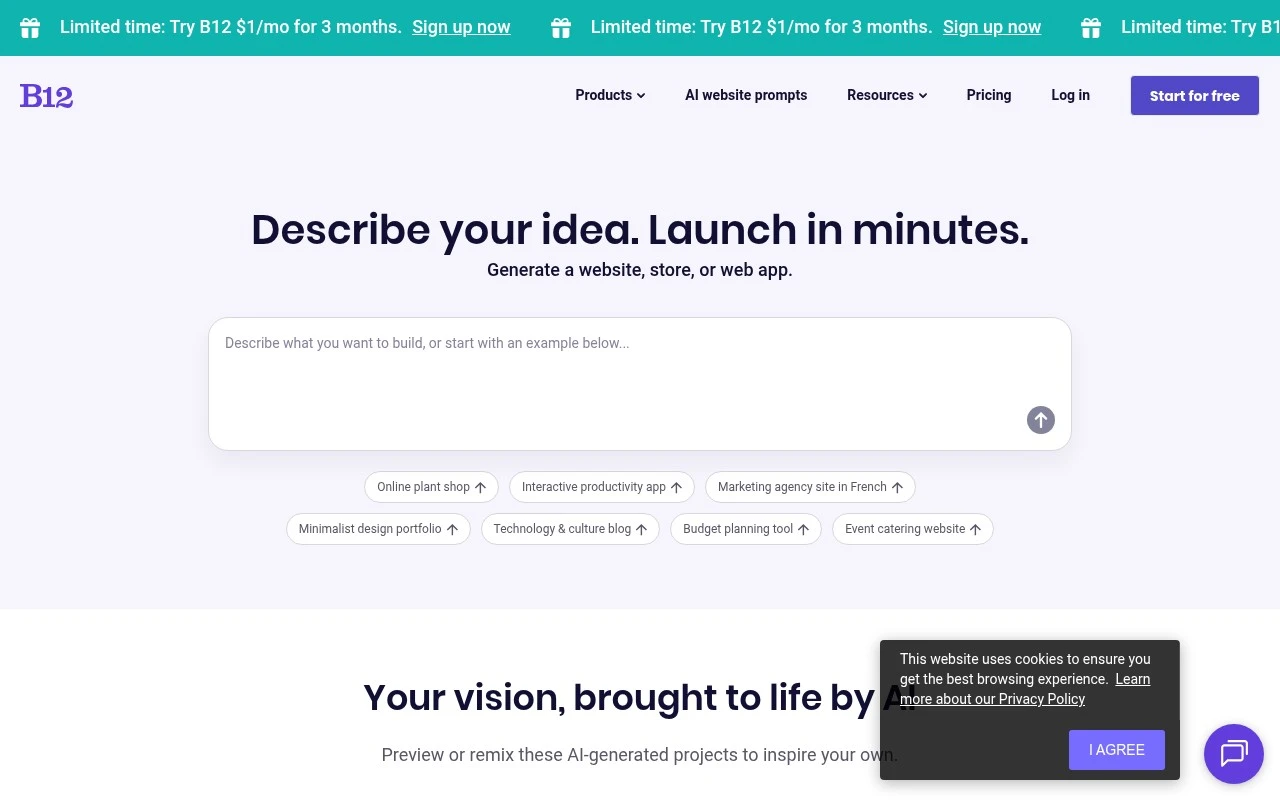
B12 is an AI website builder for launching professional websites quickly. Its site describes a workflow where users describe an idea and B12 generates a website, store, or web app preview that can be edited or remixed. The product is positioned mainly for business owners who need a polished online presence without a lengthy design process, with testimonials emphasizing ease of editing and access to human support.

FYAI Score

7.8 / 10

FYAI rating based on features, pricing and integrations

Pricing:

Free trial

Best for:

Small business owners launching a professional website fast

Score Breakdown

  • Ease of use8.6 / 10
  • Features7.2 / 10
  • Pricing7.1 / 10
  • Integrations7.1 / 10
  • Support9.0 / 10

PRODUCT PREVIEW

What this AI tool does

B12 is an AI-assisted website builder designed to help individuals and small teams create a professional site with less manual setup. It combines guided prompts with automated drafting so you can move from an idea to a publishable website without needing deep design or development experience. The tool is typically used when you want a clean online presence quickly—such as a business homepage, portfolio, or service site—and prefer a structured workflow over starting from a blank template. You provide basic information about your organization and goals, and b12 generates a starting layout and copy that you can review, edit, and refine. For people researching b12, it can be helpful to think of it as a practical option for getting a first version of a website up and running, then iterating as your needs become clearer. It’s best suited to straightforward sites where speed and simplicity matter, while still leaving room for customization as you update content over time.

Use cases

Best for

Website Generation

Describe your business and B12 generates an editable website draft with pages, copy, and layout you can remix.

Website Hosting

Publish your site on B12 with built in hosting so your pages are served online without configuring a separate server.

Build Landing Page

Use B12 to generate a landing page from a prompt, then edit sections, copy, and calls to action in the builder.

ANALYSIS

Strengths & limitations

Strengths
  • Generates a website or related project from a short business idea or prompt.
  • Targets practical business use cases such as service websites, ecommerce stores, portfolios, blogs, and simple apps.
  • Emphasizes ease of editing and mentions human support for users who need help.
Limitations
  • The provided site text is marketing-heavy and does not explain technical limits of the generated sites or web apps.
  • Details about integrations, hosting control, export options, and long-term pricing are not clear from the provided content.
  • Best fit appears to be quick business website creation, not highly custom software development.

Evaluation

FYAI score breakdown

Our structured evaluation across five key criteria

7.8 / 10

Overall score

FYAI rating based on features, pricing and integrations

  • Ease of use8.6 / 10
  • Features7.2 / 10
  • Pricing7.1 / 10
  • Integrations7.1 / 10
  • Support9.0 / 10

What users say

Findings from public reviews, documentation and community sources.

  • Ease of use

    B12’s homepage positions setup around “Describe your idea. Launch in minutes.” B12’s homepage includes customer quotes saying editing is “as simple as working in a Word document” and setup takes “just a few clicks.”

  • Features

    B12’s homepage lists AI-generated websites, stores, blogs, and web apps. B12’s homepage also lists example generators such as an expense tracker, invoice generator, and task management app.

  • Pricing

    B12 advertises starting free and a $1/mo promotional period. B12’s support pricing snippet lists a premium subscription at “$399/mo billed monthly,” “$339/mo billed annually,” plus a “One-Time Setup Fee: ($1,999).”

  • Integrations

    B12’s support integrations FAQ describes integrations as a way to “embed a third-party service directly on your website.”

  • Support

    B12’s homepage includes a customer quote: “If I need more help, I’ll email the B12 team and within 24 hours, boom, it’s done.” B12’s homepage includes another customer quote praising “Exceptional service with a human touch.”

Who is this for?

Best for users who want a fast AI-assisted website launch with human help, B12’s homepage says users can “Describe your idea. Launch in minutes,” and a customer quote says, “If I need more help, I’ll email the B12 team and within 24 hours, boom, it’s done.” Less suited to buyers who want typical self-serve builder pricing. B12’s support pricing snippet lists “$399/mo billed monthly,” “$339/mo billed annually,” plus a “One-Time Setup Fee: ($1,999),” which makes the purchase more service-led.

PRODUCT PREVIEW

Feature highlights

AI site generation

Describe your business and get a ready-to-edit website preview.

Edit or remix pages

Quickly customize layout, copy, and sections without design skills.

Human expert support

Get help from real specialists to polish and launch with confidence.

COMPARE

Discover curated alternatives worth comparing

Compare similar AI tools based on features, pricing and use cases

8.8/ 10Based on 14.986 reviews

WordPress

Website BuildersE-commerce Builders
Builds WordPress sites using an AI website builder and AI tools
Best for:
Small business owners
Pricing
Freemium

8.6/ 10Based on 28.442 reviews

Wix AI

Website BuildersE-commerce Builders
Generates a Wix website draft from user answers for editing.
Best for:
Small business owners
Pricing
Freemium

7.7/ 10Based on 35 reviews

WeWeb

Hosting & DeploymentApp / No-code Builders
Generates web app pages, databases, and logic from prompts
Best for:
Startup founders
Pricing
Freemium

Launch a polished website that brings in leads and builds trust. Join thousands of small businesses using B12 to get online faster and keep their site up to date.

FAQ

Frequently asked
questions

Everything you need to know about this AI tool,
its features, pricing, use cases, and limitations.

What types of businesses and sites are a good fit for B12?
B12 tends to fit service-based small and mid-sized businesses that want a polished marketing site with lead capture, scheduling, and basic client management in one place. It’s a practical choice if you want a guided build process and ongoing site updates without assembling a stack of plugins. If you need a complex web app, marketplace, or highly custom front-end interactions, you may outgrow it.
Does B12 have a free plan, and what do you give up compared to paid tiers?
B12 typically lets you start building without paying, but publishing a custom domain site and accessing full business features generally requires a paid plan. Lower tiers may limit advanced design control, certain integrations, and higher-volume marketing or client tools. Check the plan details for caps on pages, contacts/leads, and add-ons before committing.
How does B12 compare with Wix, Squarespace, Webflow, or WordPress for a business website?
Compared with Wix or Squarespace, B12 is often more “business-ops” oriented, bundling website management with tools like forms, scheduling, and client workflows. Webflow usually offers deeper design flexibility, while B12 prioritizes speed and maintainability over granular layout control. Versus WordPress, B12 can reduce plugin upkeep, but you may have fewer third-party extensions and less developer-level customization.
How fast can you launch a site on B12, and what onboarding effort should you expect?
B12 can have a learning curve if you’re used to simpler drag-and-drop builders, especially around its integrated business features. Third-party integrations are more limited than ecosystems like WordPress, which can matter if you rely on niche tools. Pricing can be higher than basic builders, so it’s worth comparing total cost against the features you’d otherwise add via separate services.
What should I know about data privacy, ownership, and compliance when using B12?
If you collect leads or client information through B12 forms and tools, confirm where that data is stored, how exports work, and what access controls are available for team members. Review B12’s terms, privacy policy, and any available Data Processing Addendum to assess fit for GDPR/CCPA or industry requirements. For regulated use cases, verify options for retention, deletion requests, and auditability before moving production data.