Curated ToolThis tool is part of our curated AI directory. We only include tools that meet our standards for relevance, usability and real-world value.

Podsqueeze

Transcribes, summarizes, cleans audio, and creates podcast clips

Audio SummarizationPodcast Editing
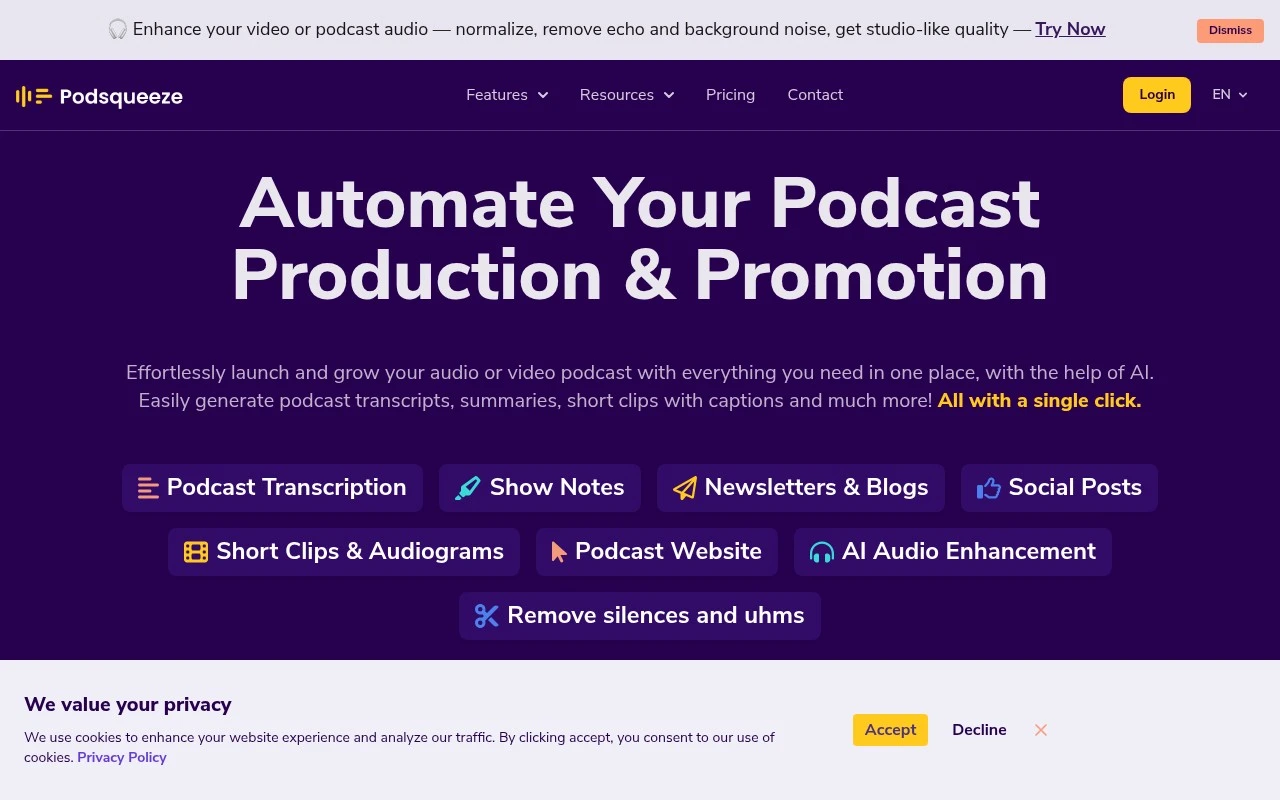
Podsqueeze is an all-in-one AI workspace for podcast content production and promotion. It is designed around audio and video podcast episodes, helping users transcribe episodes, generate derivative written content, create captioned clips or audiograms, enhance audio, and publish a branded podcast website. Its more podcast-specific features include speaker labeling, SRT export, show notes with timestamps, per-show AI voice tuning, podcast folders for managing multiple shows, client/team sharing, and a podcast topic finder.

FYAI Score

8.2 / 10

Based on 5 reviews + FYAI product analysis

Pricing:

Paid

Best for:

Podcasters and agencies producing and promoting multiple shows

Score Breakdown

  • Ease of use8.3 / 10
  • Features8.4 / 10
  • Pricing8.2 / 10
  • Integrations7.6 / 10
  • Support8.4 / 10

PRODUCT PREVIEW

What this AI tool does

Podsqueeze is an AI tool designed to help people work with podcast audio more efficiently. It focuses on turning spoken content into usable text and summaries, making it easier to review episodes, capture key points, and reuse information without listening end to end. A typical workflow is to upload or link an episode, let the tool generate a transcript, and then use that transcript to create a concise overview of what was discussed. This can be useful for podcast creators preparing show notes, editors organizing content, or teams that need to search and reference specific moments. Because it produces structured text from audio, podsqueeze can also support content repurposing and documentation tasks, such as drafting descriptions or pulling quotes for articles and newsletters. It’s best suited for users who want an informational, text-based view of podcast conversations for faster review and sharing.

Use cases

Best for

Content Repurposing

Podsqueeze turns podcast episodes into show notes with timestamps, social posts, and captioned clips or audiograms for reuse.

Transcribe Audio

Upload an episode to generate a transcript with speaker labels and export it as SRT for captions or editing.

Website Generation

Generate and publish a branded podcast website from your episodes, with pages populated from transcripts and show notes.

ANALYSIS

Strengths & limitations

Strengths
  • Combines several podcast workflows in one place: transcription, show notes, social posts, blogs, newsletters, clips, audiograms, audio cleanup, and podcast website creation.
  • Supports multi-show management with podcast folders, shareable content pages, and saved AI voice settings for each show.
  • Includes podcast-specific repurposing features such as chapter-based clip creation, caption editing, subtitle-based trimming, and one-click short-form edits under about 60 seconds.
Limitations
  • The product is clearly optimized for podcast workflows, so it may not be the right fit for general video editing, music production, or non-podcast content operations.
  • AI-generated copy, clips, transcripts, and audio edits may still need human review for accuracy, tone, and publishing quality.
  • The provided official page does not give full detail on pricing limits, supported import sources, publishing integrations, or the exact audio enhancement controls available.

Evaluation

FYAI score breakdown

Our structured evaluation across five key criteria

8.2 / 10

Overall score

Based on 5 reviews + FYAI product analysis

  • Ease of use8.3 / 10
  • Features8.4 / 10
  • Pricing8.2 / 10
  • Integrations7.6 / 10
  • Support8.4 / 10

What users say

Findings from public reviews, documentation and community sources.

  • Ease of use

    The Podsqueeze website says users can generate content “with a single click,” sign up with “No credit card required,” and launch a podcast website “in minutes, no coding required.” ProductHunt review text describes Podsqueeze as a “user-friendly AI-powered tool.”

  • Features

    The Podsqueeze website lists “transcripts, summaries, short clips with captions,” SRT files, show notes with timestamps, audio enhancement, and podcast websites. Reddit users cite Podsqueeze for “multi-speaker transcription, show notes and even episode titles.”

  • Pricing

    The Podsqueeze pricing page lists Starter at “$8.99/mo” for “120 mins,” Pro at “$49/mo” for “320 Minutes,” Agency Lite at “$89/mo” for “600 Minutes,” plus custom Enterprise. The Podsqueeze pricing page also states “Minutes Rollover” and annual plans at “30% OFF,” with usage based on minutes and clips.

  • Integrations

    The Podsqueeze transcription API page lists a “Zapier integration” to “automate workflows, trigger transcriptions, and distribute content.” The Podsqueeze transcription API page also references a transcription API and customizable output formats.

  • Support

    Podsqueeze lists direct email support via “[email protected]” and provides blog/resource content. The Podsqueeze Enterprise tier includes “Priority support,” “Feature Requests,” and “Team onboarding and training,” and a Reddit user says podsqueeze.com has been “great and open to feedback.”

Who is this for?

Best for podcasters who want one workflow for repurposing episodes, the Podsqueeze website lists “transcripts, summaries, short clips with captions,” show notes with timestamps, audio enhancement, and podcast websites. Best for teams starting without procurement friction because the Podsqueeze website says signup requires “No credit card required.” Less suited to teams that need a broad native integration marketplace, the surfaced connectivity is a “Zapier integration” plus a transcription API, so automation would center on those routes.

PRODUCT PREVIEW

Feature highlights

Smart Transcription

Speaker-labeled transcripts with SRT export and clean formatting.

Show Notes + Timestamps

Auto-generate structured notes, chapters, and summaries per episode.

Clips & Audiograms

Create captioned promo clips fast for social and newsletters.

COMPARE

Discover curated alternatives worth comparing

Compare similar AI tools based on features, pricing and use cases

7.4/ 10Based on 30 reviews

Zencastr

Podcast Editing
Edits audio/video via text, transcribes, and makes social clips
Best for:
Audio & podcast creators
Pricing
Freemium

8.5/ 10Based on 16 reviews

Wondercraft

Short-form VideoVideo Editing
Turns text or audio into editable AI-generated videos and audio
Best for:
Video creators
Pricing
Freemium

8.6/ 10Based on 130 reviews

Wellsaid

AI Voiceover
Generates realistic AI voiceovers from scripts with voice controls
Best for:
Audio & podcast creators
Pricing
Paid only

Turn every episode into ready-to-share marketing assets in minutes. See why podcast teams choose Podsqueeze to publish faster and grow their audience.

FAQ

Frequently asked
questions

Everything you need to know about this AI tool,
its features, pricing, use cases, and limitations.

What types of teams and workflows is Podsqueeze a good fit for?
Podsqueeze fits marketing teams and creators who need to turn podcast or voice recordings into publish-ready assets quickly, especially for promotion and distribution. It’s a practical choice if your priority is consistent output (clips, summaries, show notes) over deep, manual audio engineering. If you run a content pipeline tied to marketing channels, its workflow tends to align well.
Does Podsqueeze have a free plan, and what are the typical limitations compared to paid tiers?
Podsqueeze is generally positioned as a paid product, and any free access is usually limited in volume or features (for example, fewer exports or shorter processing limits). Paid tiers typically unlock higher usage, more output options, and smoother publishing workflows. If you’re comparing costs, check whether your expected episodes per month fit within the included processing quota.
How does Podsqueeze compare with other podcast repurposing tools like Descript or Castmagic?
Podsqueeze is more focused on marketing-oriented outputs and streamlined repurposing, while Descript is often chosen for heavier editing and production workflows. Compared with Castmagic-style tools, Podsqueeze can be a better fit if you want templates and distribution-friendly assets rather than a writing-first workspace. If advanced editing or collaboration is central, you may find broader feature depth elsewhere.
How fast can you get started with Podsqueeze, and what onboarding effort should you expect?
Podsqueeze may feel limiting if you need advanced audio editing controls, complex mixing, or engineer-level tooling. Pricing can be less attractive if you only publish occasionally or can accept a more manual workflow with cheaper alternatives. Support and troubleshooting resources may also be thinner than larger, more established editing suites.
What should I know about data handling, privacy, and compliance when using Podsqueeze?
Using Podsqueeze typically means uploading audio content for processing, so you should assume your files are handled on their servers rather than locally. Before committing, review their privacy policy and terms for retention, training usage (if any), and deletion controls, especially for client or sensitive recordings. If you have compliance requirements (e.g., GDPR or internal vendor reviews), confirm available documentation and data processing terms.