Curated ToolThis tool is part of our curated AI directory. We only include tools that meet our standards for relevance, usability and real-world value.

Krisp

AI noise cancellation, transcription, and meeting summaries for calls

Meeting NotesSpeech to Text
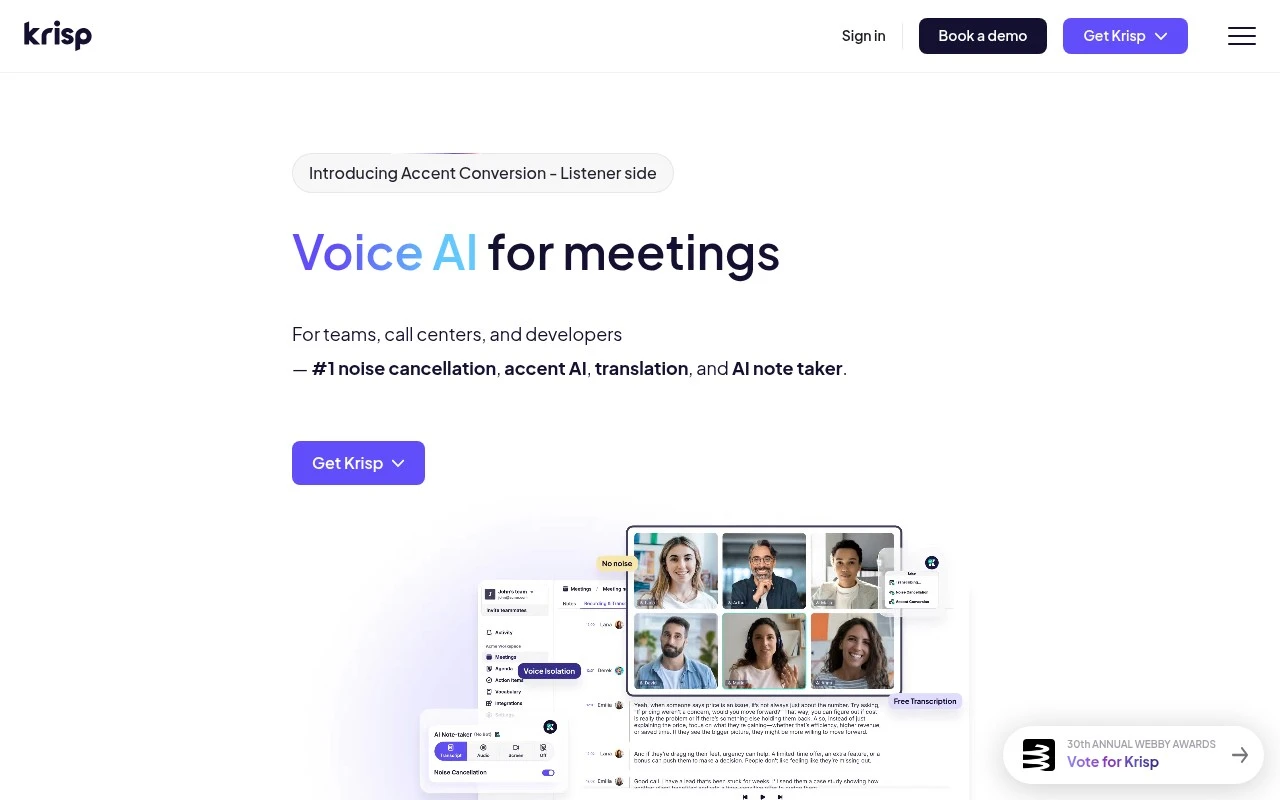
Krisp provides Voice AI for clearer calls and more productive meetings. Its core offering is AI noise cancellation, extended with an AI meeting assistant for transcripts, recordings, summaries, agendas, action items, and CRM updates. The product also includes call center-focused capabilities such as accent conversion, voice translation, agent assist, speech analytics, and voice security, plus developer-facing voice AI models and APIs.

FYAI Score

8.6 / 10

Based on 1.517 reviews

Pricing:

Freemium

Best for:

Remote teams and call centers improving call clarity and meeting output

Score Breakdown

  • Ease of use8.9 / 10
  • Features8.8 / 10
  • Pricing8.7 / 10
  • Integrations8.8 / 10
  • Support7.7 / 10

PRODUCT PREVIEW

What this AI tool does

Krisp is an AI-powered audio tool designed to improve call quality by reducing unwanted background noise. It’s commonly used during online meetings, customer support calls, interviews, and remote work sessions where clear speech matters and environmental sounds can be distracting. The tool works in real time, helping your voice come through more cleanly even in busy settings like shared offices or home environments. It can be useful for anyone who relies on voice communication and wants more consistent audio without changing their microphone setup. Because it focuses on noise reduction rather than recording or meeting management, it typically fits alongside existing conferencing apps and workflows. If you’re comparing audio tools, it’s best evaluated by how well it handles your specific noise sources and whether it integrates smoothly with the apps you already use.

Use cases

Best for

Remove Noise

Krisp removes background noise and echo from your microphone and speaker audio in real time during calls.

Transcribe Audio

Krisp transcribes live calls and recordings into text so you can search and review what was said.

Meeting Notes

Krisp generates meeting notes by turning call transcripts into summaries, agendas, and action items.

ANALYSIS

Strengths & limitations

Strengths
  • Combines real-time call enhancement with post-meeting automation, including noise cancellation, transcription, summaries, and action items.
  • Works across meeting and calling workflows, with stated integrations such as Google Calendar, Zoom, Slack, HubSpot, Salesforce, and Zapier.
  • Supports broader voice AI needs beyond meetings, including call center tools and developer APIs for voice isolation, accent conversion, noise cancellation, and translation.
Limitations
  • The product spans several audiences, so individuals who only need simple noise removal or basic notes may find the broader platform more than they need.
  • Some call center and enterprise-oriented capabilities appear positioned around demos or platform offerings rather than a simple self-serve meeting assistant flow.
  • The provided site text does not give enough detail to compare pricing tiers, usage limits, or feature availability across plans.

Evaluation

FYAI score breakdown

Our structured evaluation across five key criteria

8.6 / 10

Overall score

Based on 1.517 reviews

  • Ease of use8.9 / 10
  • Features8.8 / 10
  • Pricing8.7 / 10
  • Integrations8.8 / 10
  • Support7.7 / 10

What users say

Findings from public reviews, documentation and community sources.

  • Ease of use

    G2 lists Krisp at 4.7/5 from 1,517 reviews and says users "consistently praise Krisp for its effective noise cancellation and easy setup."

  • Features

    Krisp’s own page describes "#1 noise cancellation," AI note taker, transcription, recording, summaries, action items, CRM updates, accent conversion, and multilingual transcripts/summaries in 16 languages.

  • Pricing

    Krisp’s pricing page lists a $0 7-day free trial, Core at "$16 /mo/user" monthly or "$8 /mo/user" annually, Advanced at "$30 /mo/user" monthly or "$15 /mo/user" annually, and Call Center AI starting at "$10 per agent/mo" annually.

  • Integrations

    Krisp’s pricing page lists "Unlimited Integrations & webhook," Webhook API, Notion, Zapier, HubSpot, Slack, Pipedrive, Microsoft Teams, MCP integrations such as Claude/ChatGPT/Cursor/custom, plus Salesforce and ConnectWise on higher tiers.

  • Support

    Krisp’s pricing page says the Enterprise plan includes a "Dedicated account manager" along with admin/security controls. Krisp’s product pages position standard users mainly through self-serve trial and sales/demo flows.

Who is this for?

Best for meeting-heavy teams that want calls captured and turned into follow-ups, Krisp’s own page lists AI note taker, transcription, summaries, and action items. Best for teams that also need noise handling, because Krisp’s own page describes "#1 noise cancellation." Less suited to standard users who want dedicated account management, Krisp’s pricing page says the Enterprise plan includes a "Dedicated account manager," while standard users are mainly positioned through self-serve trial and sales/demo flows.

PRODUCT PREVIEW

Feature highlights

AI Noise Cancellation

Remove background noise and echo for clearer calls on any app.

Meeting Assistant

Get transcripts, summaries, and action items from your meetings.

Accent & Translation

Convert accents and translate speech to improve customer understanding.

COMPARE

Discover curated alternatives worth comparing

Compare similar AI tools based on features, pricing and use cases

7.4/ 10Based on 30 reviews

Zencastr

Podcast Editing
Edits audio/video via text, transcribes, and makes social clips
Best for:
Audio & podcast creators
Pricing
Freemium

7.8/ 10Based on 31 reviews

Wudpecker

Meeting NotesSummarization
Turns meeting recordings into notes, summaries, and action items
Best for:
Knowledge workers
Pricing
Freemium

8.5/ 10Based on 16 reviews

Wondercraft

Short-form VideoVideo Editing
Turns text or audio into editable AI-generated videos and audio
Best for:
Video creators
Pricing
Freemium

Sound confident on every call. Start using Krisp today and make your voice clear and professional in any meeting, anywhere.

FAQ

Frequently asked
questions

Everything you need to know about this AI tool,
its features, pricing, use cases, and limitations.

Who is Krisp a good fit for, and when should I consider alternatives?
Krisp is a strong fit for remote workers who regularly take calls from noisy environments and need cleaner microphone audio across apps. It’s also useful for support teams, sales, and recruiters who rely on consistent call quality. If you mainly need meeting transcription, recording, or collaboration features, you may get more value from tools built around those workflows.
What’s the difference between Krisp’s free plan and paid plans?
Krisp’s free plan typically includes noise cancellation with usage limits, which can be enough for occasional calls. Paid plans generally remove or raise limits and add features like echo cancellation and higher control over audio processing. If you’re on calls most of the day or rolling it out to a team, the paid tier is usually the practical option.
How does Krisp compare with built-in noise suppression in Zoom, Microsoft Teams, or Google Meet?
Built-in suppression is convenient and improving, but it’s tied to that specific app and may vary by device and meeting settings. Krisp works at the system level, so it can apply to multiple conferencing tools, VoIP apps, and even some recording workflows. If your team uses several calling platforms, Krisp can be simpler to standardize than relying on each app’s settings.
How fast can I set up Krisp and roll it out to a team?
Krisp is focused on audio cleanup, so it won’t replace tools that provide transcription, meeting notes, or broader productivity features. In some environments, aggressive suppression can slightly affect voice naturalness, especially with poor microphones or very loud background sounds. Costs can also scale noticeably for larger teams compared with relying on built-in suppression.
What should I know about Krisp’s data handling, privacy, and compliance before adopting it?
Krisp processes audio to remove noise, so you should review its current documentation on whether processing happens locally, in the cloud, or in a hybrid mode for your plan and platform. For regulated teams, confirm what audio data is stored (if any), retention settings, and whether it supports required agreements (e.g., DPA) and compliance claims. It’s also worth validating how it behaves with call recording policies and internal security requirements.