Curated ToolThis tool is part of our curated AI directory. We only include tools that meet our standards for relevance, usability and real-world value.

Asana

Plans projects, generates reports, and flags workflow bottlenecks

Task & Project Management
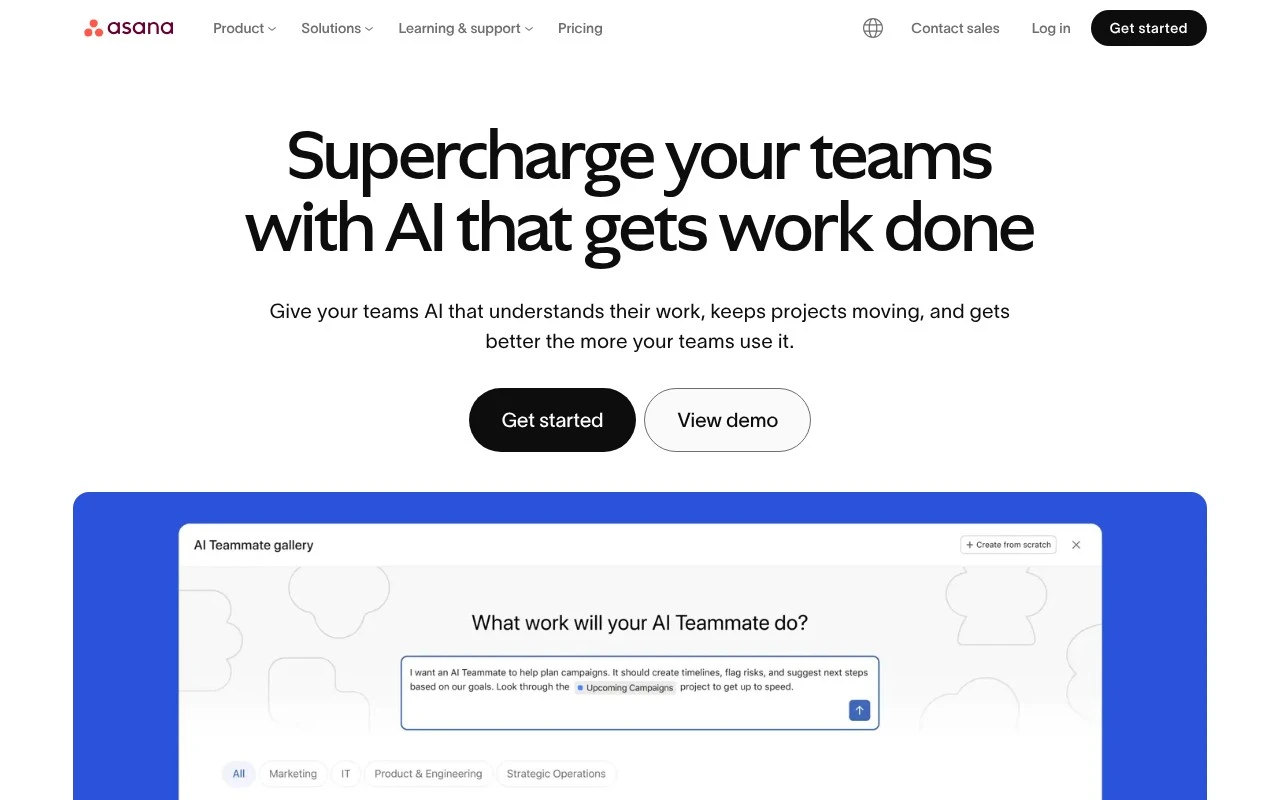
Asana is a collaborative work management platform for teams that need to organize projects, tasks, goals, dependencies, and operational workflows in one shared system. Its current positioning emphasizes human-agent teamwork: AI teammates can operate inside workflows using Asana’s Work Graph context, shared memory, and enterprise governance controls. It is aimed less at individual task lists and more at coordinated team execution across projects, service workflows, client work, and enterprise operations.

FYAI Score

8.6 / 10

Based on 13.856 reviews

Pricing:

Freemium

Best for:

Cross-functional teams running projects and operational workflows

Score Breakdown

  • Ease of use8.3 / 10
  • Features9.2 / 10
  • Pricing8.5 / 10
  • Integrations8.5 / 10
  • Support8.3 / 10

PRODUCT PREVIEW

What this AI tool does

Asana is a work management tool designed to help teams plan, track, and coordinate tasks in one place. It’s commonly used to organize projects, assign responsibilities, and keep day-to-day work visible so people know what’s happening and what needs attention. Teams typically use it to map out workflows, set deadlines, and follow progress from start to finish. It can be useful for cross-functional work where updates, priorities, and handoffs need to be clear without relying on long email threads. For someone evaluating project management software, asana provides a structured way to capture work requests, document decisions, and maintain a shared view of status. It’s often adopted by teams that want a consistent process for managing tasks while still allowing flexibility in how projects are organized.

Use cases

Best for

Project Management

Plan projects in Asana with timelines, dependencies, milestones, and goals linked to tasks in a shared Work Graph.

Task Management

Create, assign, and prioritize tasks with due dates, subtasks, comments, and status fields so teams track work in one place.

Workflow Automation

Automate workflows with rules that trigger assignees, status changes, and notifications when task fields or stages update.

ANALYSIS

Strengths & limitations

Strengths
  • Connects people, tasks, projects, goals, and dependencies through Asana’s Work Graph, giving teams shared context for execution.
  • Supports AI-assisted workflow roles such as launch planning, status reporting, compliance review, workflow optimization, and data quality management.
  • Includes enterprise-oriented governance concepts for AI agents, such as scoped permissions, identities, audit trails, and cost constraints.
Limitations
  • The official positioning is broad, so buyers may need deeper evaluation to understand exact feature fit for a specific workflow.
  • Its value depends on teams consistently structuring work, ownership, deadlines, and dependencies inside the platform.
  • It is not primarily a standalone AI content generator or general chatbot; its AI features are tied to work management workflows.

Evaluation

FYAI score breakdown

Our structured evaluation across five key criteria

8.6 / 10

Overall score

Based on 13.856 reviews

  • Ease of use8.3 / 10
  • Features9.2 / 10
  • Pricing8.5 / 10
  • Integrations8.5 / 10
  • Support8.3 / 10

What users say

Findings from public reviews, documentation and community sources.

  • Ease of use

    Asana's site offers 'Try the Asana demo,' 'Help articles and tutorials,' and 'Start with a template.' G2 lists Asana at 4.4/5 across 13,856 verified reviews.

  • Features

    Asana's pricing page lists unlimited tasks/projects, Timeline and Gantt, portfolios, and workload. Asana's pricing page says Enterprise tiers add SAML, SCIM, capacity planning, and audit/security controls.

  • Pricing

    Asana's pricing page lists Personal as '$0 Free forever,' Starter as '$10.99 per user, per month billed annually,' and Advanced as '$24.99 per user, per month billed annually.' Asana's pricing page says the free plan includes unlimited tasks/projects, and Enterprise pricing is sales-led.

  • Integrations

    Asana's pricing page lists '100+ free integrations' including Slack, Google Drive, and Zoom. Asana's pricing page says the Advanced tier specifically names Salesforce, Tableau, and Power BI support, while Enterprise connectivity includes SAML authentication, SCIM user provisioning, service accounts, and Enterprise+ items such as SIEM integrations.

  • Support

    Asana's site surfaces 'Help articles and tutorials,' demos, resources, and templates.

Who is this for?

Best for teams that need structured work management across tasks, timelines, portfolios, and workload, Asana's pricing page lists unlimited tasks/projects, Timeline and Gantt, portfolios, and workload. Less suited to buyers who need fixed enterprise pricing before contacting sales, Asana's pricing page lists Personal, Starter, and Advanced prices, but Enterprise pricing is sales-led.

PRODUCT PREVIEW

Feature highlights

Work Graph context

Connect tasks, goals, owners, and dependencies in one shared system.

AI teammates

Get AI help that understands your work context and keeps momentum.

Enterprise governance

Control access, permissions, and data for compliant team execution.

COMPARE

Discover curated alternatives worth comparing

Compare similar AI tools based on features, pricing and use cases

7.8/ 10Based on 31 reviews

Wudpecker

Meeting NotesSummarization
Turns meeting recordings into notes, summaries, and action items
Best for:
Knowledge workers
Pricing
Freemium

9.0/ 10Based on 1.589 reviews

Toggl Track

Time & Habit Tracking
Tracks time with automatic activity detection and reporting.
Best for:
Operations teams
Pricing
Freemium

8.5/ 10Based on 2.648 reviews

Todoist

Task & Project Management
Organize, schedule, and share tasks with AI-assisted planning
Best for:
Knowledge workers
Pricing
Freemium

Bring clarity to every project and keep work moving without the chaos. See why teams choose Asana to align priorities and deliver on time.

FAQ

Frequently asked
questions

Everything you need to know about this AI tool,
its features, pricing, use cases, and limitations.

When is Asana a better fit than a simpler task tracker?
Asana tends to fit best when you need cross-team coordination: projects with dependencies, owners, timelines, and goals tied together in one place. It’s also a stronger option for launch planning, status reporting, and workflow standardization across departments. If you mainly need personal to-dos or a lightweight kanban board, it can feel heavier than necessary.
What do you lose on Asana’s free plan compared with paid tiers?
The free plan works for basic task and project tracking, but it’s limited for teams that need advanced reporting, automation, and admin controls. Paid plans add features like Timeline/Gantt-style planning, more robust workflow rules, and stronger permissions and governance. AI-related capabilities and enterprise controls are typically not fully available on the free tier.
How does Asana compare with Monday.com, Jira, and ClickUp for work management?
Asana is often chosen for structured cross-functional work where dependencies, goals, and standardized workflows matter, while Jira is usually stronger for software teams focused on issue tracking and agile development. Monday.com can be more flexible for building custom boards quickly, and ClickUp often bundles many features but can require more configuration to keep consistent. The best choice depends on whether you prioritize governance and clarity (Asana) versus deep dev workflows (Jira) or highly customizable workspaces (Monday.com/ClickUp).
How quickly can a team get Asana running, and what onboarding effort should you expect?
Asana delivers the most value when teams keep work discussions, decisions, and task updates inside the platform; otherwise reporting and AI-assisted features have less context to work with. It can also become complex if every team builds its own conventions without governance. For very small teams or simple lists, the overhead may outweigh the benefits.
What should you check about Asana’s data privacy, security, and compliance before buying?
Review which plan includes the admin controls you need (permissions, audit logs, data retention, and governance features) and confirm how AI features handle workspace content. Validate where data is stored, how access is logged, and what integrations can read/write project data. If you have regulated requirements, confirm available compliance documentation and whether your specific controls require Enterprise-level features.