Curated ToolThis tool is part of our curated AI directory. We only include tools that meet our standards for relevance, usability and real-world value.

Remove BG

Removes photo backgrounds and outputs transparent cutouts.

Background Edit
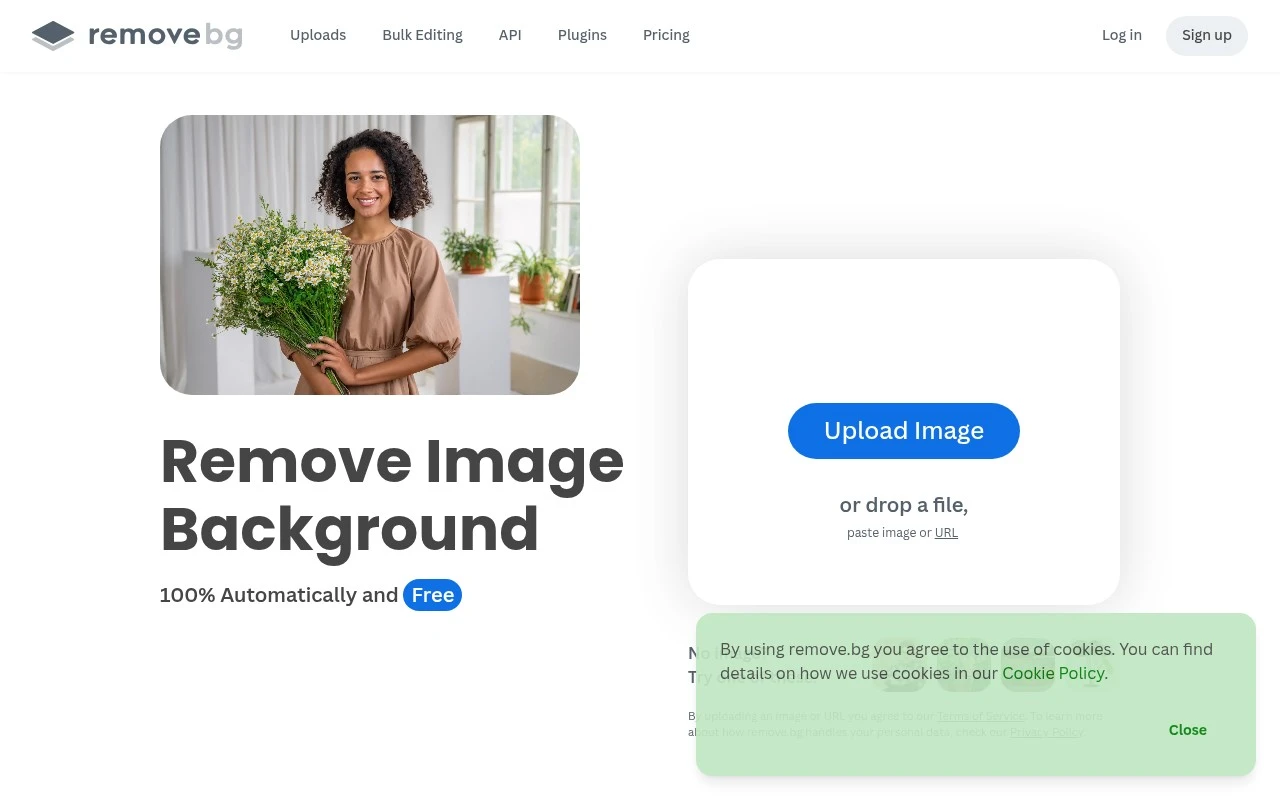
remove.bg is an AI background remover for images. It automatically detects the subject, removes the background in seconds, and supports outputs such as transparent PNGs, white backgrounds, and generated custom backdrops. The official site also describes bulk processing, a mobile app, and integrations with tools such as Figma, Photoshop, Zapier, and an API for workflow automation.

FYAI Score

8.1 / 10

Based on 8.674 reviews

Pricing:

Freemium

Best for:

Designers and ecommerce teams needing fast, clean image cutouts

Score Breakdown

  • Ease of use9.4 / 10
  • Features7.7 / 10
  • Pricing7.3 / 10
  • Integrations8.4 / 10
  • Support7.6 / 10

PRODUCT PREVIEW

What this AI tool does

Remove BG is an AI tool designed to remove the background from an image so the main subject stands out on its own. It’s commonly used when you need a clean cutout of a person, product, or object for a website, document, or design project without spending time on manual editing. You upload an image, the tool detects the foreground, and it generates a version with the background removed. This can be helpful for creating transparent PNG-style assets, preparing product photos for consistent presentation, or quickly isolating subjects for presentations and social content. As an informational resource, this page explains what removebg does, the kinds of images it works best with, and what to expect from automated background removal. Results can vary depending on lighting, contrast, and fine details like hair or transparent objects, so it’s worth reviewing the output before using it in final materials.

Use cases

Best for

Remove Background

Use Remove BG to detect the main subject and remove the background automatically, exporting a transparent PNG in seconds.

Image Background Replacement

Replace an image background by generating a new backdrop or exporting with a solid color like white after removing the original background.

ANALYSIS

Strengths & limitations

Strengths
  • Focused, one-click background removal for fast image cutouts.
  • Supports practical replacement options such as transparent, white, and generated custom backgrounds.
  • Offers workflow options beyond manual upload, including bulk editing, integrations, mobile access, and an API.
Limitations
  • It is specialized around background removal and replacement rather than being a full image-editing suite.
  • Results depend on AI subject detection, so complex images may still need review or touch-up.
  • The official page describes free use but does not fully explain pricing, resolution limits, or credit details in the provided content.

Evaluation

FYAI score breakdown

Our structured evaluation across five key criteria

8.1 / 10

Overall score

Based on 8.674 reviews

  • Ease of use9.4 / 10
  • Features7.7 / 10
  • Pricing7.3 / 10
  • Integrations8.4 / 10
  • Support7.6 / 10

What users say

Findings from public reviews, documentation and community sources.

  • Ease of use

    The remove.bg product page says users can “Remove image backgrounds automatically in 5 seconds with just one click” and describes deleting backgrounds as “fast and effortless.” Reddit usage references frame remove.bg as a straightforward site people use for quick background removal tasks.

  • Features

    The remove.bg product page lists automatic background removal, transparent PNG output, an AI background generator, and bulk editing “up to 500 images per minute.”

  • Pricing

    The remove.bg pricing page positions paid plans around “max quality, automation & scale” and mentions HD photos and API calls. Reddit users note that small-resolution use is available but “if you want higher they require a subscription.”

  • Integrations

    The remove.bg site states that integrations with “Figma, Photoshop, and Zapier” embed background removal into workflows. The remove.bg API page says users can “integrate remove.bg into your application or workflow” with one API call.

  • Support

    The remove.bg site provides self-serve resources including remove.bg's API docs and blog content.

Who is this for?

Best for people who need quick background removal for images, the remove.bg product page says it can “Remove image backgrounds automatically in 5 seconds with just one click,” and it can output transparent PNGs. Best for teams adding background removal into existing workflows, remove.bg lists integrations with “Figma, Photoshop, and Zapier” and says the API can connect with one API call. Less suited to users who need higher-resolution output without paying, Reddit users note small-resolution use is available but “if you want higher they require a subscription.”

PRODUCT PREVIEW

Feature highlights

Auto background remove

Detects subjects and removes backgrounds in seconds with AI.

Transparent PNG output

Export clean cutouts as transparent PNG or on white backgrounds.

Bulk + API workflows

Process batches or automate background removal via integrations and API.

COMPARE

Discover curated alternatives worth comparing

Compare similar AI tools based on features, pricing and use cases

7.2/ 10Based on 2.027 reviews

Pixa

AI Image Generator
Edits and creates pixel art images with drawing and animation tools.
Best for:
Designers
Pricing
Freemium

8.2/ 10Based on 193 reviews

Uizard

UI/UX Design
Generates editable UI prototypes from prompts, screenshots, or sketche
Best for:
Product teams
Pricing
Freemium

8.2/ 10Based on 56.265 reviews

Topaz Labs

Image UpscalerPhoto Editing
AI upscales, denoises, sharpens, and restores photos and videos
Best for:
Designers
Pricing
Paid only

Join thousands of teams creating clean, professional product photos in seconds. Start making your visuals stand out with Remove BG today.

FAQ

Frequently asked
questions

Everything you need to know about this AI tool,
its features, pricing, use cases, and limitations.

Is Remove BG a good fit for e-commerce product photos, marketplaces, and ad creatives?
Remove BG is a strong fit when you need fast, consistent cutouts for catalogs, marketplaces, and performance ads. It works best on clear subjects (products, people) with decent contrast and lighting. If you regularly handle reflective items, fine hair/fur, or complex props, plan for occasional manual touch-ups in another editor.
What’s the difference between Remove BG’s free option and paid plans?
The free workflow is useful for testing quality, but downloads are typically limited in resolution and may not be suitable for print or high-end product pages. Paid credits/subscriptions unlock full-resolution downloads and higher-volume processing. If you process lots of images each month, compare the effective cost per image against alternatives.
How does Remove BG compare with Canva, Adobe Photoshop, or other background removers?
Remove BG is usually faster for one-click background removal, while Canva and Photoshop offer broader design and retouching tools after the cutout. Photoshop can be more precise on difficult edges but takes more time and skill. If your workflow needs batch automation and API integration, Remove BG is often simpler than general design suites.
How quickly can a team start using Remove BG, and what onboarding is required?
Customization is limited compared with full editors, so complex composites or precise masking may require follow-up work elsewhere. Results can be inconsistent on intricate details (hair, lace, transparent objects), which can slow down QA. Costs can rise with high-volume usage, so budgeting matters if you’re processing thousands of images.
What should we consider about data handling, privacy, and compliance when using Remove BG?
Using Remove BG typically means uploading images to a third-party service, so confirm whether that aligns with your internal policies and client agreements. Review their terms for how uploads are processed, stored, and retained, especially for sensitive or identifiable content. If you need strict compliance controls, check for enterprise options, DPAs, and region-specific processing details before committing.