Curated ToolThis tool is part of our curated AI directory. We only include tools that meet our standards for relevance, usability and real-world value.

HeadshotPro

Turns selfies into AI-generated professional headshots for profiles.

Image & Design
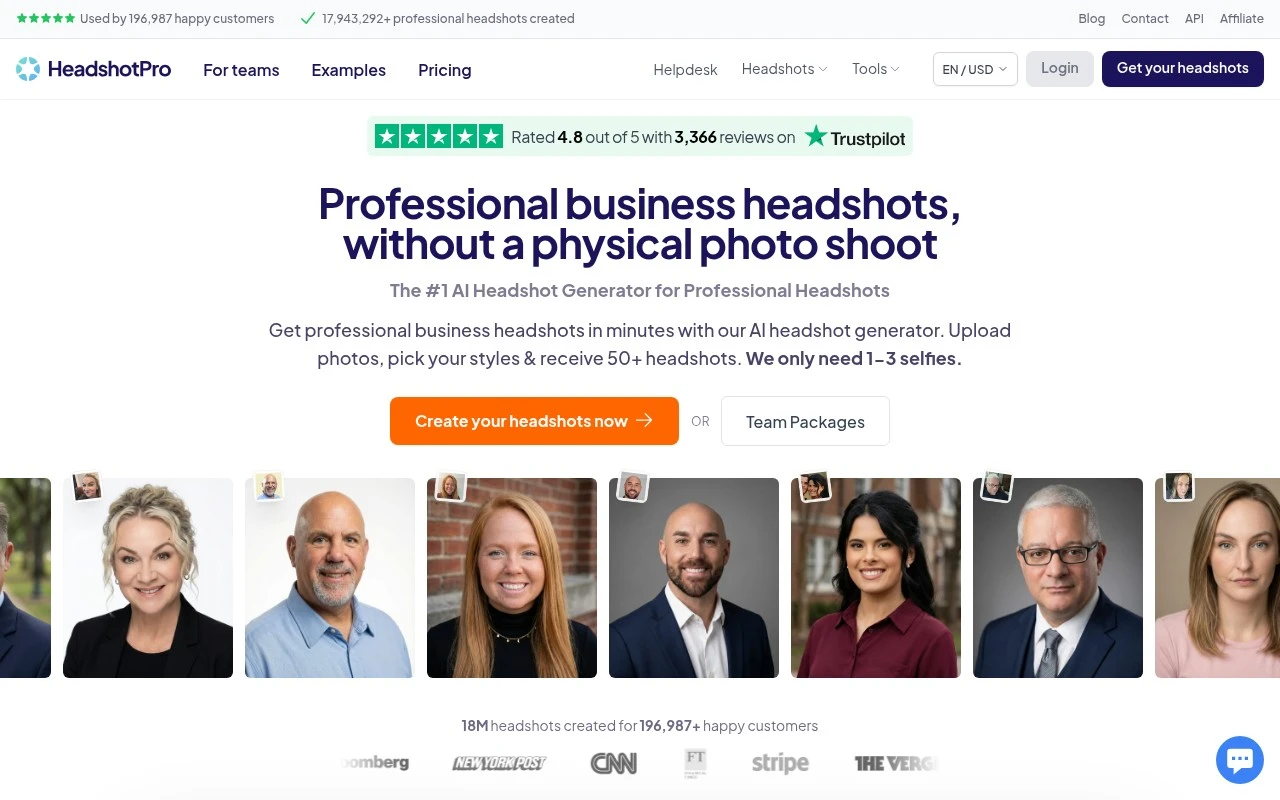
HeadshotPro is an AI headshot generator focused on professional business portraits. Users upload selfies, select styles such as outfits and backdrops, and receive many AI-generated headshot options, with the site claiming results can be delivered in as fast as 10 minutes. It is positioned as an alternative to an in-person photo shoot for individuals and teams that need usable headshots for professional branding.

FYAI Score

8.3 / 10

Based on 3.503 reviews

Pricing:

Paid

Best for:

Individuals and teams needing consistent business headshots fast

Score Breakdown

  • Ease of use9.0 / 10
  • Features7.1 / 10
  • Pricing8.3 / 10
  • Integrations8.6 / 10
  • Support8.7 / 10

PRODUCT PREVIEW

What this AI tool does

HeadshotPro is an AI tool designed to help people create professional-looking headshots from existing photos. It’s typically used when you need a consistent profile image for work-related contexts—such as LinkedIn, company directories, speaker bios, or team pages—without scheduling a traditional photo session. In practice, you upload one or more images and the system generates new headshot-style results that aim to match common expectations for professional portraits, such as clean framing and a polished appearance. This can be useful for individuals updating their personal branding or organizations trying to standardize employee photos across different locations. If you’re comparing options, it helps to think about the kinds of photos you already have, the level of realism you need, and whether you want results that look like a studio portrait or a more natural, everyday photo. headshotpro fits best for users looking for an informational, low-friction way to produce headshot images without a full photography workflow.

Use cases

Best for

AI Headshot Variations

Upload a few selfies and HeadshotPro generates multiple professional headshot options from them using AI.

Team Headshot Consistency

Create matching business headshots for a team by generating staff photos with consistent framing and style from selfies.

Outfit and Backdrop Swaps

Generate profile photos by selecting different outfit and background combinations applied to your uploaded selfies.

ANALYSIS

Strengths & limitations

Strengths
  • Can create professional headshots without scheduling or attending a physical photo shoot.
  • Produces many image options from a small number of uploaded selfies.
  • Supports both individual and corporate/team headshot needs, with team discounts and an API mentioned on the site.
Limitations
  • AI-generated results may not all look like the user closely enough to be usable.
  • Generated images can include unwanted artifacts or changes, such as adding glasses according to a review shown on the site.
  • Style control may be limited for users who want very specific outfit or background choices.

Evaluation

FYAI score breakdown

Our structured evaluation across five key criteria

8.3 / 10

Overall score

Based on 3.503 reviews

  • Ease of use9.0 / 10
  • Features7.1 / 10
  • Pricing8.3 / 10
  • Integrations8.6 / 10
  • Support8.7 / 10

What users say

Findings from public reviews, documentation and community sources.

  • Ease of use

    The HeadshotPro homepage says users "only need 1-3 selfies" and presents the workflow as "Upload your photos (5 minutes)," "Let our AI work its magic (10-30 minutes)," and "Download your favorites (5 minutes)." The HeadshotPro homepage includes on-page reviews describing the product as "straightforward" and "easy to use."

  • Features

    The HeadshotPro homepage lists AI business headshots, 50+ results, outfit/backdrop selection, and individual and corporate workflows. The HeadshotPro homepage also references commercial ownership and API/team options.

  • Pricing

    The HeadshotPro pricing page states "Professional AI headshots starting at $29" and includes "70+ headshots in as fast as 10 minutes." The HeadshotPro pricing page also references full commercial rights/ownership and a full refund if users do not get a profile-worthy result.

  • Integrations

    Zapier states that HeadshotPro "integrates with 9000 other apps." The HeadshotPro homepage separately surfaces API positioning for the product.

  • Support

    The HeadshotPro Help Center is organized by user type: Individual, Team Owner, and Team Member. The HeadshotPro Help Center includes sections for photo uploads, editing, downloads, team management, account/login, security, and privacy, plus a "Contact Support" path.

Who is this for?

Best for individuals or teams that need business headshots quickly, the HeadshotPro homepage says users "only need 1-3 selfies" and lists "Let our AI work its magic (10-30 minutes)," while the pricing page references "70+ headshots in as fast as 10 minutes." Less suited to users who need a broad image creation/editing suite, HeadshotPro’s listed features center on AI business headshots, outfit/backdrop selection, and headshot workflows rather than a wide image creation/editing suite.

PRODUCT PREVIEW

Feature highlights

AI Headshot Generator

Upload selfies and get dozens of professional headshot options.

Style & Backdrop Picks

Choose outfits and backgrounds to match your brand and role.

Results in Minutes

Generate usable business portraits in as fast as 10 minutes.

COMPARE

Discover curated alternatives worth comparing

Compare similar AI tools based on features, pricing and use cases

7.2/ 10Based on 2.027 reviews

Pixa

AI Image Generator
Edits and creates pixel art images with drawing and animation tools.
Best for:
Designers
Pricing
Freemium

8.2/ 10Based on 193 reviews

Uizard

UI/UX Design
Generates editable UI prototypes from prompts, screenshots, or sketche
Best for:
Product teams
Pricing
Freemium

8.2/ 10Based on 56.265 reviews

Topaz Labs

Image UpscalerPhoto Editing
AI upscales, denoises, sharpens, and restores photos and videos
Best for:
Designers
Pricing
Paid only

Upgrade your team’s image in minutes. Create consistent, professional headshots that boost trust and elevate your brand with HeadshotPro.

FAQ

Frequently asked
questions

Everything you need to know about this AI tool,
its features, pricing, use cases, and limitations.

Is HeadshotPro a good fit for teams, or is it better for individual headshots?
HeadshotPro is typically a stronger fit for businesses that want consistent, professional-looking headshots across many employees without coordinating photo shoots. It’s also useful for individuals who need a standard corporate headshot quickly. If you need highly stylized portraits or creative art direction, you may find other tools more suitable.
Does HeadshotPro have a free plan, and what are the limitations of paid options?
HeadshotPro is generally positioned as a paid service rather than a freemium tool, so you should expect to purchase a package to generate results. Paid tiers usually differ by the number of headshots/variations and the range of backgrounds or looks you can choose from. If you’re comparing tools, check whether competitors offer free previews or refunds, since HeadshotPro’s value depends on whether the outputs match your brand needs.
How does HeadshotPro compare to other AI headshot generators like Aragon AI or Secta?
HeadshotPro is often chosen for straightforward, corporate-friendly headshots and brand consistency across a team. Some alternatives may offer more stylistic variety, more aggressive retouching, or different pricing models per person. When comparing, focus on realism, consistency across employees, and how much control you get over wardrobe/background choices.
How fast can a company get started with HeadshotPro, and what does onboarding involve?
HeadshotPro prioritizes speed and uniform, professional results, but that can mean less creative control than a designer-led workflow. Results depend heavily on the quality and variety of uploaded photos, so inconsistent inputs can produce uneven outputs across a team. It also requires a reliable internet connection since the process is cloud-based.
What should we consider about data privacy and compliance when using HeadshotPro for employee photos?
Employee headshots are personal data, so you’ll want to review HeadshotPro’s terms for how images are stored, processed, and retained, and whether you can request deletion. Confirm where data is hosted and whether the vendor supports common requirements like DPA availability and GDPR-aligned handling if applicable. Internally, get employee consent and document the purpose (e.g., company directory, email signatures, LinkedIn) before uploading.