Curated ToolThis tool is part of our curated AI directory. We only include tools that meet our standards for relevance, usability and real-world value.

Dashword

Turns SEO research into content briefs and optimization guidance

Copy Optimization
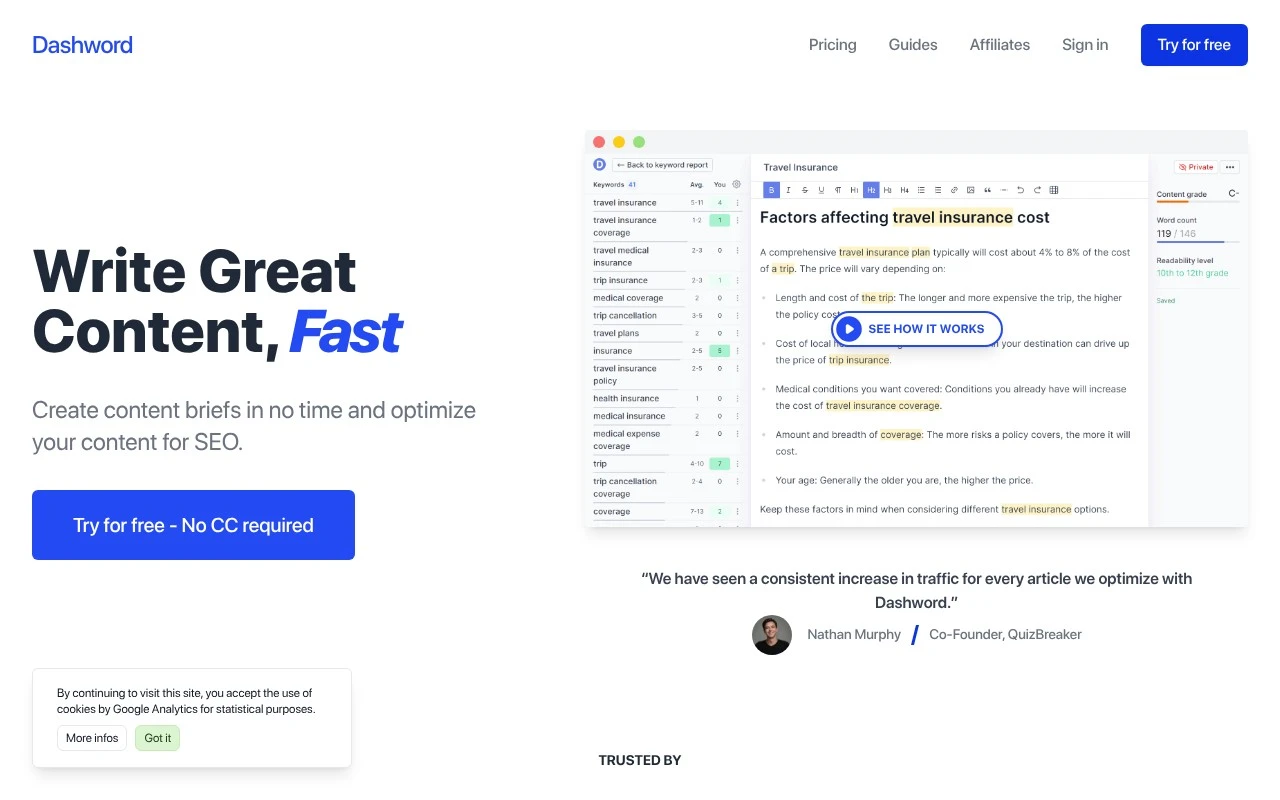
Dashword helps SEO and content teams plan, optimize, and maintain search-focused articles. It combines a content brief builder, an optimization editor with topic and keyword guidance, and monitoring features that track published pages for traffic and ranking changes.

FYAI Score

7.6 / 10

FYAI rating based on features, pricing and integrations

Pricing:

Free trial

Best for:

SEO and content teams optimizing search-focused articles

Score Breakdown

  • Ease of use7.8 / 10
  • Features7.7 / 10
  • Pricing7.5 / 10
  • Integrations7.3 / 10
  • Support7.3 / 10

PRODUCT PREVIEW

What this AI tool does

Dashword is an AI writing tool designed to help teams plan, draft, and refine content with more structure and consistency. It’s typically used during the early stages of content creation, when you need to turn a topic into an outline and a workable first draft while keeping the intended audience and goals in view. In practice, dashword supports an informational workflow: you start with a subject, develop key points, and shape the writing into a clear, readable piece. It can be useful for marketers, editors, and writers who want a repeatable process for producing articles and other long-form content without losing track of what the page is meant to explain. Because it’s built around guiding the writing process rather than simply generating text, dashword can also help with revisions and alignment across a content team. The result is a more organized path from idea to publishable copy, with less time spent on blank-page drafting and rework.

Use cases

Best for

SEO Content Optimization

Dashword scores drafts against topic and keyword guidance in its editor to highlight missing sections and terms.

Keyword Research

It analyzes top-ranking pages for a query to suggest related topics and keywords to include in a content brief.

Rank Tracking

It monitors published pages and alerts you to traffic and ranking changes so you can update content when performance drops.

ANALYSIS

Strengths & limitations

Strengths
  • Combines brief creation, on-page content optimization, and post-publication monitoring in one workflow.
  • Shows competitor outlines, keyword ideas, FAQs, and content scoring to guide article relevance.
  • Includes automated monitoring features such as weekly keyword reports, rank tracking, and page import via crawler.
Limitations
  • Focused on SEO article workflows rather than general-purpose writing or broad marketing automation.
  • The homepage describes optimization and briefing support, not full autonomous article generation.
  • The provided official page does not explain the underlying scoring methodology or data sources in detail.

Evaluation

FYAI score breakdown

Our structured evaluation across five key criteria

7.6 / 10

Overall score

FYAI rating based on features, pricing and integrations

  • Ease of use7.8 / 10
  • Features7.7 / 10
  • Pricing7.5 / 10
  • Integrations7.3 / 10
  • Support7.3 / 10

What users say

Findings from public reviews, documentation and community sources.

  • Ease of use

    Dashword's product page promotes low-friction setup with "Try for free - No CC required," briefs created "In Minutes," an interactive builder where users can "Add and edit content in just a few clicks," and sharing "with one click."

  • Features

    Dashword's product page lists content briefs, competitor outlines, SEO content optimization, real-time content scoring, content monitoring, traffic trend alerts, weekly keyword reports, rank tracking, automated page import, and AI writing.

  • Pricing

    Dashword's pricing page lists a Startup tier at "$99/mo" with "30 content reports," "5 user seats," and "AI Writer (100k words)." Dashword's pricing page lists a Business tier "from $349/mo" with 100 reports, API access, and SSO, and the site also references a free first report and a no-credit-card trial.

  • Integrations

    Dashword's site lists a "Google Docs add-on" and "API Docs," and Dashword's Business plan includes "API access" and SSO.

  • Support

    Dashword's site links to self-serve resources including "Guides," "Blog," "SEO Glossary," "API Docs," and "Contact." Dashword's pricing FAQ covers trial, cancellation, data access after cancellation, and discounts.

Who is this for?

Best for SEO content teams that need briefs, optimization, and monitoring in one workflow, Dashword's product page lists content briefs, SEO content optimization, real-time content scoring, content monitoring, rank tracking, and AI writing. Less suited to solo users looking for a low-cost entry tool, Dashword's pricing page starts with a Startup tier at "$99/mo" with "5 user seats," so the entry plan is packaged around team use.

PRODUCT PREVIEW

Feature highlights

Rank & Traffic Monitor

Track published pages for ranking and traffic changes over time.

Brief Builder

Create clear content plans with structure, intent, and guidance.

Page Monitoring

Track published pages for traffic and ranking shifts over time.

COMPARE

Discover curated alternatives worth comparing

Compare similar AI tools based on features, pricing and use cases

7.4/ 10Based on 5 reviews

Chapterly

Copy OptimizationBlog & Article Writing
AI writing assistant for refining narrative, characters, and settings
Best for:
Content creators
Pricing
Freemium

8.8/ 10Based on 846 reviews

Yoast SEO

Content & On-pageTechnical & Audit
Generates and optimizes SEO titles, descriptions, and content
Best for:
SEO teams
Pricing
Freemium

8.1/ 10Based on 1.124 reviews

Yext

SEO MonitoringAI Search / GEO
Manages verified business data for search and AI discovery.
Best for:
SEO teams
Pricing
Paid

Create content that ranks and resonates. Use Dashword to turn search insights into clearer, more complete drafts—then publish with confidence.

FAQ

Frequently asked
questions

Everything you need to know about this AI tool,
its features, pricing, use cases, and limitations.

Who is Dashword the best fit for, and when should you pick a different tool?
Dashword is a strong fit for content teams that want to optimize SEO briefs and existing articles using SERP-driven recommendations and performance tracking. It works best when you already have a steady publishing workflow and want data-backed guidance on what to update. If you mainly need a fast AI drafting tool for short-form copy or social posts, you may find other writing tools more efficient.
Does Dashword have a free plan, and what are the main limitations compared to paid?
Dashword typically operates as a paid product, and any trial access (when available) is mainly for evaluating the workflow rather than running ongoing production. Paid tiers are where you get consistent access to content briefs, optimization suggestions, and tracking features. If you need a permanently free editor or basic grammar checks, Dashword may be more than you need.
How does Dashword compare with Surfer SEO, Clearscope, or MarketMuse for content optimization?
Dashword is most comparable to tools focused on content briefs and on-page optimization, with an emphasis on turning SERP data into actionable writing guidance. Compared with enterprise-oriented platforms like MarketMuse, Dashword is usually simpler to operate but may offer fewer advanced planning or inventory-level features. Versus Surfer SEO or Clearscope, the decision often comes down to your preferred workflow, integrations, and how much you value built-in performance tracking.
How quickly can a team get Dashword set up, and what onboarding effort should you expect?
Dashword can feel less intuitive if your team isn’t comfortable interpreting data-driven recommendations, which can slow early adoption. Pricing may be higher than basic writing assistants that focus only on drafting or editing. Non-English support can be limited, which matters if you publish across multiple languages.
What should I know about Dashword’s data handling, privacy, and compliance before using it?
If you’re using Dashword for client work, treat any content you upload as potentially sensitive and confirm what is stored, for how long, and whether it’s used to improve models or shared with subprocessors. Review Dashword’s DPA, security documentation, and regional data processing options (if needed) to match your compliance requirements. For regulated industries, consider minimizing personal data in inputs and using role-based access controls where available.