Wispr Flow
Curated ToolThis tool is part of our curated AI directory. We only include tools that meet our standards for relevance, usability and real-world value.

Wispr Flow

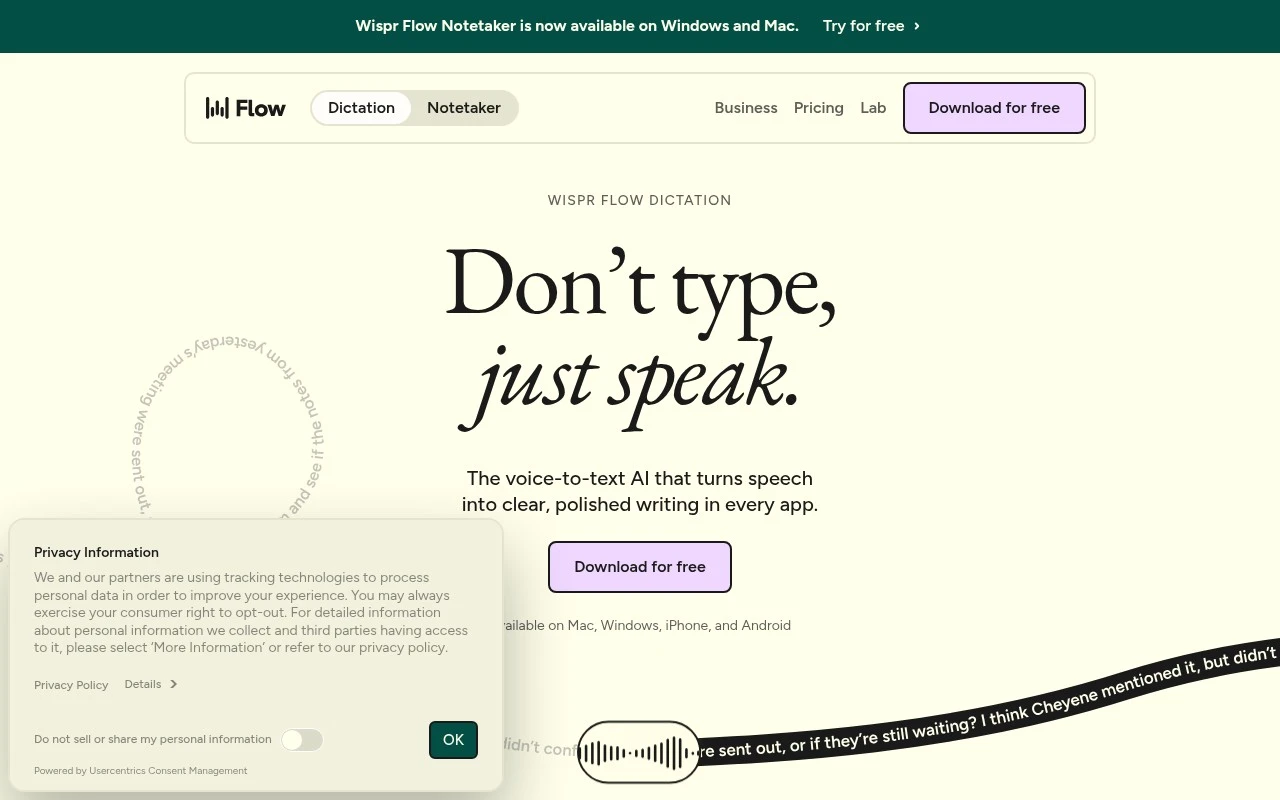
Wispr Flow is an AI voice dictation app that converts spoken words into polished text across the apps where you write. It supports automatic punctuation, formatting, and voice-driven editing commands.
Voice & Audio

Wispr Flow

FYAI Score

8.7 / 10

Based on 78 reviews

Pricing:

Feemium

Best for:

Professionals drafting emails, docs, notes, and messages by voice

Score Breakdown

  • Ease of use8.8 / 10
  • Features8.9 / 10
  • Pricing8.9 / 10
  • Integrations8.3 / 10
  • Support8.2 / 10

PRODUCT PREVIEW

What this AI tool does

Wispr Flow
Wispr Flow is an AI dictation tool for Mac, Windows, iPhone, and Android that lets people speak wherever they would normally type. It turns spoken words into polished text inside everyday apps, so writing can happen in an email client, browser, document editor, chat app, ticketing system, or mobile field without switching into a separate writing workspace. Instead of treating dictation as a raw transcript, the tool focuses on finished text. It removes filler words, repeated phrases, and false starts, then adds punctuation and formatting so the output reads more like something intentionally written than something merely recorded. That makes it useful for messages, notes, documents, comments, prompts, and other short-to-medium writing tasks where speed matters but clarity still counts. For professionals, students, creators, and anyone who thinks faster than they type, Wispr Flow is best at fast cross-app voice writing. Its value is not simply speech recognition, but the ability to capture a thought at speaking speed and place it directly into the workflow already in front of the user. This positions it closer to an intelligent writing layer for the operating system than a traditional transcription app. Personal adaptation is a major part of the product story. The tool can learn custom vocabulary, names, technical terms, snippets, languages, and style preferences, which helps it handle domain-specific writing more naturally over time. For users who often repeat phrases, write in multiple contexts, or work with specialized terminology, that adaptability reduces the need to constantly correct the same mistakes. Across devices, the experience is designed around continuity. On desktop, it can replace typing in many places where people compose text throughout the day. On iPhone and Android, it extends the same idea to mobile writing, where long typing sessions are often slower and more error-prone. The result is a voice-first input layer that follows the user rather than locking their work into one app. Wispr Flow is for people who want dictation to feel less like transcription and more like writing by voice. It suits users who send many messages, draft ideas quickly, document work, respond to customers, write notes, or use AI tools and prompts throughout the day. Its strongest fit is with workflows where the user already knows what they want to say and needs a faster, cleaner way to get it into text. The product’s character is practical rather than theatrical. It does not try to be a full word processor, a meeting recorder, or a creative suite. Its purpose is narrower and often more valuable in daily use, helping spoken language become usable written language in the places where typing normally happens. In that sense, Wispr Flow is a productivity tool built around a simple shift: making voice a reliable primary input method for everyday writing.

Use cases

Best for

Voice Dictation

Wispr Flow inserts dictated emails, messages, documents, and other text directly into the app you are using.

Speech Cleanup

It removes filler words, repeated phrases, and corrections, then adds punctuation and formatting to produce cleaner text.

Custom Writing Style

It learns custom vocabulary, expands snippets, and applies writing styles so dictated text matches personal or work terms.

ANALYSIS

Strengths & limitations

Strengths
  • Works across apps and devices, so users can dictate wherever they normally type without relying on separate app-specific plugins.
  • Best suited to natural speech because it is designed to handle rambling, pauses, corrections, filler words, punctuation, and formatting automatically.
  • Useful for multilingual and specialized work because it supports automatic language detection across 100+ languages, custom vocabulary, snippets, and app-specific style settings.

Limitations
  • Less suitable for users who need exact verbatim transcription because Flow is designed to clean and rewrite spoken language into polished text.
  • Less suitable for quiet, shared, or highly confidential environments because the workflow depends on speaking aloud and using microphone-based input.
  • Not a full document, project, or workflow automation platform because its core job is voice input and text generation inside the apps users already use.

Evaluation

FYAI score breakdown

Our structured evaluation across five key criteria

8.7 / 10

Overall score

Based on 78 reviews

  • Ease of use8.8 / 10
  • Features8.9 / 10
  • Pricing8.9 / 10
  • Integrations8.3 / 10
  • Support8.2 / 10

What users say

Findings from public reviews, documentation and community sources.

  • Ease of use

    Wispr Flow describes a workflow of “Don’t type, just speak,” with operation “anywhere you can type, with no plugins required,” and syncing across Mac, Windows, iPhone, and Android. A Reddit thread on r/ProductivityApps reports users describing Wispr Flow as “300% better” and usable “anywhere on any screen,” while also mentioning app-specific bugs and punctuation issues.

  • Features

    Wispr Flow's pricing page lists speech-to-text in any app, automatic filler/repetition cleanup, 100+ languages, and custom vocabulary. Wispr Flow's pricing page also lists shared dictionaries, analytics, SSO/SAML, SCIM, audit logs, HIPAA controls, SOC 2 Type II and ISO 27001 for Team and enterprise features.

  • Pricing

    Wispr Flow's pricing page lists a Free plan, Pro at $12/user/mo annually or $15 monthly, Growth at $18/user/mo annually or $23 monthly, and Enterprise custom pricing. Wispr Flow's pricing page says the free tier includes dictation across Mac, Windows, iOS, and Android with stated word limits, while paid plans unlock unlimited dictation and team/admin features.

  • Integrations

    Wispr Flow's pricing page says Flow provides “speech-to-text in any app” and works with “Mac, Windows, iOS, and Android.” Wispr Flow's pricing page says meeting notes can be used in “Claude, ChatGPT, and other AI tools (MCP),” and Enterprise connectivity includes SSO/SAML, SCIM, MDM, and domain capture.

  • Support

    Wispr Flow's pricing page says Free includes Standard support, while Pro and Growth list Priority support. Wispr Flow's pricing page says Enterprise includes Premium support plus dedicated support with SLAs.

Who is this for?

Best for people who want to dictate across devices and apps, with Wispr Flow's pricing page saying it provides “speech-to-text in any app” and works with “Mac, Windows, iOS, and Android.” Less suited to users who depend on flawless dictation in every context, because a Reddit thread on r/ProductivityApps mentions app-specific bugs and punctuation issues that could require manual correction.

PRODUCT PREVIEW

Feature highlights

Cross-App Dictation

Speak into any app instead of switching to a separate writing workspace.

Polished Transcripts

Removes filler words, fixes repeats, and adds punctuation automatically.

Adaptive Voice Style

Learns vocabulary, snippets, languages, and your preferred writing tone.

COMPARE

Discover curated alternatives worth comparing

Compare similar AI tools based on features, pricing and use cases

8.5/ 10Based on 23 reviews

Cartesia

AI Voiceover
Adds AI speech, streaming transcription, and voice agents
Best for:
Software developers
Pricing
Freemium

8.2/ 10Based on 215 reviews

Synthflow

Voice & Audio
Automates phone calls, follows logic, and connects systems
Best for:
Customer support teams
Pricing
Paid only

9.2/ 10Based on 2,638 reviews

Retell AI

Voice & Audio
Automates phone calls, routes issues, and logs outcomes
Best for:
Operations teams
Pricing
Usage-based

Wispr Flow

Turn spoken thoughts into polished text anywhere you work. Start writing faster today with a voice-first flow that keeps up with your ideas.

FAQ

Frequently asked
questions

Everything you need to know about this AI tool,
its features, pricing, use cases, and limitations.

Who is Wispr Flow best for?
Wispr Flow is best for people who write a lot and want to dictate directly into the apps they already use. It fits professionals, founders, writers, developers, knowledge workers, and multilingual users who need emails, chats, notes, documents, or technical text cleaned up from natural speech into readable writing.
Is Wispr Flow free, and what do paid plans add?
Wispr Flow uses a freemium pricing model, so users can start with a free option and upgrade for more capability. Teams evaluating it should check wisprflow.ai for current plan limits, usage allowances, device support, vocabulary features, snippets, and any paid features tied to advanced or higher-volume dictation.
How does Wispr Flow compare with other voice dictation tools?
Wispr Flow is most useful when you want AI-polished dictation across everyday apps rather than simple speech-to-text in one workspace. Compared with similar tools, its strengths are natural-speech cleanup, punctuation, formatting, learned vocabulary, snippets, style adaptation, and multilingual support. Other options may be better for verbatim transcripts or meeting recordings.
How hard is it to set up Wispr Flow?
Wispr Flow should require less onboarding than a full writing or workflow platform because its main role is voice input across apps. Users will still need time to get comfortable dictating, allowing microphone access, setting preferred styles, and adding custom vocabulary or snippets for specialized terms, client names, or technical language.
What are the main drawbacks of Wispr Flow?
Wispr Flow is not ideal for users who need exact verbatim transcription because it is designed to clean up and rewrite spoken language. It can also be awkward in quiet, shared, or confidential settings where speaking aloud is impractical. It is not a full document management, project, or automation system.
Is Wispr Flow suitable for confidential or regulated work?
Teams handling sensitive information should review Wispr Flow’s current privacy, security, and compliance details before using it for confidential work. Key points to verify include how audio and generated text are processed, retention settings, encryption, vendor access, training-data policies, compliance certifications, and whether the tool fits internal rules for microphone-based input.