Curated ToolThis tool is part of our curated AI directory. We only include tools that meet our standards for relevance, usability and real-world value.

Unreal Speech

Unreal Speech is an AI text-to-speech platform that converts written text into natural-sounding speech for applications, media, and narration. It can generate voiceover audio through a web interface or API.
AI Voiceover

FYAI Score

8.2 / 10

Based on 14 reviews + FYAI product analysis

Pricing:

Freemium

Best for:

Developers building production text-to-speech into apps and workflows

Score Breakdown

  • Ease of use8.4 / 10
  • Features7.4 / 10
  • Pricing9.4 / 10
  • Integrations7.5 / 10
  • Support8.5 / 10

PRODUCT PREVIEW

What this AI tool does

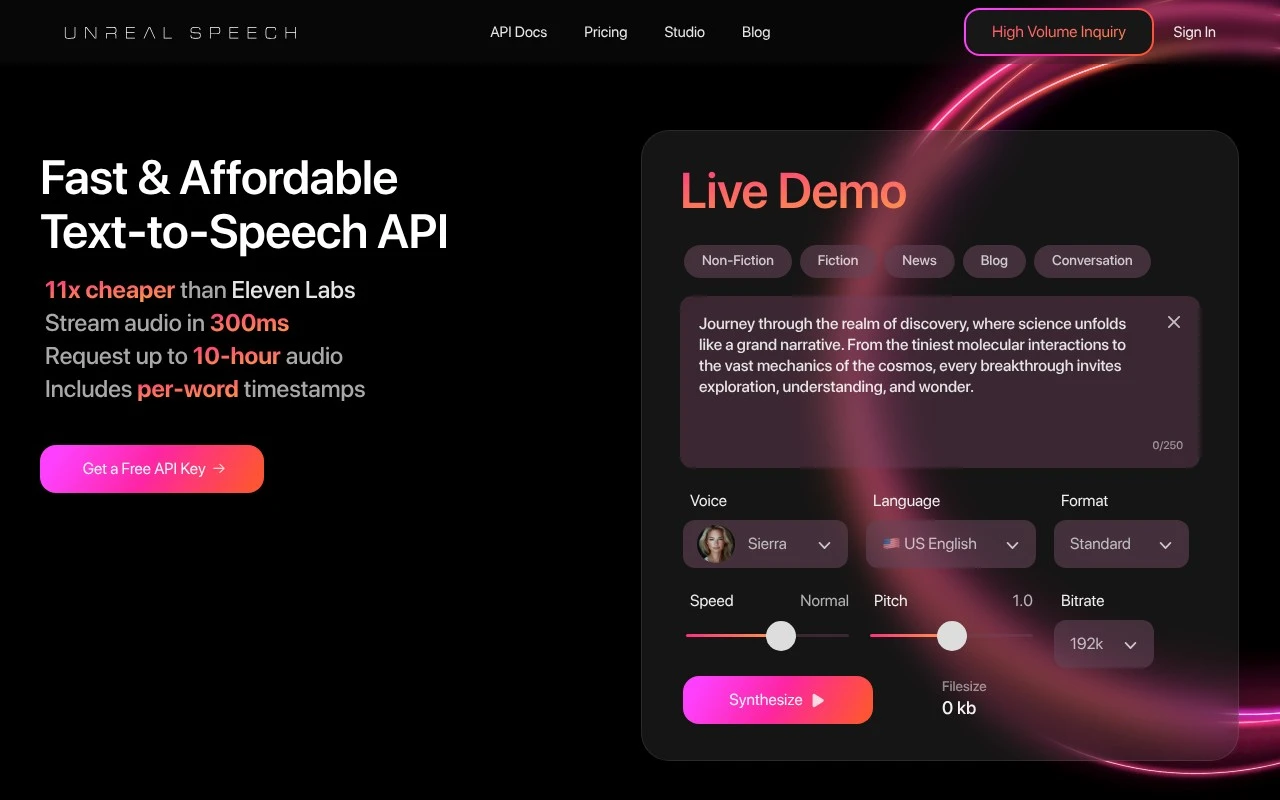
Unreal Speech is a text to speech API for developers, product teams, and media workflows that need to generate voiceover at production scale without treating synthetic speech as a premium-only feature. It is positioned less as a consumer voice studio and more as infrastructure for applications, platforms, and content pipelines that need fast, reliable, and affordable spoken audio. Speed is central to the product story. The platform emphasizes streaming audio in about 300ms, which makes it relevant for interactive use cases such as conversational agents, learning apps, customer support systems, and real-time narration. For teams building voice into a user-facing product, that low-latency focus can matter as much as the naturalness of the voice itself. Unreal Speech is best suited for teams that want to generate voiceover programmatically, especially when volume, cost control, and integration flexibility are more important than a visual editing interface. Its API-first design gives developers endpoints for instant streaming, synchronous generation, asynchronous long-form synthesis, and WebSocket streaming with timestamp data. That makes it useful both for quick clips and for more complex products where audio needs to be generated, delivered, and synchronized inside an application. Long-form audio is another important part of its identity. The tool supports generation of audio up to 10 hours, which makes it relevant for audiobooks, training materials, documentation, narrated articles, and other content formats where short prompt limits can become a production bottleneck. Instead of forcing teams to manually stitch together many small files, the platform is designed around longer synthesis jobs that fit publishing and media workflows. For localization and content variation, Unreal Speech offers a voice library with 48 voices across 8 languages. This gives teams enough range to match different product tones, regions, or content types without turning the platform into a sprawling voice marketplace. The emphasis is on practical coverage for scalable text to speech rather than on celebrity-style voice cloning or highly theatrical voice design. Timestamp output gives the API a role beyond simple audio generation. Word-level or sentence-level timing can help synchronize captions, karaoke-style highlighting, educational reading aids, video overlays, or interactive transcripts with playback. For products where speech is only one part of a broader user experience, this timing data can reduce engineering work and make the generated audio easier to coordinate with visual interfaces. Affordability is a major part of how the tool is framed. Teams comparing Unreal Speech pricing are likely to be evaluating whether synthetic voice can be used continuously, not just for occasional marketing clips or prototypes. The platform’s value proposition is strongest when a business expects to generate large amounts of speech and needs predictable economics around that usage. Compared with creator-oriented voiceover tools, the experience is more technical and more backend-focused. A marketer looking for a simple browser editor may prefer a tool built around scripts, timelines, and exports, while an engineering team embedding text to speech inside a product may find the API model more appropriate. Unreal Speech is therefore best understood as speech generation infrastructure rather than an all-in-one audio production suite. At its core, the tool serves the growing need to turn written content into spoken output automatically, quickly, and at scale. Unreal Speech combines low-latency streaming, long-form synthesis, multilingual voices, and synchronization data in a package aimed at developers and production teams. Its character is pragmatic, cost-aware, and integration-ready, making it a strong option for organizations that want voice generation to become a dependable part of their software stack.

Use cases

Best for

Text to Speech

Use Unreal Speech’s text to speech API to stream audio from text in about 300ms or generate files with word or sentence timestamps.

Generate Voiceover

Generate voiceover by sending scripts to the synchronous or async long form endpoints to produce narration audio for videos or podcasts.

ANALYSIS

Strengths & limitations

Strengths
  • Best suited to production-scale apps because it provides multiple API paths for instant streaming, synchronous generation, asynchronous long-form synthesis, and WebSocket streaming.
  • Strong fit for real-time or interactive products because its site emphasizes streaming audio in about 300ms.
  • Useful for narrated content and read-along interfaces because timestamp output can synchronize spoken words or sentences with playback.

Limitations
  • Less suitable for non-technical teams because it is primarily an API product that requires development work to integrate into an app or workflow.
  • Less suitable for broad global localization because its published voice catalog covers 48 voices across 8 languages.
  • Less suitable for teams needing predictable free usage at scale because the freemium model can require paid usage as production volume grows.

Evaluation

FYAI score breakdown

Our structured evaluation across five key criteria

8.2 / 10

Overall score

Based on 14 reviews + FYAI product analysis

  • Ease of use8.4 / 10
  • Features7.4 / 10
  • Pricing9.4 / 10
  • Integrations7.5 / 10
  • Support8.5 / 10

What users say

Findings from public reviews, documentation and community sources.

  • Ease of use

    G2’s review summary says users “consistently praise the affordable pricing and ease of use” and highlight “seamless integration and clear documentation” for Unreal Speech.

  • Features

    The Unreal Speech product page lists TTS API capabilities including “Stream audio in 300ms,” “Generate 10-hr audio,” “48 voices & 8 languages,” and “Per-word timestamps.”

  • Pricing

    The Unreal Speech pricing page lists a Free tier at “250K characters,” Starter at “$10 /mo” for 500,000 characters, and published higher-volume tiers up to Enterprise. The Unreal Speech pricing page also positions the service as “11x cheaper than 11Labs.”

  • Integrations

    The GitHub listing says the “Unreal Speech Python SDK allows you to easily integrate the Unreal Speech API into your Python applications.”

  • Support

    G2’s review summary says users highlight “clear documentation” and “seamless integration” for Unreal Speech.

Who is this for?

Best for developers building text-to-speech into applications, the GitHub listing says the “Unreal Speech Python SDK allows you to easily integrate the Unreal Speech API into your Python applications.” Less suited to users who need a broader voice-audio suite, the cited product capabilities are TTS API items such as “Generate 10-hr audio,” “48 voices & 8 languages,” and “Per-word timestamps.”

PRODUCT PREVIEW

Feature highlights

300ms Streaming TTS

Stream audio almost instantly for responsive voice apps and agents.

10-Hour Synthesis

Generate long-form audio asynchronously for podcasts and narration.

Timestamps via API

Get word/sentence timings to sync captions, highlights, and playback.

COMPARE

Discover curated alternatives worth comparing

Compare similar AI tools based on features, pricing and use cases

7.4/ 10Based on 30 reviews

Zencastr

Podcast Editing
Edits recordings like text, transcribes, and cuts social clips
Best for:
Audio & podcast creators
Pricing
Freemium

8.5/ 10Based on 16 reviews

Wondercraft

Short-form VideoVideo Editing
Creates editable videos and audio from text, prompts, media
Best for:
Video creators
Pricing
Freemium

8.6/ 10Based on 130 reviews

Wellsaid

AI Voiceover
Creates business voiceovers with voice and pronunciation controls
Best for:
Audio & podcast creators
Pricing
Paid only

Turn scripts into lifelike voiceovers in minutes. Start creating polished audio for videos, ads, and podcasts with Unreal Speech today.

FAQ

Frequently asked
questions

Everything you need to know about this AI tool,
its features, pricing, use cases, and limitations.

Who is Unreal Speech best suited for?
Unreal Speech is best suited for developers, product teams, and audio platforms that need programmable text-to-speech at scale. It fits apps that generate narrated content, stream short voice responses, turn long text into audio, or synchronize speech with captions, highlighting, or reading interfaces.
Is Unreal Speech free, and what limits should I expect?
Unreal Speech uses a freemium pricing model, so teams can start with a free option and move to paid usage as volume grows. Buyers should check unrealspeech.com for current quotas, overage rules, and feature limits, especially for long-form synthesis, streaming, timestamps, and high-volume API usage.
How does Unreal Speech compare with other text-to-speech APIs?
Unreal Speech is most comparable to developer-focused text-to-speech APIs rather than simple voiceover editors. Its strengths are API access, streaming, long-form synthesis, and timestamped audio. The best choice depends on voice quality needs, latency targets, budget, language coverage, integration effort, and expected usage volume.
How hard is it to set up Unreal Speech in an app?
The main trade-off with Unreal Speech is that it is built for technical API workflows, not casual manual voiceover production. Short synchronous requests have character limits, larger audio generation may require asynchronous task handling, and teams should test real voice quality, latency, uptime, and cost before relying on it in production.
What should teams check before sending user text to Unreal Speech?
Teams should review Unreal Speech’s current data handling, privacy, retention, and compliance terms before sending sensitive or regulated text. Important checks include whether text or audio is stored, how requests are protected, where data is processed, what subprocessors are used, and whether the service meets internal security requirements.