Curated ToolThis tool is part of our curated AI directory. We only include tools that meet our standards for relevance, usability and real-world value.

Mureka

Generates AI music, lyrics, and full songs from text prompts.

Music & Sound Effects
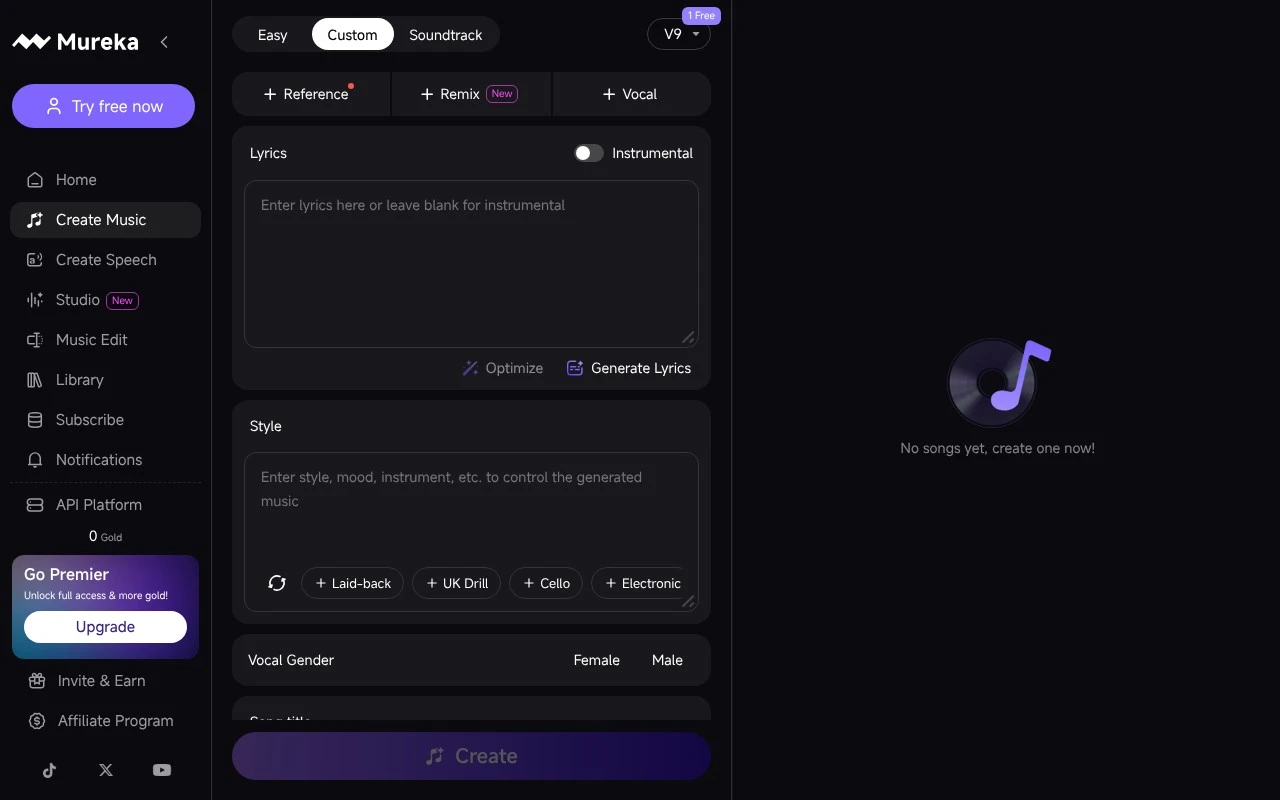
Mureka is an AI music generator that creates original music from prompts and user-selected settings such as genre, mood, tempo, key, instruments, track length, and vocal or instrumental preferences. Its official site positions it for creators who need customizable, royalty-free songs, melodies, lyrics, background tracks, and soundscapes, with options for downloading finished tracks and using stems for further editing.

FYAI Score

7.5 / 10

Based on 154 reviews

Pricing:

Freemium

Best for:

Creators needing custom, royalty-free music for videos, games, and podcasts

Score Breakdown

  • Ease of use7.3 / 10
  • Features7.3 / 10
  • Pricing7.1 / 10
  • Integrations8.8 / 10
  • Support7.1 / 10

PRODUCT PREVIEW

What this AI tool does

Mureka is an AI tool page entry intended to help readers understand what the product is and how it may be used. Since the available details about its purpose and core workflow are not provided here, this description focuses on setting expectations and explaining the kind of information users typically look for when evaluating an AI tool. In practice, a page like this is most useful when it clarifies the tool’s main use case, the type of input it needs, and the kind of output it produces, along with any limits or assumptions. If you share a brief intro and the primary task mureka is designed for, this description can be updated to reflect the real workflow and help users decide whether it fits their needs.

Use cases

Best for

Background Music Prompts

Create original background tracks by prompting genre, mood, tempo, instrumentation, and style parameters.

Full Song Generation

Mureka generates complete songs from text prompts with lyrics, vocals or instrumentals, and adjustable structure.

Track and Stems Export

Download generated tracks and, when available, stems for editing workflows or further production in a DAW.

ANALYSIS

Strengths & limitations

Strengths
  • Supports prompt-based music creation with controls for style, mood, tempo, key, instruments, duration, and vocals.
  • Covers both instrumental background music and fuller song creation, including lyrics generation or imported lyrics.
  • The official site claims downloadable, royalty-free tracks with commercial-use rights and compatibility with professional production workflows.
Limitations
  • The available official page is heavily promotional and does not clearly document model limits, licensing details, or exact plan restrictions.
  • Claims such as studio-quality output, full commercial rights, and DAW integration should be verified in the product terms before professional use.
  • The scrape does not provide enough detail to assess editing depth, export formats, collaboration features, or how consistently the generated music meets production standards.

Evaluation

FYAI score breakdown

Our structured evaluation across five key criteria

7.5 / 10

Overall score

Based on 154 reviews

  • Ease of use7.3 / 10
  • Features7.3 / 10
  • Pricing7.1 / 10
  • Integrations8.8 / 10
  • Support7.1 / 10

What users say

Findings from public reviews, documentation and community sources.

  • Ease of use

    Reddit users in r/MurekaAi describe Mureka as usable after a short period, with one user saying, "I've had Mureka for a little over a week now, and for the most part I'm enjoying it," while also noting that "some genres work better than others."

  • Features

    Mureka’s own page says users can input prompts and configure "genre, mood, tempo, and instrumentation," access "individual stems," add vocals, and use a "lyrics generator." Mureka’s own page also says users can download tracks with "full commercial rights."

  • Pricing

    Published pricing snippets list "Monthly Pro $7.17/mo Billed $86 yearly" with "500 songs per month." Trustpilot shows a 1.5/5 Trustpilot rating, with users citing subscription "transparency" and "ease of cancellation" issues.

  • Integrations

    Mureka’s platform page describes "Track Generation, Song Extension, Region Editing, and Stem Extraction, all in one API." The supplied integration sources also list DAW compatibility and Make automation availability.

  • Support

    Trustpilot-linked support notes describe support as delivered through the product and its community rather than a separate documented channel.

Who is this for?

Best for creators who want prompt-based AI music generation with production controls, Mureka’s own page says users can configure "genre, mood, tempo, and instrumentation" and access "individual stems." Less suited to buyers who need clear subscription handling before committing. Trustpilot shows a 1.5/5 Trustpilot rating, with users citing subscription "transparency" and "ease of cancellation" issues.

PRODUCT PREVIEW

Feature highlights

Prompt-to-music

Generate original songs from a simple prompt and creative direction.

Deep track controls

Set genre, mood, tempo, key, instruments, length, and vocals.

Stems & downloads

Download finished tracks and stems for easy edits in your DAW.

COMPARE

Discover curated alternatives worth comparing

Compare similar AI tools based on features, pricing and use cases

7.4/ 10Based on 30 reviews

Zencastr

Podcast Editing
Edits audio/video via text, transcribes, and makes social clips
Best for:
Audio & podcast creators
Pricing
Freemium

8.5/ 10Based on 16 reviews

Wondercraft

Short-form VideoVideo Editing
Turns text or audio into editable AI-generated videos and audio
Best for:
Video creators
Pricing
Freemium

8.6/ 10Based on 130 reviews

Wellsaid

AI Voiceover
Generates realistic AI voiceovers from scripts with voice controls
Best for:
Audio & podcast creators
Pricing
Paid only

See how Mureka turns every call into a faster, more personal customer experience. Start automating voice support today and keep customers moving forward.

FAQ

Frequently asked
questions

Everything you need to know about this AI tool,
its features, pricing, use cases, and limitations.

What types of customer support use cases is Mureka a good fit for?
Mureka is best suited for teams that want to automate voice-based customer support such as call deflection, IVR replacement, appointment scheduling, and order/status inquiries. It tends to fit companies that already run a CRM-driven support workflow and want voice to plug into existing customer records. If your support is mostly chat/email or requires heavy agent-side tooling, you may find other platforms more aligned.
Does Mureka have a free plan, and what are the typical limitations of lower tiers?
Mureka is generally positioned as a paid, business-focused product rather than a consumer-style freemium tool. If a trial or pilot is available, it’s usually limited by usage (minutes/calls), number of seats, or access to analytics and integrations. Confirm whether key items you’ll need—CRM connectors, reporting, and production deployment—are included in the tier you’re evaluating.
How does Mureka compare with other voice automation and contact-center tools?
Compared with broader contact-center suites, Mureka is more focused on voice engagement and automation rather than being an all-in-one ticketing or omnichannel platform. Versus generic voice bots, it stands out most when CRM integration and interaction analytics are central to your decision. If you need deep industry-specific flows or extensive customization, some enterprise conversational AI platforms may offer more flexibility.
How quickly can a team typically set up Mureka, and what onboarding effort should we expect?
Mureka may be less ideal if you need highly tailored industry workflows or extensive customization beyond standard support scenarios. There can be a learning curve for teams without prior voice technology experience, which can slow rollout. Cost may also be higher than basic support tools, so ROI typically depends on call volume and deflection rates.
What should we check about Mureka’s data handling, privacy, and compliance before choosing it?
Verify what customer audio, transcripts, and metadata are stored, how long they’re retained, and whether you can control deletion and access. Ask whether Mureka supports encryption in transit/at rest, role-based access, and audit logs, and whether it offers a DPA and relevant compliance options for your region and industry. If you handle regulated data, confirm whether recordings can be disabled or redacted and how CRM data is shared between systems.