Seedance
Curated ToolThis tool is part of our curated AI directory. We only include tools that meet our standards for relevance, usability and real-world value.

Seedance

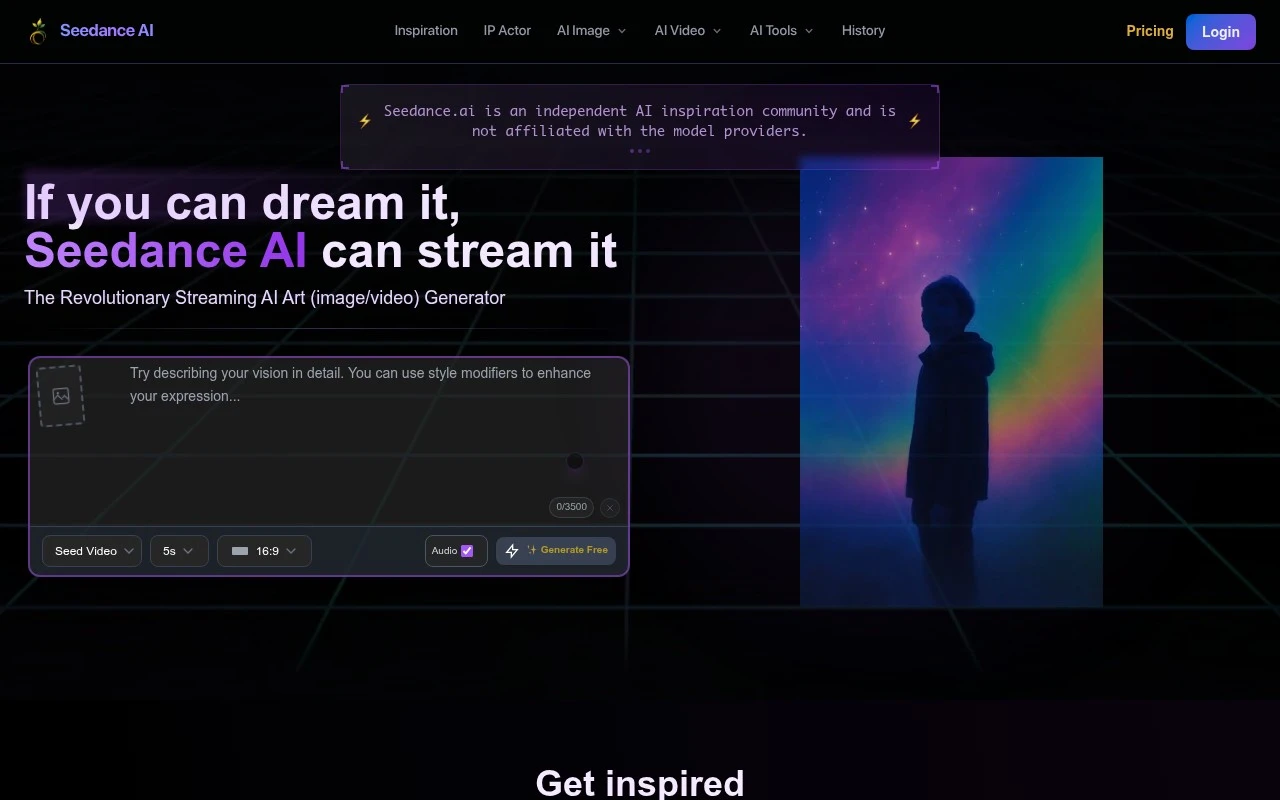
Generates AI images and short videos with creative edits and sharing features.
Short-form VideoVideo Generators

FYAI Score

FYAI rating based on features, pricing and integrations

Pricing:

Paid

Best for:

AI artists and video makers creating shareable clips

Score Breakdown

FYAI rating based on features, pricing and integrations
PRODUCT PREVIEW

What this AI tool does

Seedance

Use cases

Best for

ANALYSIS

Strengths & limitations

Strengths
  • Best suited to experimental creators because it brings image generation, video generation, effects, editing, and some audio-oriented tools into one creative workspace.
  • Useful for prompt inspiration because the product is built around a community where users can browse, publish, like, comment on, and join creative challenges.
  • Accessible for casual use because basic AI image and short video creation is presented as free to start, with credits used for more demanding outputs.
Limitations
  • Less suitable for teams that need a single-purpose professional video pipeline because Seedance is a broad creative community with many generation tools rather than a focused production suite.
  • Less suitable for high-volume or premium output needs on a zero-budget workflow because higher resolutions, longer durations, and professional outputs require credits.
  • Less suitable for users who want only a private creation tool because much of the experience is organized around community discovery, sharing, chat rooms, and challenges.

Evaluation

FYAI score breakdown

Our structured evaluation across five key criteria

FYAI rating based on features, pricing and integrations

PRODUCT PREVIEW

Feature highlights

Generate Images

Create AI art from prompts with selectable styles and models.

Generate Video

Turn ideas into short AI videos for social posts and experiments.

Video Style Transfer

Apply creative effects and styles to reshape your clips.

COMPARE

Discover curated alternatives worth comparing

Compare similar AI tools based on features, pricing and use cases

8.5/ 10Based on 16 reviews

Wondercraft

Short-form VideoVideo Editing
Creates editable videos and audio from text, prompts, media
Best for:
Video creators
Pricing
Freemium

8.5/ 10Based on 65 reviews

Wisecut

Short-form VideoVideo Editing
Finds highlights, removes pauses, captions and reframes clips
Best for:
Video creators
Pricing
Freemium

8.6/ 10Based on 2,521 reviews

Vizard.ai

Short-form VideoVideo Editing
Extracts short clips, adds captions, and resizes videos
Best for:
Social media managers
Pricing
Freemium

Seedance

Start turning rough ideas into polished visual stories with Seedance today. See what your next scroll-stopping image or clip could become.

FAQ

Frequently asked
questions

Everything you need to know about this AI tool,
its features, pricing, use cases, and limitations.

Who is Seedance best for?
Seedance is best for AI art enthusiasts, prompt creators, social content makers, designers, and casual creators who want to generate images and short videos in a browser-based creative community. It fits users who value experimentation, prompt inspiration, effects, editing options, and sharing work with others.
How much does Seedance cost, and what are the paid limits?
Seedance should be treated as a paid, credit-based AI creation platform for higher-demand image and video outputs. Basic creation may be accessible to start, but higher resolutions, longer video durations, and more professional outputs are the areas where users should expect credits or paid usage to matter.
How does Seedance compare with other AI image and video tools?
Seedance stands out by combining image generation, short video generation, effects, edits, and community discovery in one workspace. Compared with more focused tools, it is better for exploration and sharing, while dedicated production platforms may be stronger for teams needing structured workflows, review processes, or specialized video pipelines.
How quickly can I start creating with Seedance?
Seedance is less ideal for users who need a private, single-purpose, professional video production suite. Its strengths are breadth and community interaction, which can be a trade-off for teams that want controlled workflows, high-volume output on a low budget, or a tool focused only on production-ready video creation.
What should teams check about Seedance privacy and data handling?
Teams should review Seedance.ai’s current privacy terms, content ownership rules, sharing defaults, and data handling practices before using it for client or confidential work. Because the platform includes community browsing, publishing, comments, chats, and challenges, users should be clear about what content may become public or discoverable.