Curated ToolThis tool is part of our curated AI directory. We only include tools that meet our standards for relevance, usability and real-world value.

ImagineArt

Generates and edits images and videos from prompts and media inputs

Short-form VideoAnimation
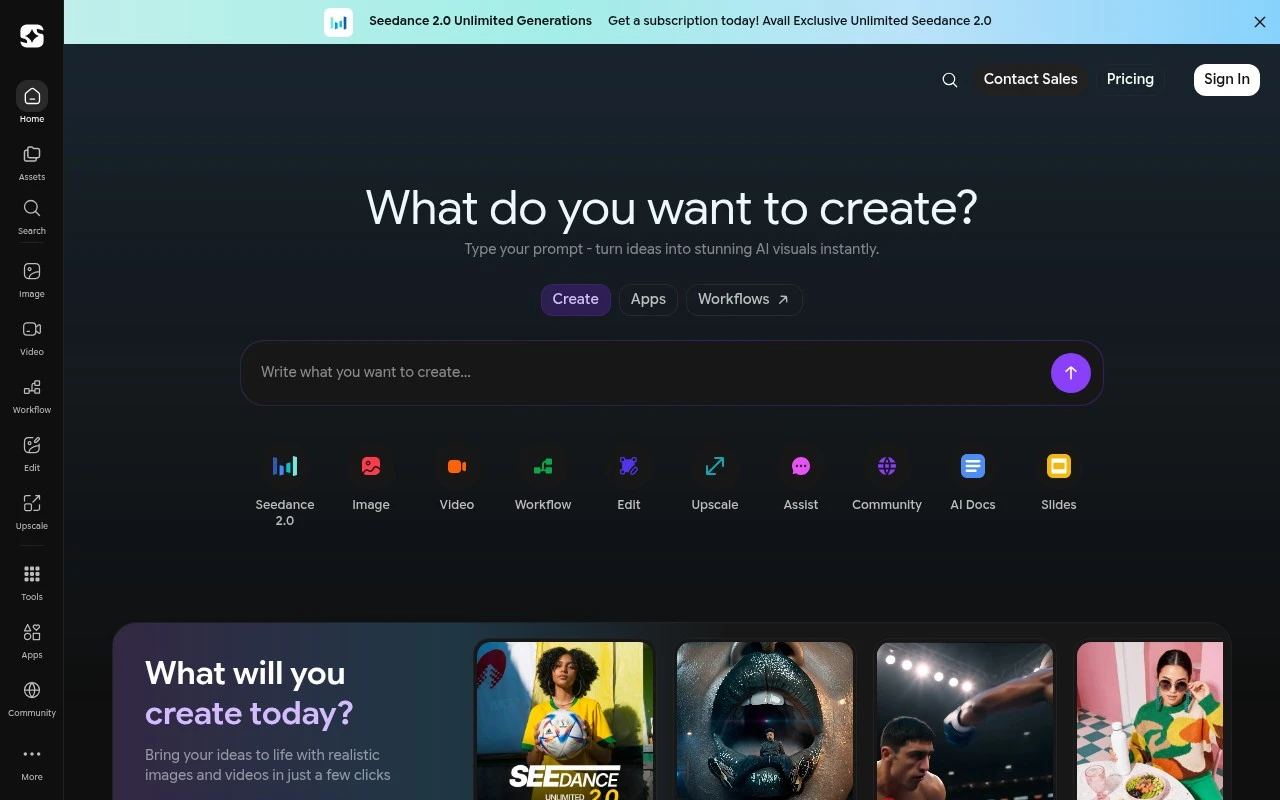
ImagineArt is an AI creative suite for generating and editing images, videos, shorts, and voice/audio. Its official site positions it as a web and mobile platform with tools for text-to-image, text-to-video, image-to-video, inpainting, upscaling, background removal, cinematic workflows, ad creation, fashion shoots, lipsync, and collaborative asset creation.

FYAI Score

8.1 / 10

Based on 1.176 reviews

Pricing:

Freemium

Best for:

Creators and marketers producing AI visuals and short-form video

Score Breakdown

  • Ease of use8.0 / 10
  • Features8.3 / 10
  • Pricing7.3 / 10
  • Integrations8.3 / 10
  • Support8.5 / 10

PRODUCT PREVIEW

What this AI tool does

ImagineArt is an AI tool designed to help users create visual content from text prompts. It’s typically used when you want to explore ideas quickly, generate concept images, or produce artwork variations without starting from a blank canvas. In practice, you describe what you want to see—such as a scene, character, style, or mood—and the system generates images based on that description. This can be useful for early-stage brainstorming, creative experimentation, and producing reference visuals for design or storytelling. As with most generative image tools, results depend on how specific your prompt is and may require a few iterations to match your intent. It’s a good fit for informational exploration of AI image generation workflows, especially for users comparing tools or learning how prompt-based creation works.

Use cases

Best for

Generate Images

ImagineArt generates images from text prompts and lets you refine results with inpainting and upscaling.

Remove Background

Use ImagineArt background removal to cut out a subject from an image and export it with a transparent background.

Text to Speech

ImagineArt converts written scripts into spoken audio using its text to speech voice generation tool.

ANALYSIS

Strengths & limitations

Strengths
  • Covers multiple creative formats in one platform, including images, videos, shorts, and audio or voice.
  • Includes both generation and post-production tools such as inpaint, upscale, background remover, edit image, extend video, lipsync, and motion controls.
  • Offers specialized studios and workflows for ads, film-style content, fashion shoots, brand assets, and team collaboration.
Limitations
  • The homepage lists many models and studio features, but does not clearly explain the exact limits, pricing, or availability of each capability.
  • Because it bundles many creative tools, users may need time to understand which model or workflow fits a specific task.
  • The official page emphasizes generation and editing breadth more than professional production controls, licensing details, or enterprise governance information.

Evaluation

FYAI score breakdown

Our structured evaluation across five key criteria

8.1 / 10

Overall score

Based on 1.176 reviews

  • Ease of use8.0 / 10
  • Features8.3 / 10
  • Pricing7.3 / 10
  • Integrations8.3 / 10
  • Support8.5 / 10

What users say

Findings from public reviews, documentation and community sources.

  • Ease of use

    G2 review evidence describes ImagineArt onboarding as smooth, with “helpful tutorials and an easy setup experience.” ImagineArt’s homepage says creation is possible with “no experience needed” and “in just a few clicks,” while Reddit feedback includes some negative user experiences.

  • Features

    ImagineArt’s own page describes a broad AI creative suite covering images, videos, shorts, and voice. ImagineArt’s own page lists text-to-video, image-to-video, lip-sync, and multiple model options like Kling, Runway, and Veo.

  • Pricing

    ImagineArt’s pricing page presents subscription and credit-based purchasing with Creator and Ultimate plans. ImagineArt’s pricing page includes FAQs for credits, rollover, refunds, downgrades, and failed generations.

  • Integrations

    Capterra lists an API for ImagineArt. ImagineArt references plugins/MCP/workflows, and a third-party MCP listing says ImagineArt connects with Cursor, OpenAI, and custom-built clients.

  • Support

    G2 review evidence says ImagineArt “customer support and onboarding are smooth,” with “helpful tutorials.” ImagineArt’s pricing/features pages surface FAQs around refunds, downgrades, failed generations, and plan changes, while Reddit contains some refund/scam complaints.

Who is this for?

Best for creators who need one tool for AI video-animation plus adjacent assets, ImagineArt’s page covers images, videos, shorts, and voice and lists text-to-video, image-to-video, and lip-sync. Less suited to users who want simple non-credit purchasing, ImagineArt’s pricing page presents subscription and credit-based purchasing, so usage planning involves credits and related policies.

PRODUCT PREVIEW

Feature highlights

Text-to-Image Studio

Generate on-brand images from prompts for ads, posts, and concepts.

Text-to-Video

Turn scripts into cinematic clips and shorts with AI video generation.

Edit & Enhance

Inpaint, upscale, remove backgrounds, and refine assets in one place.

COMPARE

Discover curated alternatives worth comparing

Compare similar AI tools based on features, pricing and use cases

8.5/ 10Based on 16 reviews

Wondercraft

Short-form VideoVideo Editing
Turns text or audio into editable AI-generated videos and audio
Best for:
Video creators
Pricing
Freemium

8.5/ 10Based on 65 reviews

Wisecut

Short-form VideoVideo Editing
Edits long videos by removing pauses and adding captions
Best for:
Video creators
Pricing
Freemium

8.6/ 10Based on 2.521 reviews

Vizard.ai

Short-form VideoVideo Editing
Extracts short clips from long videos and adds captions for social.
Best for:
Social media managers
Pricing
Freemium

Bring your brand stories to life with imagineart. Create scroll-stopping animated videos faster and launch campaigns with confidence.

FAQ

Frequently asked
questions

Everything you need to know about this AI tool,
its features, pricing, use cases, and limitations.

Is imagineart a good fit for marketing and branding videos, or more for cinematic/long-form animation?
imagineart is typically a better match for short marketing assets like promo clips, product explainers, and social ads where speed and templates matter. If you need highly bespoke motion design, character animation, or long-form storytelling with frame-level control, you may find it limiting compared with pro animation suites. It’s most practical when you want consistent brand visuals without a heavy production workflow.
Does imagineart have a free plan, and what are the main limitations compared to paid tiers?
imagineart commonly gates higher output quality, export options, and usage volume behind paid plans, with free access (if available) mainly suited for testing. Expect limits around watermarks, resolution, render priority, or monthly credits on lower tiers. If you’re producing client work, check whether the plan includes commercial usage rights and sufficient exports per month.
How does imagineart compare with other template-based video makers and AI animation tools?
Compared with template-first video makers, imagineart tends to be strongest when you want quick animated branding pieces without building everything from scratch. Against more advanced motion/3D tools, it usually trades deep customization for faster assembly and a simpler UI. When comparing, focus on template variety, brand kit controls, export formats, and how much manual timeline editing you actually need.
How quickly can a team get started with imagineart, and what onboarding effort should I expect?
The common trade-offs are limited fine-grained customization for advanced users and longer rendering times on complex projects. Subscription pricing can also be hard to justify for very small teams if usage is sporadic. If you frequently need unique animation styles or tight iteration cycles, test a real project end-to-end before committing.
What should I check about data privacy, ownership, and compliance when using imagineart?
Review imagineart’s terms for how uploaded assets and generated videos are stored, whether they’re used to improve models, and how long data is retained. Confirm who owns the outputs and whether commercial use is explicitly permitted on your plan. If you handle sensitive client data, look for controls like account-level access management, deletion requests, and any stated compliance posture (e.g., GDPR support).