Curated ToolThis tool is part of our curated AI directory. We only include tools that meet our standards for relevance, usability and real-world value.

Hailuo AI

Generates videos and images from prompts, photos, or frames

Short-form VideoVideo Generators
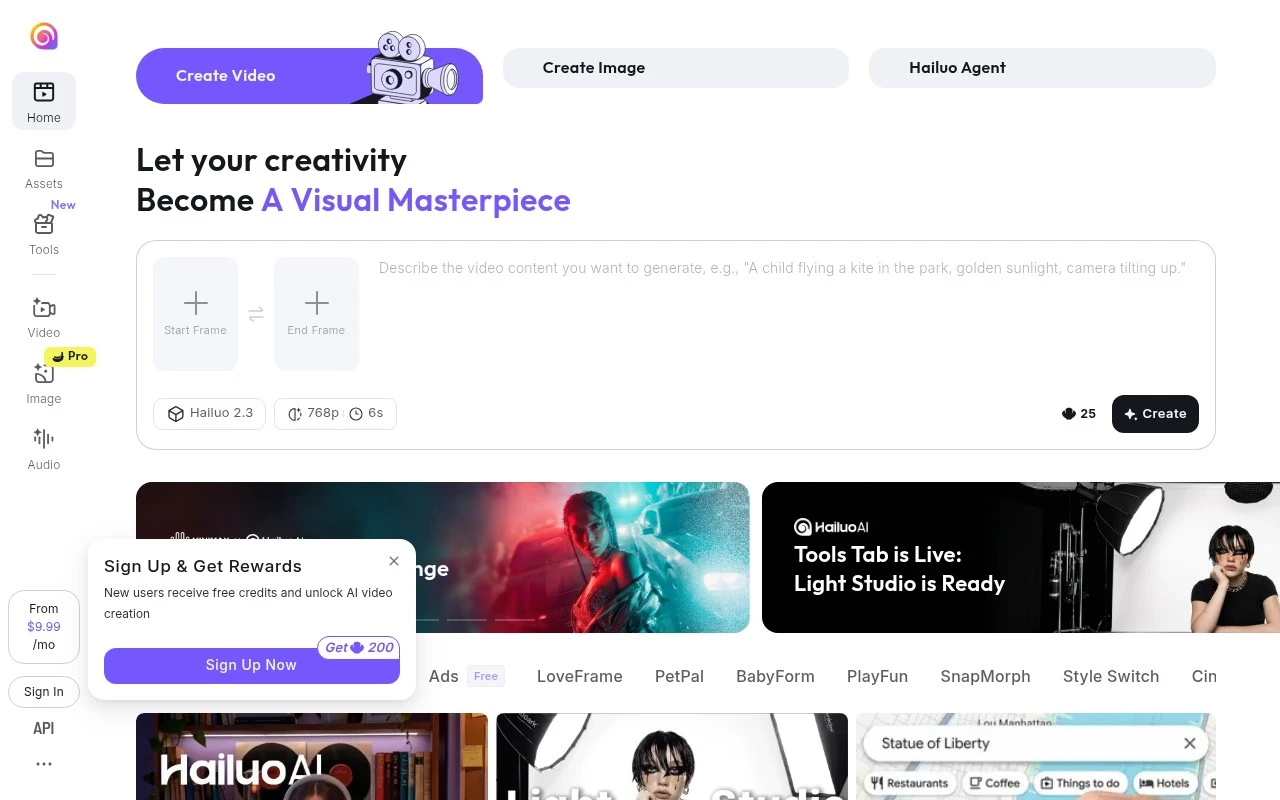
Hailuo AI is an online AI video and image generator for creators. The official site positions it as a place to create videos and images from text or photos, with additional tools for memes, social content, start/end frame generation, relighting, style switching, and other visual effects. It appears focused on fast creative asset generation rather than professional editing, production management, or enterprise media workflows.

FYAI Score

7.2 / 10

Based on 93 reviews

Pricing:

Freemium

Best for:

Creators making fast social videos, memes, and visual assets

Score Breakdown

  • Ease of use7.4 / 10
  • Features7.1 / 10
  • Pricing7.3 / 10
  • Integrations7.2 / 10
  • Support7.1 / 10

PRODUCT PREVIEW

What this AI tool does

Hailuo AI is an AI tool page intended to help readers understand what the product is and how it might fit into their workflow. Since the available details about its purpose and core capabilities are not defined, this description focuses on setting expectations and explaining how to evaluate the tool based on your needs. When reviewing hailuoai, look for clear information about what inputs it accepts, what outputs it produces, and what kinds of tasks it is designed to support. It can also be helpful to check whether it offers documentation, examples, and guidance on responsible use, especially if you plan to use it with sensitive data or in a professional setting.

Use cases

Best for

Generate Video

Generate videos from a text prompt or an uploaded photo using Hailuo AI’s online video generator and visual effects.

Generate Images

Generate images from text prompts or source photos, then apply style switching, relighting, and meme templates.

Short Form Video Creation

Create short social clips by generating quick scenes from text, adding meme style visuals, and exporting for posting.

ANALYSIS

Strengths & limitations

Strengths
  • Supports both video and image creation from text or photos.
  • Includes creator-focused tools and themed effects for social content and memes.
  • Offers frame-based creation options such as start frame and end frame inputs.
Limitations
  • The official page provides limited detail about output length, resolution, editing controls, or export options.
  • Pricing, usage limits, and commercial rights are not clearly described in the provided site text.
  • Its positioning is broad, so users may need to test it to understand how much control it offers compared with dedicated video editors.

Evaluation

FYAI score breakdown

Our structured evaluation across five key criteria

7.2 / 10

Overall score

Based on 93 reviews

  • Ease of use7.4 / 10
  • Features7.1 / 10
  • Pricing7.3 / 10
  • Integrations7.2 / 10
  • Support7.1 / 10

What users say

Findings from public reviews, documentation and community sources.

  • Ease of use

    A Reddit user describes Hailuo as “so easy to use.” The same Reddit post says Hailuo is “not... the best choice for realistic human animation/motion.”

  • Features

    The Hailuo homepage says users can “Create AI videos and images from text or photos” and presents creator tools across “Video Image Audio,” including start/end frame controls, Hailuo Agent, and Light Studio.

  • Pricing

    A Reddit user says “these AI animation services are overpriced” and says failed prompts mean “credits you waste.”

  • Integrations

    A third-party integration listing states Hailuo is available via “web and mobile apps” and offers “API access.”

  • Support

    A Reddit user says Hailuo was “not even replying to emails” and describes “no support” and difficulty finding a customer service number.

Who is this for?

Best for creators who want quick text/photo-to-video experiments, the Hailuo homepage says users can “Create AI videos and images from text or photos,” and a Reddit user describes Hailuo as “so easy to use.” Less suited to users who need realistic human animation or responsive support, a Reddit user says Hailuo is “not... the best choice for realistic human animation/motion,” and another Reddit user says Hailuo was “not even replying to emails.”

PRODUCT PREVIEW

Feature highlights

Text-to-video

Generate short videos from prompts for quick content experiments.

Image-to-video

Animate photos into clips with start/end frames and effects.

Relight & restyle

Switch styles and lighting to remix visuals for new looks fast.

COMPARE

Discover curated alternatives worth comparing

Compare similar AI tools based on features, pricing and use cases

8.5/ 10Based on 16 reviews

Wondercraft

Short-form VideoVideo Editing
Turns text or audio into editable AI-generated videos and audio
Best for:
Video creators
Pricing
Freemium

8.5/ 10Based on 65 reviews

Wisecut

Short-form VideoVideo Editing
Edits long videos by removing pauses and adding captions
Best for:
Video creators
Pricing
Freemium

8.6/ 10Based on 2.521 reviews

Vizard.ai

Short-form VideoVideo Editing
Extracts short clips from long videos and adds captions for social.
Best for:
Social media managers
Pricing
Freemium

Turn ideas into scroll-stopping promo videos in minutes. Start creating campaigns that capture attention and drive more conversions with Hailuo AI.

FAQ

Frequently asked
questions

Everything you need to know about this AI tool,
its features, pricing, use cases, and limitations.

Is Hailuo AI a good fit for marketing promos, product launches, and social ads?
Hailuo AI is best suited for teams producing short promotional videos like product highlights, campaign creatives, and social media ads using templates and prebuilt assets. It’s a practical choice when speed and consistency matter more than frame-level control. If your workflow depends on complex motion graphics or heavy compositing, you may find it limiting compared with pro editors.
Does Hailuo AI have a free plan, and what are the typical limitations of paid tiers?
Hailuo AI is primarily positioned as a subscription product, and any free access (if offered) is usually limited by exports, watermarking, or restricted templates/assets. Paid plans typically unlock higher export limits and broader template libraries, which matters for teams producing content weekly. Before committing, check whether the plan includes the output resolution and commercial usage rights you need.
How does Hailuo AI compare with tools like Canva, CapCut, or Adobe Express for marketing video creation?
Compared with Canva or Adobe Express, Hailuo AI tends to be more focused on quickly assembling promo-style videos from templates rather than broad design suites. Versus CapCut, it generally trades advanced timeline editing and effects for a simpler, guided production flow. If you need detailed edits (keyframes, multi-track audio, fine transitions), a timeline-first editor may be a better fit.
How fast can a team get started with Hailuo AI, and what onboarding effort should you expect?
Hailuo AI can feel restrictive if you need granular control over timing, layered effects, or custom animations beyond what templates allow. Output quality may vary with more complex projects, especially when you push beyond the intended template structure. It’s often a better fit for repeatable marketing formats than for highly bespoke video work.
What should I check about data privacy, content ownership, and compliance when using Hailuo AI?
Review Hailuo AI’s terms for how uploaded media and generated videos are stored, retained, and whether they’re used to improve models or services. Confirm who owns the final outputs and whether commercial use is explicitly permitted under your plan. If you handle regulated or sensitive data, look for controls like account-level access management, deletion requests, and any available compliance statements (e.g., GDPR support).