Curated ToolThis tool is part of our curated AI directory. We only include tools that meet our standards for relevance, usability and real-world value.

Content Harmony

Grades content for topical coverage and builds SEO research briefs

Content & On-pageSEO Monitoring
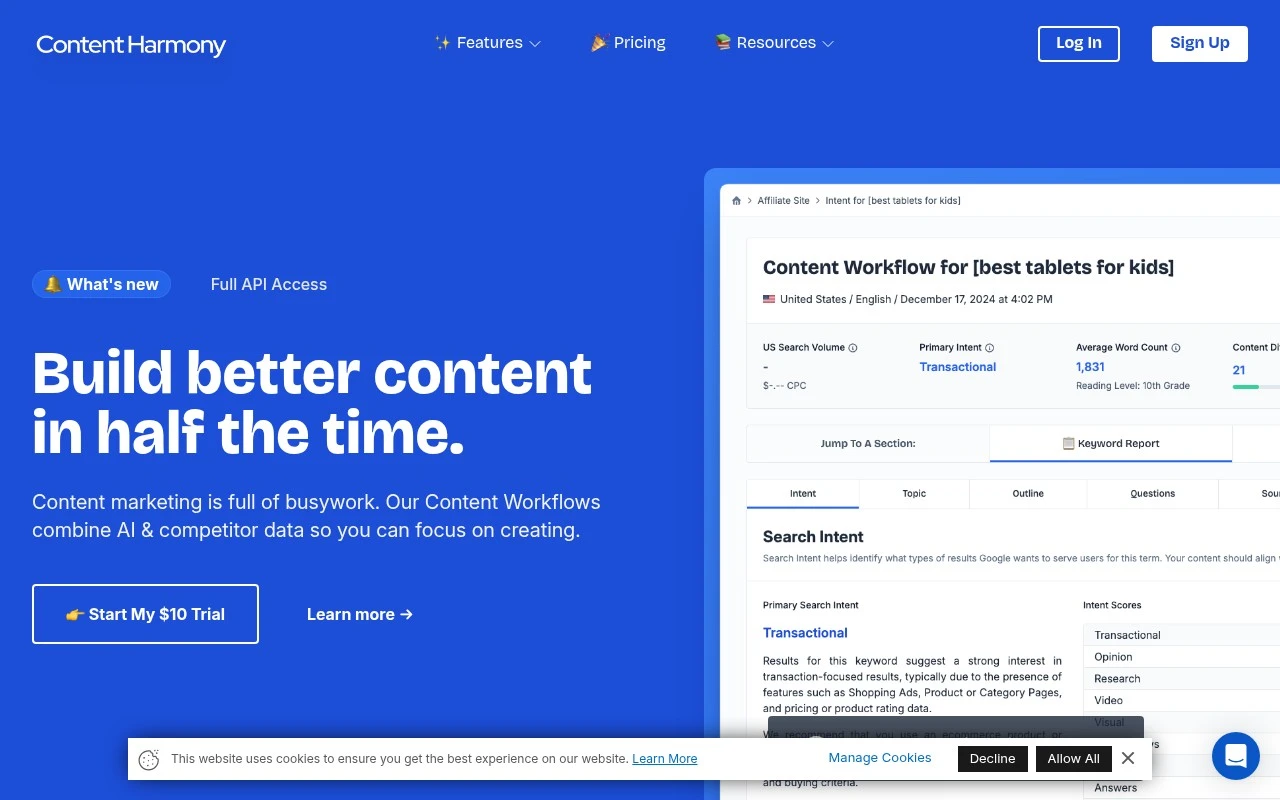
Content Harmony helps content and SEO teams turn topic research into structured content briefs and then evaluate drafts against topic coverage expectations. Its workflow focuses on the manual steps teams often perform before writing: analyzing search intent, reviewing related keywords and entities, studying competitor structure, outlining key questions, citing authoritative sources, identifying visual requirements, sharing briefs, and grading content.

FYAI Score

8.7 / 10

Based on 22 reviews

Pricing:

Paid

Best for:

SEO and content teams creating consistent briefs and on-topic drafts

Score Breakdown

  • Ease of use9.3 / 10
  • Features7.8 / 10
  • Pricing9.0 / 10
  • Integrations8.3 / 10
  • Support9.1 / 10

PRODUCT PREVIEW

What this AI tool does

Content Harmony is an AI tool designed to help people plan, draft, and refine written content with more consistency. It can be useful when you need to turn rough notes into a readable structure, align wording with a specific audience, or keep tone and terminology steady across multiple pages. In practice, it supports common writing workflows such as outlining, rewriting for clarity, and improving coherence between sections. It can also help reduce time spent on repetitive edits by suggesting alternative phrasing and highlighting areas that may need more context. This tool is typically used by teams and individuals who produce informational content and want a more streamlined way to move from idea to publishable text. As with any AI-assisted writing, the best results come from providing clear inputs and reviewing the output for accuracy and fit.

Use cases

Best for

SEO Content Optimization

Grade drafts against a topic brief to flag missing keywords, entities, questions, sources, and required visuals.

Keyword Research

Use Content Harmony to compile related keywords, entities, and questions from topic research into a structured content brief.

Serp Analysis

Analyze top SERP competitors to extract search intent, page structure patterns, and authoritative sources for your outline.

ANALYSIS

Strengths & limitations

Strengths
  • Combines keyword research, brief creation, sharing, and content grading into a single SEO content workflow.
  • Standardized brief formats can help agencies and internal teams create more consistent instructions for writers.
  • Built around practical content marketing and SEO processes, with emphasis on speed and repeatability.
Limitations
  • The provided site content positions it mainly around SEO content briefs and grading, so it may not replace broader content planning, CMS, or publishing tools.
  • The page does not provide enough detail to confirm specific integrations, collaboration controls, or reporting depth.
  • Access appears to be based on content workflow credits, which may require teams to evaluate fit against their expected brief volume.

Evaluation

FYAI score breakdown

Our structured evaluation across five key criteria

8.7 / 10

Overall score

Based on 22 reviews

  • Ease of use9.3 / 10
  • Features7.8 / 10
  • Pricing9.0 / 10
  • Integrations8.3 / 10
  • Support9.1 / 10

What users say

Findings from public reviews, documentation and community sources.

  • Ease of use

    G2 reports a 4.8/5 rating from 22 reviews and says users “consistently praise the ease of use and time-saving capabilities.” Capterra snippets mention “The UX is wonderful” and “Easy to use / time saver.”

  • Features

    Content Harmony's website lists SEO content workflow features including keyword reports, content briefs, a content grader, and search intent analysis. Content Harmony's website also references overlapping keywords/entities, competitor document structure, key questions, authoritative sources, and visual content requirements.

  • Pricing

    Content Harmony's pricing page lists usage-based plans from $50/month for 5 content workflows up to $799/month for 150, plus enterprise from $1,000/month. Content Harmony's pricing page says all plans include unlimited users, unlimited projects, rollover credits, and a $10 trial with “no trial limits or auto renewals.”

  • Integrations

    Content Harmony's integrations page lists Google Docs, Microsoft Word, Notion, Moz, DataForSEO, EditorNinja, outgoing webhooks, and API access. Content Harmony's integrations page also lists shareable links and copy-to-clipboard workflows.

  • Support

    Content Harmony's docs include getting-started guides, a quick-start video, workflow articles, Google Docs add-on guidance, and feature-specific help pages. Content Harmony's docs say support is available via live chat or email, and Content Harmony's pricing page says plans include free team training.

Who is this for?

Best for content teams and agencies that need repeatable SEO content workflows, Content Harmony's pricing page lists usage-based plans from $50/month for 5 content workflows and includes unlimited users and unlimited projects on all plans. Best for teams that create briefs in collaborative editors because Content Harmony's integrations page lists Google Docs, Microsoft Word, and Notion. It is less suited to teams looking for a broad SEO suite or large app marketplace because the cited features center on content briefs, keyword reports, content grading, and search intent analysis, while the integrations page lists a defined set of connectors rather than an extensive marketplace ecosystem.

PRODUCT PREVIEW

Feature highlights

Intent Research

Map search intent, questions, and entities to guide what to cover.

Content Brief Builder

Create structured outlines, sources, and visuals requirements in one brief.

Draft Coverage Grader

Evaluate drafts against topic coverage expectations before publishing.

COMPARE

Discover curated alternatives worth comparing

Compare similar AI tools based on features, pricing and use cases

8.8/ 10Based on 846 reviews

Yoast SEO

Content & On-pageTechnical & Audit
Generates and optimizes SEO titles, descriptions, and content
Best for:
SEO teams
Pricing
Freemium

8.1/ 10Based on 1.124 reviews

Yext

SEO MonitoringAI Search / GEO
Manages verified business data for search and AI discovery.
Best for:
SEO teams
Pricing
Paid

7.7/ 10Based on 5.772 reviews

Writesonic

Copy Optimization
Monitors brand visibility in answer engines and flags citation gaps
Best for:
Marketing teams
Pricing
Freemium

Start publishing content that ranks and reads better. See why SEO teams choose Content Harmony to align writers, editors, and strategy in one workflow.

FAQ

Frequently asked
questions

Everything you need to know about this AI tool,
its features, pricing, use cases, and limitations.

What types of teams and workflows is Content Harmony a good fit for?
Content Harmony fits SEO-led content teams that need repeatable briefs, SERP-driven outlines, and clear on-page recommendations for writers and editors. It’s especially useful for agencies or in-house teams producing content at scale and coordinating across roles. If your priority is brand storytelling or highly creative formats over search performance, it may feel restrictive compared with more open-ended writing tools.
Does Content Harmony offer a free plan, and what are the main limitations compared to paid?
Content Harmony is typically positioned as a paid platform; if a trial is available, it’s usually time- or usage-limited rather than a full free tier. The biggest differences in paid plans tend to be the number of content reports/briefs you can generate, collaboration features, and access to integrations. If you’re comparing costs, map pricing to your monthly content volume and how many stakeholders need access.
How does Content Harmony compare with Surfer SEO, Clearscope, and MarketMuse?
Content Harmony is often chosen for its workflow around content briefs and team collaboration, while Surfer SEO is frequently used for in-editor optimization and scoring. Clearscope is known for straightforward keyword-driven recommendations and a simpler experience, whereas MarketMuse leans more into content strategy and topic modeling at the portfolio level. Your choice usually comes down to whether you need briefing + process (Content Harmony) versus heavier optimization scoring or broader strategy tooling.
How quickly can you get Content Harmony running for a team, and what onboarding is involved?
Content Harmony’s SERP- and SEO-driven recommendations can push content toward what already ranks, which may limit experimentation or unconventional angles. New users may need time to learn how to interpret suggestions without over-optimizing. Budget can also be a factor if you only publish occasionally or don’t need collaboration features.
What should I check regarding data privacy, ownership, and compliance when using Content Harmony?
Review what Content Harmony stores from your inputs (briefs, drafts, keywords) and how long that data is retained, especially if you handle client or regulated content. Confirm whether data is used to improve models or shared with subprocessors, and whether you can request deletion. If you have compliance requirements (e.g., GDPR, SOC 2), verify the vendor’s current documentation and contractual terms before rolling it out broadly.