Curated ToolThis tool is part of our curated AI directory. We only include tools that meet our standards for relevance, usability and real-world value.

Reflect

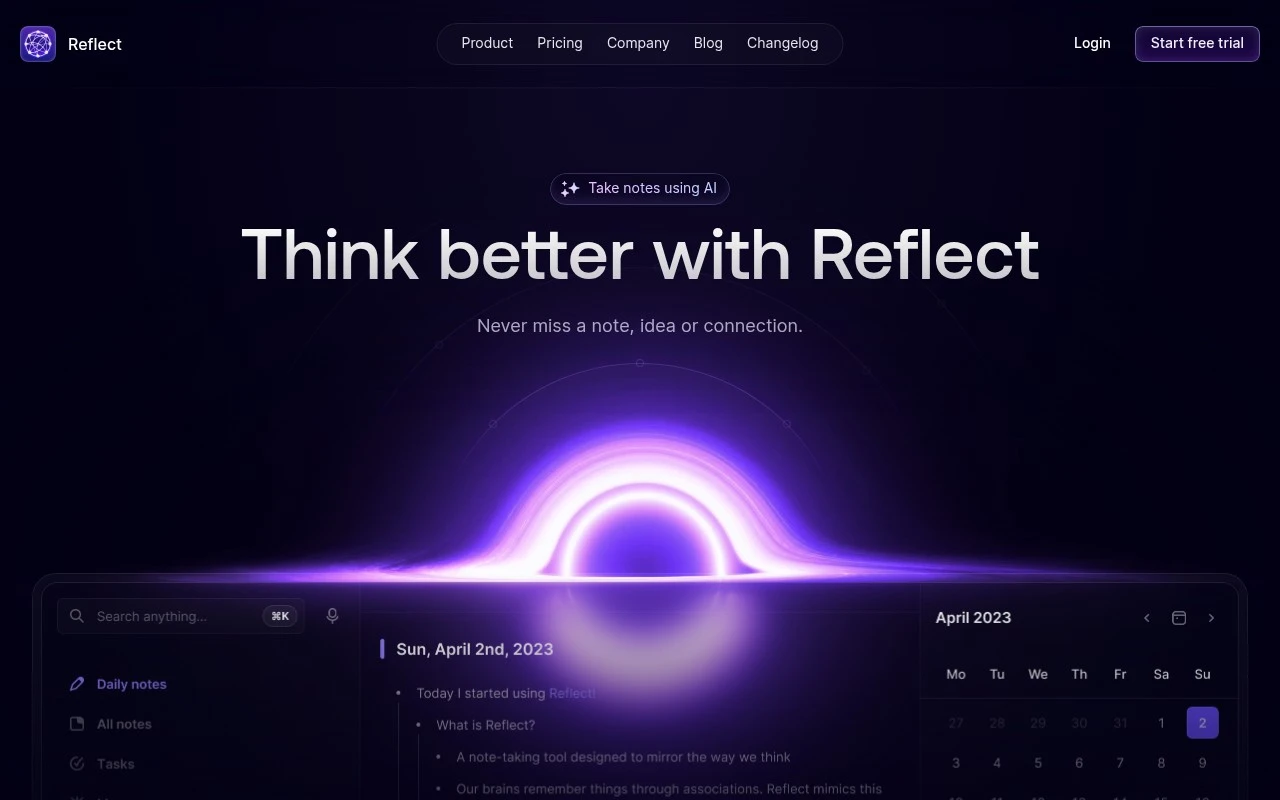
Reflect is an AI note-taking app that helps users capture linked notes, record and transcribe audio, and use an AI assistant to summarize or search their knowledge base.
Meeting NotesKnowledge Search

FYAI Score

7.9 / 10

Based on 45 reviews

Pricing:

Paid

Best for:

Knowledge workers building a personal knowledge base

Score Breakdown

  • Ease of use8.4 / 10
  • Features7.6 / 10
  • Pricing7.6 / 10
  • Integrations8.6 / 10
  • Support7.3 / 10

PRODUCT PREVIEW

What this AI tool does

Reflect is a personal note-taking app for people who want fast capture, connected thinking, and private cross-device notes in one place. It is best suited to professionals, researchers, founders, writers, and lifelong learners who treat notes as a long-term knowledge system rather than a temporary scratchpad. The core idea is simple: capture thoughts quickly, connect them through backlinks, and return to them later through search, structure, and context. For people who think in networks rather than folders, the platform turns everyday notes into a personal knowledge base. Backlinks help ideas reference one another naturally, so a meeting note, book highlight, project idea, or journal entry can become part of a larger map. This makes Reflect useful not only for storing information, but for noticing relationships between information over time. Fast capture is central to the experience. Notes can be created from desktop or mobile, captured offline, clipped from the browser, or added while moving between devices. That matters for users who need a reliable place to put thoughts before they disappear, then organize them later without losing the original context. AI support gives the app a second role as an assistant for shaping raw notes into clearer material. Reflect uses OpenAI models to help rewrite content, summarize long notes, create outlines, improve phrasing, and work with custom prompts. It can also transcribe audio, which makes it useful for turning conversations, voice memos, interviews, and meeting notes into written material that can be searched and connected with the rest of a knowledge base. Reading workflows extend the tool beyond manual note-taking. Kindle and Readwise-related integrations make it easier to bring highlights and reading notes into the same system as daily work notes. For readers who learn through annotation, this helps bridge the gap between passive consumption and active knowledge building. Calendar integrations give Reflect a practical workday rhythm. Connections with Google Calendar and Outlook allow notes to sit closer to meetings and scheduled events, so preparation, agendas, follow-ups, and reflections can live beside the relevant time context. This is especially helpful for people who want better meeting notes without maintaining a separate meeting documentation system. Privacy is a defining part of the product’s positioning. Reflect includes end-to-end encryption and syncs across devices, combining the convenience of cloud access with a stronger privacy model than many conventional note apps. For users putting sensitive thoughts, client notes, research, or work plans into a single system, that balance is a major part of the appeal. Publishing, export, and API access make the notes less locked away. The app can support public sharing or longer-term portability when a user wants to publish selected work, move data elsewhere, or connect notes to other systems. This helps position it as a personal knowledge platform rather than a closed writing surface. A fair Reflect review would describe the tool as polished, opinionated, and focused on individual knowledge work. It is not trying to be a large team wiki or a general project management suite. Its strength is the combination of quick capture, backlink-driven organization, AI-assisted writing, and privacy-conscious syncing. Prospective users comparing Reflect pricing should think less in terms of a simple notes utility and more in terms of whether they want one durable home for ideas, reading, meetings, and AI-enhanced recall. Reflect is best at helping a person build a searchable, connected record of what they think, read, hear, and decide, then use that record as a living knowledge base.

Use cases

Best for

Meeting Notes

Capture meeting notes in Reflect with backlinks, calendar-linked context, and AI prompts to turn notes into summaries and action items.

Transcribe Audio

Transcribe recorded audio into text notes using Reflect AI, then generate summaries or outlines from the transcript with custom prompts.

Knowledge Base Search

Search your encrypted networked notes by keyword and backlinks to quickly retrieve related context across devices.

ANALYSIS

Strengths & limitations

Strengths
  • Best suited to fast personal knowledge capture because it combines quick note entry, backlink-based networked notes, offline capture, and cross-device sync.
  • Strong fit for AI-assisted note workflows because GPT-4 and Whisper support transcription, summarization, outlining, rewriting, and reusable custom prompts inside the note system.
  • Useful for reading- and calendar-driven workflows because it connects notes with browser clipping, Kindle and Readwise workflows, Google Calendar, Outlook, publishing, export, and API access.

Limitations
  • Less suitable for teams that need shared workspaces, admin controls, or collaborative project management because Reflect is primarily designed as a personal note-taking system.
  • Less suitable for users who want a free long-term notes app because Reflect is a paid product.
  • Less suitable for organizations with strict restrictions on third-party AI processing because its AI features rely on OpenAI models for tasks such as transcription, summarization, and rewriting.

Evaluation

FYAI score breakdown

Our structured evaluation across five key criteria

7.9 / 10

Overall score

Based on 45 reviews

  • Ease of use8.4 / 10
  • Features7.6 / 10
  • Pricing7.6 / 10
  • Integrations8.6 / 10
  • Support7.3 / 10

What users say

Findings from public reviews, documentation and community sources.

  • Ease of use

    Reflect's own page describes Reflect as a “beautifully minimalist” app “built for speed,” and lists instant sync, daily capture, search, and offline mobile use. Product Hunt reviewers describe Reflect as “fast” and “simple.”

  • Features

    Reflect's site lists networked/backlinked notes, AI using GPT-4 and Whisper, voice-note transcription, and end-to-end encryption. Reflect's site also references meeting notes, browser and Kindle capture, publishing, offline iOS, search, export, and API access.

  • Pricing

    Reflect's pricing page states “One plan one price” at “$10 /month billed annually” with a 14-day trial. Reflect's pricing page positions the product as a paid plan that includes AI, encryption, sync, web clipping, and Kindle support.

  • Integrations

    Reflect lists native connections including Zapier, Readwise, Google and Outlook, Chrome and Safari, and Kindle sync, plus export and API access. Zapier states Reflect can connect with “9000 other apps.”

  • Support

    Reflect's site surfaces company resources including a blog and changelog. Product Hunt review snippets describe the product experience, including comments that Reflect is “fast” and “simple.”

Who is this for?

Best for people building a personal knowledge-management system, Reflect's site lists networked/backlinked notes, AI using GPT-4 and Whisper, voice-note transcription, and Kindle capture. Less suited to users who need an ongoing free note-taking workspace, Reflect's pricing page states “One plan one price” at “$10 /month billed annually” with a 14-day trial.

PRODUCT PREVIEW

Feature highlights

Backlinked notes

Connect ideas with backlinks to build a living note network.

End-to-end privacy

Keep notes encrypted end-to-end across devices and sync.

AI note assistant

Summarize, outline, transcribe, and improve notes with prompts.

COMPARE

Discover curated alternatives worth comparing

Compare similar AI tools based on features, pricing and use cases

7.8/ 10Based on 31 reviews

Wudpecker

Meeting NotesSummarization
Turns recordings into notes, summaries, action items, and Q&A
Best for:
Knowledge workers
Pricing
Freemium

9.0/ 10Based on 1,589 reviews

Toggl Track

Time & Habit Tracking
Tracks time, automates activity capture, and reports team data
Best for:
Operations teams
Pricing
Freemium

8.5/ 10Based on 2,648 reviews

Todoist

Task & Project Management
Captures tasks, organizes schedules, and clarifies action plans
Best for:
Knowledge workers
Pricing
Freemium

Get your thoughts organized and your goals clear. Start a daily reflection habit with Reflect and make better decisions with less mental clutter.

FAQ

Frequently asked
questions

Everything you need to know about this AI tool,
its features, pricing, use cases, and limitations.

Who is Reflect best suited for?
Reflect is best suited for individuals building a personal knowledge base around notes, ideas, meetings, reading highlights, and tasks. It fits knowledge workers, writers, researchers, founders, and students who want fast capture, backlinks, search, calendar context, and AI help for transcribing voice notes, rewriting content, outlining, and summarizing notes.
Is Reflect free or paid?
Reflect is a paid note-taking product rather than a free note app. Its positioning is closer to a subscription tool for personal knowledge management, with AI-assisted note workflows included in the product experience. Buyers comparing Reflect pricing should check reflect.app for the latest plan details and billing terms.
How does Reflect compare with other note-taking and knowledge base tools?
Reflect is strongest when the priority is a minimalist personal note system with backlinks, search, capture tools, and built-in AI for notes. Compared with broader productivity platforms, it is more focused on individual knowledge work than team project management, complex databases, or company-wide collaboration workflows.
How quickly can I get started with Reflect?
Reflect’s main trade-off is that it is focused on personal note-taking and knowledge work, not broad workflow automation or full project management. It is also a paid product, and its AI features are centered on note workflows such as transcription, writing cleanup, meeting summaries, outlines, and custom prompts.
What should I know about Reflect’s privacy and data handling?
Reflect uses OpenAI technologies, including GPT-4 and Whisper, for AI features such as transcription, summarization, rewriting, and prompt-based assistance. Users handling sensitive meeting notes, research, or personal information should review Reflect’s current privacy, security, and data-processing terms, and confirm whether they meet any internal compliance requirements.