Curated ToolThis tool is part of our curated AI directory. We only include tools that meet our standards for relevance, usability and real-world value.

Veed.io

AI video editor for captions, cleanup, dubbing, and export

Content & SocialAd Creation
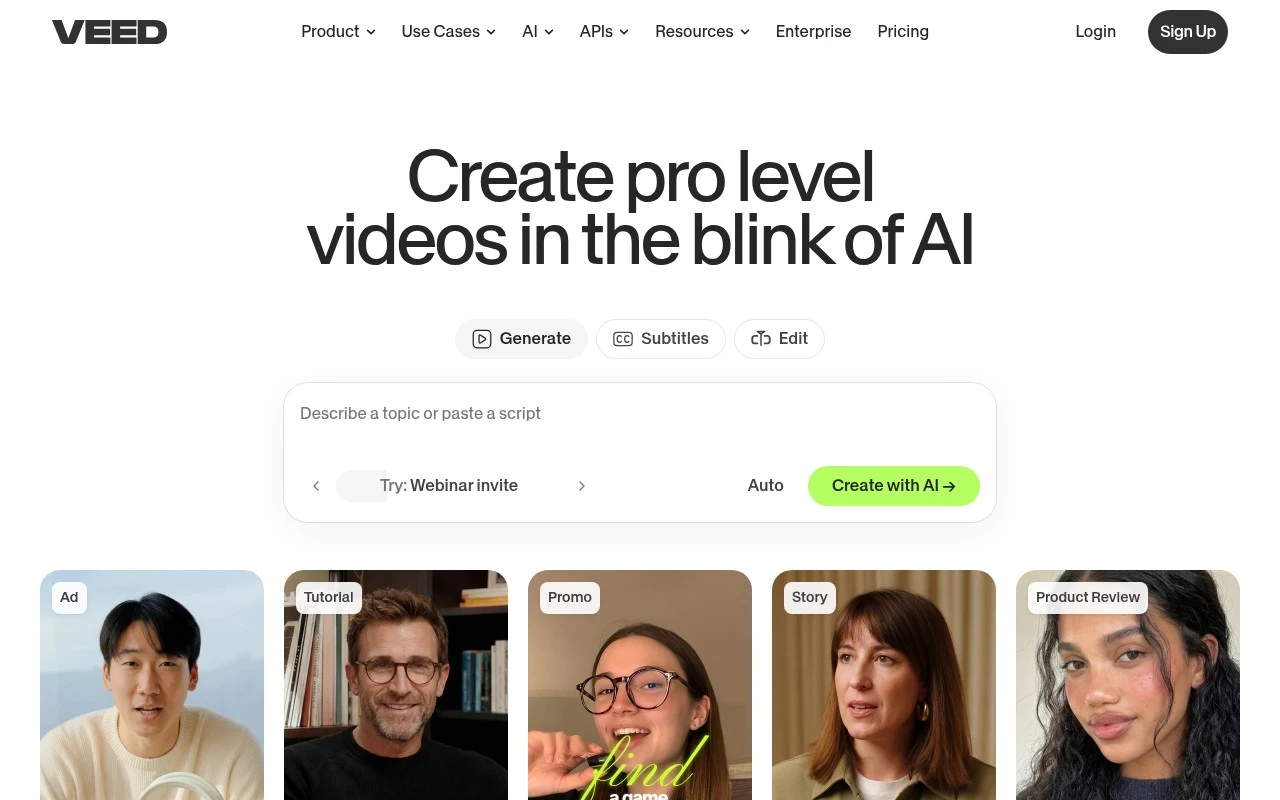
Veed.io.io is a web-based AI video creation platform that combines generation and editing in one workflow. It supports text-to-video, image-to-video, AI avatars, AI voice and text-to-speech, subtitles, dubbing, translation, screen recording, background and noise removal, eye contact correction, and branded video formatting. Its positioning is strongest for social, marketing, UGC-style ads, explainers, product demos, and business content where speed and ease of use matter more than a full professional post-production suite.

FYAI Score

8.2 / 10

Based on 3.725 reviews

Pricing:

Freemium

Best for:

Marketing teams and creators shipping social videos fast

Score Breakdown

  • Ease of use8.8 / 10
  • Features9.0 / 10
  • Pricing7.1 / 10
  • Integrations8.1 / 10
  • Support7.4 / 10

PRODUCT PREVIEW

What this AI tool does

Veed.io is a browser-based video editing tool designed for people who want to create and refine videos without installing desktop software. It focuses on a straightforward workflow, making it suitable for common tasks like trimming clips, adjusting audio, adding text, and preparing videos for sharing online. Because it runs in the cloud, you can typically start a project from different devices and collaborate or review edits more easily than with files stored on a single computer. It’s often used by individuals and small teams who need quick turnarounds for social media, presentations, or internal communications. If you’re comparing online video editors, veed can be a practical option when you value convenience and a simple interface over advanced, specialized editing tools. As with any web-based editor, your experience may depend on your internet connection and the size of the media you’re working with.

Use cases

Best for

Edit Video

Edit video in Veed.io by trimming clips, adding captions, overlays, and branded templates directly in the browser.

Text to Speech

Convert text to speech by generating AI voiceovers from a script and syncing the audio to your video timeline.

Transcribe Audio

Transcribe audio by uploading a file and generating editable subtitles you can export as SRT or burn into video.

ANALYSIS

Strengths & limitations

Strengths
  • Combines AI video generation, editing, subtitles, dubbing, translation, and branding in one workflow.
  • Strong fit for social and marketing videos, including ads, explainers, demos, testimonials, reels, and thought-leadership content.
  • Includes practical cleanup and publishing tools such as automatic captions, noise reduction, eye contact correction, compression, and brand styling.
Limitations
  • The official positioning is centered on social and marketing content, so it may not be the best fit for complex film, broadcast, or advanced post-production workflows.
  • The platform covers many video tasks, which may be more than needed for users looking for a single-purpose subtitle or compression tool.
  • AI-generated video, avatars, dubbing, and voice tools may still require human review for brand accuracy, tone, and final publishing quality.

Evaluation

FYAI score breakdown

Our structured evaluation across five key criteria

8.2 / 10

Overall score

Based on 3.725 reviews

  • Ease of use8.8 / 10
  • Features9.0 / 10
  • Pricing7.1 / 10
  • Integrations8.1 / 10
  • Support7.4 / 10

What users say

Findings from public reviews, documentation and community sources.

  • Ease of use

    G2’s review signal says users “consistently praise VEED for its ease of use” and that VEED’s AI features “simplify video editing and subtitle generation.” VEED’s homepage includes a user quote: “I didn’t need 15 tutorials - I jumped straight in and started editing.”

  • Features

    VEED’s homepage says users can “Create talking heads, edit with AI, dub videos, and add subtitles.” VEED’s homepage lists tools including AI Video Generator, AI Avatar, Dubbing AI, and Automatic Subtitle Generator.

  • Pricing

    VEED’s pricing page says “Start for free, upgrade to get powerful features” and references AI credits, subtitle/translation limits, multi-user charging, and refunds in its FAQ. Capterra lists 3.2/5 and includes the billing criticism that “the billing model relies on customers forgetting annual” subscriptions.

  • Integrations

    VEED’s API page snippet says “Integrate VEED’s AI video APIs” for “Fabric 1.0 & Lip Sync.” n8n lists VEED AI Video API automations with “hundreds of other apps.”

  • Support

    VEED’s pricing page FAQ includes “Do you offer a trial,” “Can I really cancel anytime,” “How do AI credits work,” “What is your refund policy,” and education plans. G2’s review signal says users “consistently praise VEED for its ease of use,” while Capterra lists 3.2/5.

Who is this for?

Best for creators and teams that want AI-assisted video creation in one workflow, VEED’s homepage says users can “Create talking heads, edit with AI, dub videos, and add subtitles.” Less suited to buyers who need pricing clarity before committing, VEED’s pricing page references AI credits, subtitle/translation limits, multi-user charging, and refunds, and Capterra includes the billing criticism that “the billing model relies on customers forgetting annual” subscriptions.

PRODUCT PREVIEW

Feature highlights

Text-to-video

Generate videos from prompts, then refine with an easy editor.

Subtitles & dubbing

Auto-captions, translate, and dub to reach global audiences.

Clean audio fast

Remove noise and enhance voice for clearer, pro-sounding videos.

COMPARE

Discover curated alternatives worth comparing

Compare similar AI tools based on features, pricing and use cases

8.5/ 10Based on 16 reviews

Wondercraft

Short-form VideoVideo Editing
Turns text or audio into editable AI-generated videos and audio
Best for:
Video creators
Pricing
Freemium

8.5/ 10Based on 65 reviews

Wisecut

Short-form VideoVideo Editing
Edits long videos by removing pauses and adding captions
Best for:
Video creators
Pricing
Freemium

8.6/ 10Based on 2.521 reviews

Vizard.ai

Short-form VideoVideo Editing
Extracts short clips from long videos and adds captions for social.
Best for:
Social media managers
Pricing
Freemium

Create scroll-stopping videos in minutes, not days. Join teams using Veed.io to publish faster and keep every clip on-brand.

FAQ

Frequently asked
questions

Everything you need to know about this AI tool,
its features, pricing, use cases, and limitations.

Is Veed.io a good fit for marketing teams producing social ads and promo videos?
Veed.io fits teams that need quick, repeatable edits for short-form marketing content like social ads, product teasers, and announcement videos. It’s especially useful when subtitles, captions, and simple brand styling are part of the workflow. If your projects require complex motion graphics, multi-cam timelines, or heavy color work, you may outgrow it.
What are the practical differences between Veed.io’s free plan and paid plans?
The free plan is best for testing the editor and basic exports, but it typically comes with restrictions like watermarks, export limits, and fewer premium assets. Paid plans generally unlock higher export quality, more templates/stock assets, and expanded subtitle/caption features. If you need team collaboration or consistent brand output, you’ll likely need a paid tier.
How does Veed.io compare with Canva, CapCut, and Adobe Express for marketing video work?
Compared with Canva and Adobe Express, Veed.io is usually more video-first, with a smoother workflow for captions and timeline edits. CapCut can offer more advanced effects for creators, but Veed.io tends to be simpler for brand-oriented marketing teams and browser-based collaboration. If your priority is design-heavy layouts across many asset types, Canva may be the better hub.
How fast can a team get started with Veed.io, and what onboarding is required?
Veed.io is optimized for speed and simplicity, so it may feel limiting for advanced compositing, detailed audio mixing, or highly customized animations. Template-driven workflows can constrain teams that need unique visual systems on every project. Costs can also rise if you need multiple seats or higher-tier features across a team.
What should I consider about data privacy, security, and compliance when using Veed.io?
Before adopting Veed.io, review its current terms for where content is stored, how long files are retained, and whether it supports your required controls (e.g., SSO, audit logs, or enterprise admin features). If you handle sensitive customer data or regulated content, confirm whether the plan you’re considering offers appropriate contractual options (like a DPA) and meets your region’s requirements. Also check how uploaded media may be used for product improvement and whether you can opt out.