Curated ToolThis tool is part of our curated AI directory. We only include tools that meet our standards for relevance, usability and real-world value.

Devin AI

Autonomous coding agent for refactors, migrations, PRs, and QA

Code Generation & CompletionDebugging
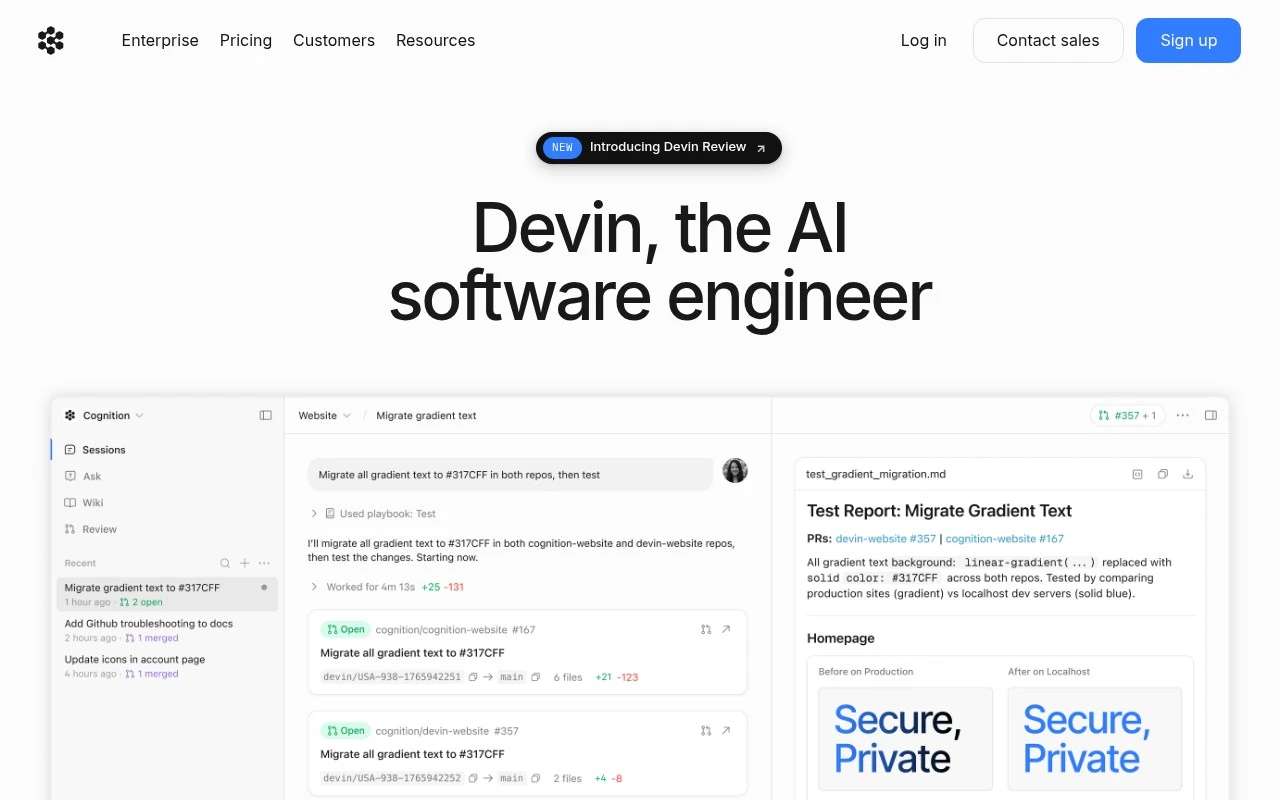
Devin AI AI, from devin.ai, is an AI software engineering agent for teams that want to delegate real coding work rather than only receive code suggestions. The official site describes Devin as a cloud-based AI coding agent that can work on engineering tasks such as migrations, refactors, PR review, visual QA, and incident resolution, with developers staying in the loop to review and merge its output.

FYAI Score

8.0 / 10

Based on 1 reviews

Pricing:

Paid

Best for:

Engineering teams delegating real coding work with review control

Score Breakdown

  • Ease of use7.4 / 10
  • Features8.2 / 10
  • Pricing7.9 / 10
  • Integrations8.3 / 10
  • Support8.5 / 10

PRODUCT PREVIEW

What this AI tool does

Devin AI is an AI tool designed to help with software development work by assisting across common coding tasks. It can be used as a companion during the development process, supporting activities like drafting code, reasoning through implementation details, and iterating on changes based on feedback. In practice, it’s most useful when you want to move from an idea or requirement to working code more efficiently, while still keeping a developer in control of decisions and review. It can also help with understanding existing code, exploring alternative approaches, and producing initial versions of tests or documentation. As with any AI-assisted workflow, results depend on the clarity of the prompt and the context you provide. It’s best treated as a productivity aid rather than a replacement for standard engineering practices such as code review, testing, and security checks.

Use cases

Best for

Generate Code

Devin AI implements assigned tickets by writing code, running tests, and opening a pull request for review and merge.

Code Review

It reviews pull requests by checking diffs, running checks, and leaving inline comments or suggested changes for developers.

Code Refactoring

It refactors code by applying structured changes across files, updating tests, and submitting the refactor as a pull request.

ANALYSIS

Strengths & limitations

Strengths
  • Built for software engineering work rather than general chatbot assistance, with emphasis on planning and executing code changes.
  • Supports parallel cloud agents, which is useful for large batches of engineering tasks such as migrations or repetitive refactors.
  • Official case material shows use in large enterprise-scale code migration work where humans reviewed Devin’s changes instead of doing every step manually.
Limitations
  • Human review is still central; Devin is described as producing work for engineers to approve, not as a replacement for engineering ownership.
  • The public site content is oriented toward serious teams and sales-led adoption, so it may be less suited to casual individual coding help.
  • Detailed public information about pricing, setup requirements, and operational limits is not established in the provided site text.

Evaluation

FYAI score breakdown

Our structured evaluation across five key criteria

8.0 / 10

Overall score

Based on 1 reviews

  • Ease of use7.4 / 10
  • Features8.2 / 10
  • Pricing7.9 / 10
  • Integrations8.3 / 10
  • Support8.5 / 10

What users say

Findings from public reviews, documentation and community sources.

  • Ease of use

    Devin’s customer case frames the workflow as delegation plus review, saying engineers could “just review Devin’s changes, make minor adjustments, then merge their PR,” and that Devin “provided an easy way” to reduce engineering hours. Devin’s website also describes a small upfront teaching/fine-tuning step and a human-in-the-loop approval flow.

  • Features

    Devin’s website positions Devin as an “AI coding agent and software engineer” with “parallel cloud agents.” Devin’s website lists use cases including code migrations, PR review, visual QA, and incident-resolution-style workflows, and the Nubank case describes large-scale refactoring across millions of lines of code.

  • Pricing

    The Devin pricing page lists 5 tiers, from Free to Enterprise as “Let’s talk.” The Devin pricing page says usage allowances are described as “light,” “increased,” or “significantly higher,” with extra usage consumed at API pricing.

  • Integrations

    The Devin pricing page lists “Slack and Teams,” “Linear and Jira,” “GitHub, GitLab, and Bitbucket,” and “Devin API.” The Devin pricing page says Enterprise connectivity includes “SAML/OIDC SSO” and centralized admin controls.

  • Support

    The Devin pricing page says Teams includes “Priority support.” The Devin pricing page says Enterprise adds “Highest priority support,” “Dedicated account management,” “Dedicated Slack Connect channel for support,” an “Optional onboarding call,” and “Dedicated account and engineering support.”

Who is this for?

Best for engineering teams that want to delegate coding work and review the output, Devin’s customer case says engineers could “just review Devin’s changes, make minor adjustments, then merge their PR.” Less suited to users who need near-zero setup, Devin’s website describes a small upfront teaching/fine-tuning step and a human-in-the-loop approval flow.

PRODUCT PREVIEW

Feature highlights

Autonomous coding

Takes on migrations, refactors, and fixes end-to-end in the cloud.

PR-ready output

Opens PRs and iterates from feedback so you can review and merge.

QA & incident help

Supports visual QA, PR review, and incident resolution workflows.

COMPARE

Discover curated alternatives worth comparing

Compare similar AI tools based on features, pricing and use cases

8.3/ 10Based on 68 reviews

Gemini Code Assist

Code Generation & CompletionTesting & Refactoring
AI coding assistant for code completion, edits, and explanations
Best for:
Software developers
Pricing
Freemium

9.1/ 10Based on 46 reviews

GitHub Copilot

Code Generation & CompletionTesting & Refactoring
AI coding assistant for code suggestions, chat, and reviews
Best for:
Software developers
Pricing
Freemium

8.9/ 10Based on 6 reviews

Cline

Code Generation & CompletionDebugging
Agentic coding runtime that edits files and runs commands
Best for:
Software developers
Pricing
Free

See why teams choose Devin AI to resolve more customer requests faster. Start delivering consistent, timely support today while reducing workload and costs.

FAQ

Frequently asked
questions

Everything you need to know about this AI tool,
its features, pricing, use cases, and limitations.

What types of customer support teams is Devin AI a good fit for?
Devin AI tends to work best for teams with high volumes of repetitive tickets (order status, password resets, basic troubleshooting) where consistent answers matter. It’s also a solid option if you want configurable chat flows and reporting to spot common issues. If your support is dominated by nuanced, emotionally sensitive cases, you’ll likely still need strong human coverage.
Does Devin AI have a free plan, and what are the typical limitations compared to paid tiers?
Devin AI’s availability of a free tier can vary, but free/trial access is usually limited by message volume, features (analytics, integrations), or the number of agents/queues supported. Paid plans typically unlock higher usage caps, more customization, and better reporting. Before choosing, confirm what counts as a “conversation” and whether overages are billed or throttled.
How does Devin AI compare with other customer support automation tools?
Compared with many chatbot-focused tools, Devin AI is often evaluated on how well it reduces agent workload while still allowing tailored workflows and providing interaction analytics. Some competitors may offer broader multilingual coverage or stronger handoff/agent-assist features out of the box. If multi-language support or complex intent handling is a priority, benchmark those areas with real transcripts.
How long does it usually take to set up Devin AI, and what effort is involved?
Devin AI may underperform on complex or emotionally charged conversations where empathy and judgment are central. The initial setup can be time-consuming if you need deep customization across multiple workflows. Multilingual support may be more limited than some alternatives, which can be a blocker for global support.
What should I check about data handling, privacy, and compliance before using Devin AI?
Verify what customer data Devin AI stores, how long it’s retained, and whether it’s used for model training by default or only with opt-in. Confirm encryption, access controls, audit logs, and whether you can restrict PII collection or redact sensitive fields. If you have compliance requirements (e.g., GDPR/CCPA), review the DPA, data residency options, and subprocessors list before rollout.