Curated ToolThis tool is part of our curated AI directory. We only include tools that meet our standards for relevance, usability and real-world value.

Quickads

Uses AI and ad data to generate and test paid ad creatives

Ad CreationMarket Research
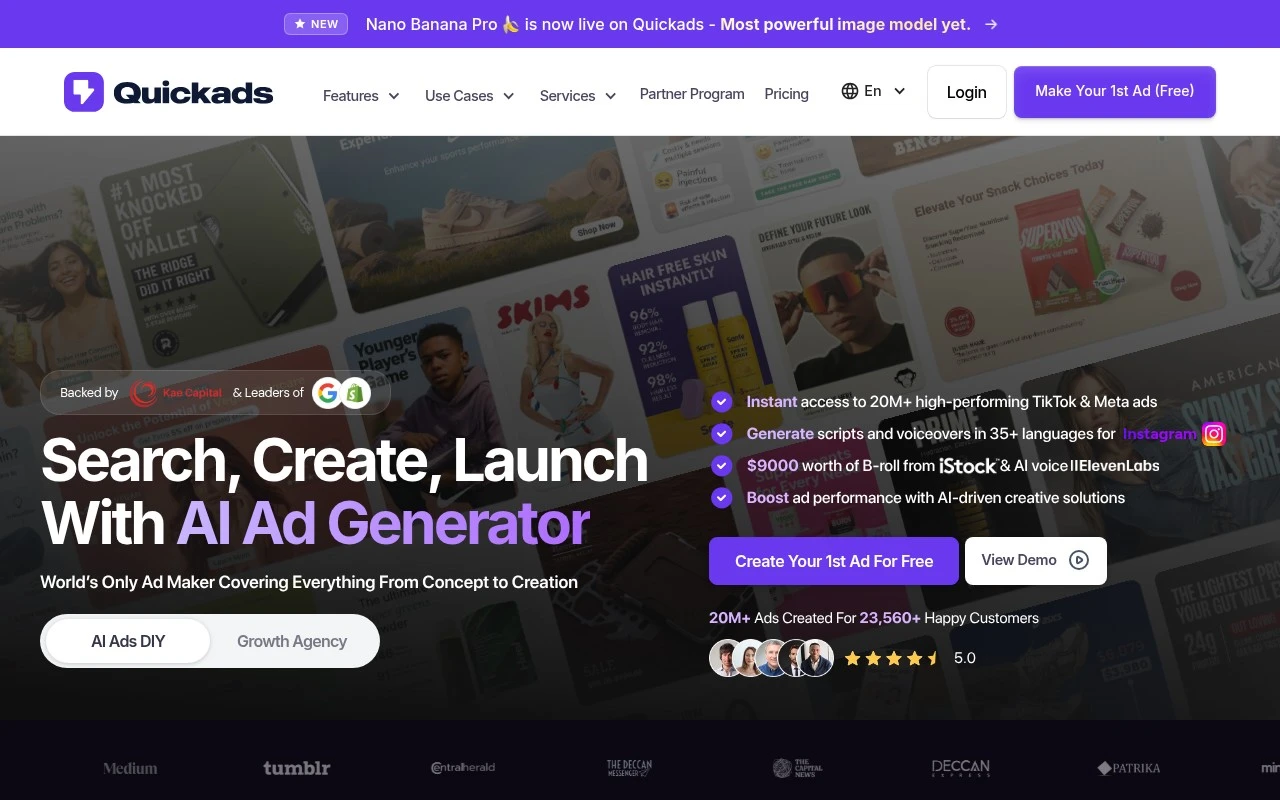
Quickads is positioned as a performance creative partner that combines AI production tools, a claimed 30M+ ad intelligence layer, and human creative strategists to help teams build and test paid-ad creative. Its site describes both a platform with modules such as Creative Intelligence, Image Studio, Video Studio, and Performance Hub, and managed services for ad creative and campaign management across major paid channels.

FYAI Score

7.6 / 10

Based on 31 reviews

Pricing:

Free trial

Best for:

Performance marketers scaling paid-ad creative testing

Score Breakdown

  • Ease of use8.0 / 10
  • Features7.8 / 10
  • Pricing7.6 / 10
  • Integrations7.1 / 10
  • Support7.3 / 10

PRODUCT PREVIEW

What this AI tool does

Quickads is an AI tool designed to help users create advertising copy and simple ad creatives with less manual drafting. It’s intended for people who need to produce multiple variations of ad text quickly, such as small business owners, marketers, or teams testing different messages across channels. You typically provide a product or service description, a target audience, and any required tone or constraints, and the tool generates suggested headlines, descriptions, and alternative wording to compare. This can be useful for brainstorming, speeding up first drafts, and keeping messaging consistent when you’re iterating on campaigns. Because outputs are generated automatically, results may still need review for accuracy, brand fit, and compliance with platform policies. quickads works best when you supply clear inputs and treat the suggestions as starting points rather than final, ready-to-publish ads.

Use cases

Best for

Video Ad Creation

Use Video Studio to generate and edit paid social video ads from prompts, templates, and brand assets.

Competitor Analysis

Quickads uses Creative Intelligence to search competitor ads and surface creatives, formats, and messaging patterns by channel.

Generate Images

Use Image Studio to generate ad images from prompts and resize or adapt them into channel specific variants.

ANALYSIS

Strengths & limitations

Strengths
  • Combines creative research, production, and performance workflow rather than only generating isolated ad assets.
  • Covers multiple paid media channels, including Meta, Google/YouTube, Amazon, and TikTok.
  • Offers both AI-enabled tooling and human creative/service support, which may suit teams that do not want an AI-only workflow.
Limitations
  • The official page is heavily marketing-oriented and does not clearly show the exact self-serve product workflow or limitations.
  • Many performance claims are presented by the company and should be independently validated before relying on them.
  • It appears focused on paid advertising creative, so it may not fit teams looking for a general-purpose design, video, or brand asset tool.

Evaluation

FYAI score breakdown

Our structured evaluation across five key criteria

7.6 / 10

Overall score

Based on 31 reviews

  • Ease of use8.0 / 10
  • Features7.8 / 10
  • Pricing7.6 / 10
  • Integrations7.1 / 10
  • Support7.3 / 10

What users say

Findings from public reviews, documentation and community sources.

  • Ease of use

    G2 says users "consistently praise Quickads for its ease of use and efficient ad creation" and that Quickads "simplifies the ad management process and saves" time.

  • Features

    The Quickads site describes "30M+ proprietary ad signals," "Creative Intelligence," "Image Studio," "Video Studio," and a "Performance Hub." The Quickads site also lists services for Meta, Google/YouTube, Amazon, TikTok, campaign management, graphics, email creative, 3D animations, motion graphics, AI photoshoots, virtual fashion photoshoots, and UGC/video production.

  • Pricing

    The Quickads pricing page lists a "$1 Trial Only For New User," "DIY Creatives" with "$0 to get started," and "Pro plans from $99/mo." The Quickads pricing page says higher-touch tiers use "Custom based on volume & scope" and "Let's talk."

  • Integrations

    MoEngage says "The integration between MoEngage and QuickAds allows customers to generate AI ads using QuickAds and send them via emails on MoEngage."

  • Support

    The Quickads pricing page offers "Schedule a Call" and "Contact Sales." The Quickads pricing page says the campaign tier includes a "Dedicated strategist & campaign manager."

Who is this for?

Best for marketing teams that need ad creative production across formats, the Quickads site lists "Image Studio," "Video Studio," a "Performance Hub," and services for Meta, Google/YouTube, Amazon, and TikTok. Best for teams that want human campaign help, because the pricing page says the campaign tier includes a "Dedicated strategist & campaign manager." Less suited to teams choosing mainly for a broad documented integration ecosystem, the cited integration fact is MoEngage, where customers can generate AI ads using QuickAds and send them via emails on MoEngage.

PRODUCT PREVIEW

Feature highlights

Creative Intelligence

Analyze what works across ads and turn insights into new concepts.

Image Studio

Generate and iterate ad images quickly for rapid testing cycles.

Performance Hub

Track creative performance and optimize iterations across channels.

COMPARE

Discover curated alternatives worth comparing

Compare similar AI tools based on features, pricing and use cases

7.5/ 10Based on 12.890 reviews

Zoominfo

Lead GenerationCRM & Segmentation
Find and enrich B2B leads with firmographic and contact data
Best for:
Sales teams
Pricing
Paid only

8.6/ 10Based on 6.982 reviews

Zoho CRM

Sales & OutreachAnalytics & Reporting
AI assists CRM tasks: rewrite emails, detect anomalies, predict
Best for:
Sales teams
Pricing
Freemium

8.0/ 10Based on 1.041 reviews

Zoho Campaigns

Lead GenerationCRM & Segmentation
Create, automate, and analyze email and SMS marketing campaigns
Best for:
Marketing teams
Pricing
Freemium

Launch better-performing ads faster with Quickads. Turn ideas into ready-to-run campaigns in minutes and start improving ROI today.

FAQ

Frequently asked
questions

Everything you need to know about this AI tool,
its features, pricing, use cases, and limitations.

Who is Quickads a good fit for, and when should I pick a different tool?
Quickads fits small teams and growing businesses that want to produce ad creatives quickly and manage campaigns with lightweight performance tracking. It’s most useful when speed and consistency matter more than deep creative control. If you need highly customized workflows, complex approval chains, or enterprise-grade governance, a more advanced ad platform or creative suite may be a better match.
Does Quickads have a free plan, and what are the typical limitations compared to paid tiers?
Quickads commonly offers a free or trial option, but it’s usually constrained by usage caps (such as limited exports, credits, or campaign volume) and fewer features. Paid plans typically unlock higher generation limits, more templates/variations, and expanded management or analytics features. Check the current pricing page on quickads.ai because plan details can change.
How does Quickads compare to other AI ad-creation and management tools?
Quickads is generally positioned as an end-to-end workflow tool: generating ad creatives, helping manage ads, and tracking performance in one place. Some competitors focus more narrowly on copywriting or design assets, while others are stronger on media buying and attribution. If your priority is advanced creative customization or deep integrations with specific ad networks, compare those capabilities carefully before choosing Quickads.
How fast can I get Quickads running, and what onboarding effort should I expect?
Quickads can be less flexible for experienced marketers who want granular control over every creative element and workflow step. Automated copy and creatives may still need editing to match brand tone and compliance requirements. Integrations may not cover every niche ad platform, which can matter if you run campaigns outside major networks.
What should I know about data handling, privacy, and compliance when using Quickads?
Assume you’ll be uploading business and campaign data (creative assets, product info, and performance metrics), so confirm what Quickads stores, for how long, and whether data is used to improve models. If you operate under GDPR/CCPA or handle regulated content, review their DPA, subprocessors, and account-level controls before importing customer data. For sensitive campaigns, avoid including personal data in prompts unless Quickads explicitly supports compliant handling and deletion.