Curated ToolThis tool is part of our curated AI directory. We only include tools that meet our standards for relevance, usability and real-world value.

Leadpages

Generates landing pages from prompts and runs A/B tests.

Lead GenerationLanding Pages
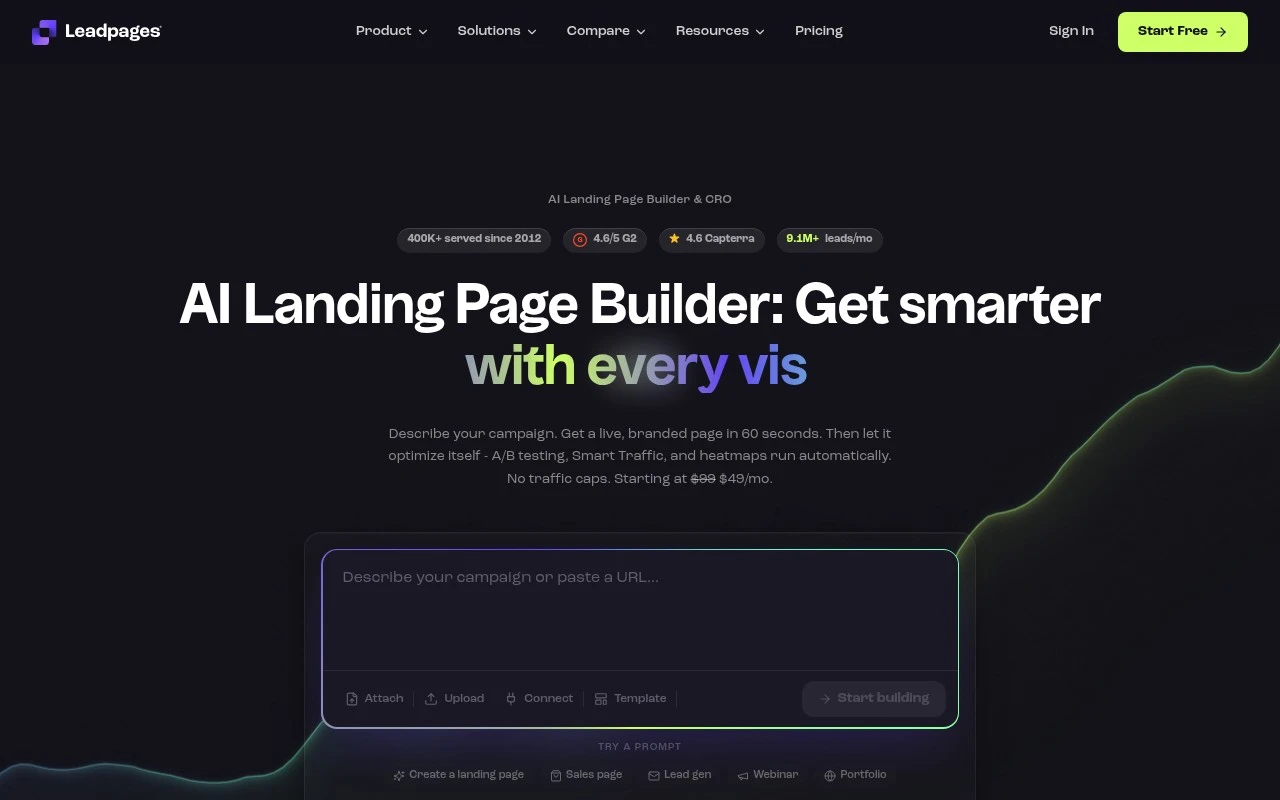
Leadpages is a landing page and conversion optimization platform. Its current positioning centers on an AI landing page builder that can turn a campaign description into a branded page, then help optimize that page with A/B testing, Smart Traffic, heatmaps, personalization, visitor intelligence, and conversion tracking. It also supports forms, integrations with tools such as HubSpot, Salesforce, Mailchimp, Shopify, Klaviyo, ActiveCampaign, Google Ads, and Meta Ads, plus websites, blogs, and embedded Stripe checkout.

FYAI Score

8.3 / 10

Based on 437 reviews

Pricing:

Paid only

Best for:

Small businesses and marketers building landing pages to grow leads

Score Breakdown

  • Ease of use8.8 / 10
  • Features9.1 / 10
  • Pricing7.6 / 10
  • Integrations8.2 / 10
  • Support7.1 / 10

PRODUCT PREVIEW

What this AI tool does

Leadpages is a tool for creating and publishing landing pages and other conversion-focused web pages without needing to code. It’s typically used by marketers, small businesses, and creators who want a straightforward way to launch pages for campaigns, collect leads, or promote a specific offer. The platform centers on a visual page builder and ready-made templates, helping users assemble pages quickly and keep layouts consistent. It also supports common workflows like connecting forms to email marketing services and tracking performance, so you can understand how visitors interact with a page and make adjustments over time. If you’re comparing options for landing page software, this tool is best suited for teams that want a guided, template-driven approach rather than building pages from scratch. It can fit into existing marketing stacks and is often used as part of a broader lead generation process.

Use cases

Best for

Build Landing Page

Generate a branded landing page from a campaign description using Leadpages AI, then publish it with your domain and integrations.

Conversion Rate Optimization

Run A/B tests, Smart Traffic routing, and heatmaps to compare variants and track which page elements drive conversions.

Lead Capture

Add embedded forms and Stripe checkout to capture leads, then sync submissions to tools like HubSpot or Mailchimp.

ANALYSIS

Strengths & limitations

Strengths
  • Combines landing page creation, lead capture, A/B testing, heatmaps, analytics, personalization, and checkout features in one platform.
  • Uses AI to generate pages from prompts and apply brand styling, which can reduce setup time for campaign pages.
  • Built for conversion workflows, with Smart Traffic, automated testing, ad-to-page message matching, and integrations with CRM, email, ecommerce, and ad platforms.
Limitations
  • Best suited to marketing and conversion pages; it may be more specialized than needed for general-purpose website building.
  • Many of the optimization claims depend on having enough traffic and conversion data for tests, routing, and heatmaps to be meaningful.
  • The provided site text shows pricing around a paid monthly plan, but the exact current price is ambiguous in the scrape and should be verified before publishing pricing details.

Evaluation

FYAI score breakdown

Our structured evaluation across five key criteria

8.3 / 10

Overall score

Based on 437 reviews

  • Ease of use8.8 / 10
  • Features9.1 / 10
  • Pricing7.6 / 10
  • Integrations8.2 / 10
  • Support7.1 / 10

What users say

Findings from public reviews, documentation and community sources.

  • Ease of use

    G2's product-review signal says users "consistently praise the ease of use and intuitive design" and highlight how quickly they can create professional-looking landing pages. Leadpages' own page says users can get a "live, branded page in 60 seconds."

  • Features

    Leadpages' own page lists landing-page and CRO features including "AI Page Creation," "A/B Testing," "Self-Improving Pages," and "Heatmaps." Leadpages' own page also references websites/blogs and Stripe checkout.

  • Pricing

    Leadpages' pricing page shows entry pricing as "Starting at $99/mo" with a displayed promotional "$49/mo." Leadpages' pricing page also references a "7-day free trial" and "No traffic caps."

  • Integrations

    Leadpages' own page names integrations including "Google Ads," "Meta Ads," "Shopify," and "Mailchimp." Leadpages' own page also lists "webhooks" and "CSV export."

  • Support

    A Reddit discussion in r/PPC includes a negative customer-service report saying Leadpages had "grubby customer service" and would "never return money for lapsed" service.

Who is this for?

Best for marketers who need landing pages launched quickly, G2 says users praise the ease of use, and Leadpages says users can get a "live, branded page in 60 seconds." Best for campaigns that need conversion testing because Leadpages lists "A/B Testing," "Self-Improving Pages," and "Heatmaps." Less suited to buyers who need detailed support confidence before purchase, a Reddit discussion includes a customer-service report saying Leadpages had "grubby customer service" and would "never return money for lapsed" service.

PRODUCT PREVIEW

Feature highlights

AI Landing Pages

Turn a campaign brief into a branded landing page fast.

Conversion Testing

Run A/B tests and Smart Traffic to lift conversions.

Forms & Integrations

Capture leads and sync to CRM, email, ads, and checkout.

COMPARE

Discover curated alternatives worth comparing

Compare similar AI tools based on features, pricing and use cases

7.5/ 10Based on 12.890 reviews

Zoominfo

Lead GenerationCRM & Segmentation
Find and enrich B2B leads with firmographic and contact data
Best for:
Sales teams
Pricing
Paid only

8.6/ 10Based on 6.982 reviews

Zoho CRM

Sales & OutreachAnalytics & Reporting
AI assists CRM tasks: rewrite emails, detect anomalies, predict
Best for:
Sales teams
Pricing
Freemium

8.0/ 10Based on 1.041 reviews

Zoho Campaigns

Lead GenerationCRM & Segmentation
Create, automate, and analyze email and SMS marketing campaigns
Best for:
Marketing teams
Pricing
Freemium

Join thousands of businesses turning clicks into leads. Launch pages that convert faster, grow your list, and start generating more sales with Leadpages today.

FAQ

Frequently asked
questions

Everything you need to know about this AI tool,
its features, pricing, use cases, and limitations.

When is Leadpages a good fit, and when should I pick a different builder?
Leadpages is a strong fit if you need to launch conversion-focused landing pages quickly, collect leads, and connect them to your email/CRM stack. It’s especially practical for small teams running paid campaigns, webinars, or lead magnets without developer support. If you need highly custom layouts, complex web apps, or deep site-wide design control, a more flexible website builder or custom build may suit better.
Does Leadpages have a free plan, and what are the main limitations compared to paid?
Leadpages typically offers a free trial rather than a permanent free plan, so ongoing use requires a subscription. Lower tiers can limit advanced features like certain integrations, optimization tools, or higher usage allowances depending on the plan. If you need more collaboration, advanced conversion features, or higher volume, you’ll likely need a higher-tier plan.
How does Leadpages compare with Unbounce, Instapage, or ClickFunnels for landing pages?
Compared with Unbounce or Instapage, Leadpages is often simpler to operate and template-driven, but those tools can offer more experimentation and enterprise-grade optimization workflows. Versus ClickFunnels, Leadpages is more focused on standalone landing pages and lead capture rather than full funnel/checkout experiences. If your priority is rapid page creation and straightforward integrations, Leadpages is competitive; for heavy A/B testing and personalization, alternatives may be stronger.
How fast can I get a working landing page live in Leadpages, and what setup is required?
Leadpages can feel restrictive if you want pixel-perfect design control, custom components, or highly dynamic page behavior beyond what the builder supports. Some teams also outgrow the built-in reporting and prefer dedicated analytics tools for deeper attribution and funnel analysis. Pricing can be less attractive for startups if you only need a few simple pages.
What should I consider about data, privacy, and compliance when using Leadpages?
Leadpages collects lead data submitted through your forms, so you’ll want to confirm where data is stored, how long it’s retained, and what subprocessors are involved. Check whether the plan supports features you need for consent management (e.g., GDPR-friendly opt-ins) and whether your integrations pass data securely to your CRM/email platform. For regulated industries, review the vendor’s security documentation and ensure your tracking scripts and cookies align with your compliance requirements.