Curated ToolThis tool is part of our curated AI directory. We only include tools that meet our standards for relevance, usability and real-world value.

FeedHive

Generates social posts, captions, hashtags, and schedules publishing

Marketing AutomationSocial Media
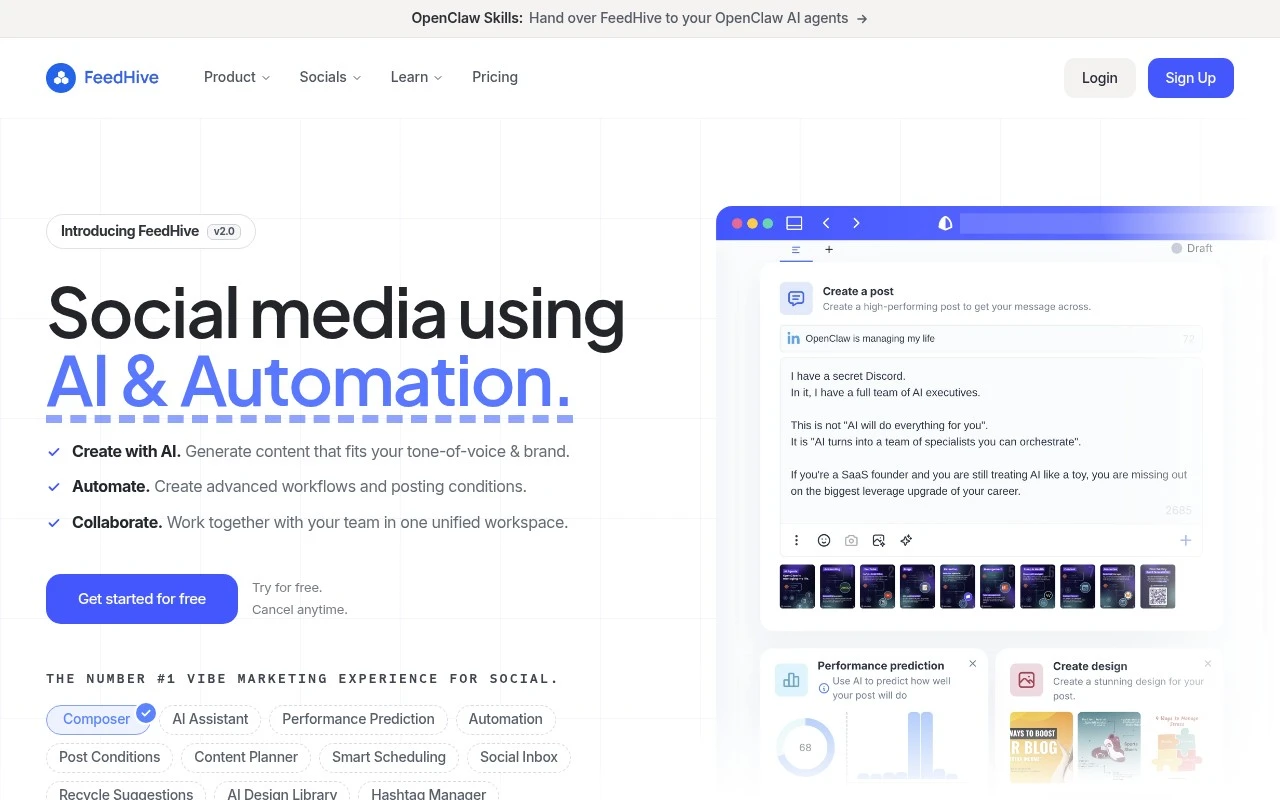
FeedHive helps teams run social media from one workspace. It combines an AI writing assistant, content planner, smart scheduling, post recycling, approval workflows, social inbox features, and integrations such as Zapier, Make, API/CLI access, and an MCP server for more automated or agent-driven workflows.

FYAI Score

8.8 / 10

Based on 172 reviews

Pricing:

Freemium

Best for:

Social media teams managing multi-channel content at scale

Score Breakdown

  • Ease of use9.2 / 10
  • Features8.6 / 10
  • Pricing9.0 / 10
  • Integrations9.3 / 10
  • Support7.5 / 10

PRODUCT PREVIEW

What this AI tool does

FeedHive is an AI-assisted tool designed to help individuals and teams plan, write, and manage social media content in a more structured way. It focuses on supporting the day-to-day workflow of creating posts, refining copy, and keeping a consistent publishing rhythm across channels. In practice, it’s useful when you want to turn rough ideas into publishable drafts, adjust tone for different audiences, or reuse content without rewriting everything from scratch. The AI components can help with suggestions and edits, while the broader workspace helps you organize what’s going out and when. This page provides an informational overview of what the tool is for and the kinds of tasks it can support, so you can decide whether it fits your content planning and publishing needs.

Use cases

Best for

Social Media Content Creation

FeedHive uses an AI writing assistant plus a content planner to draft, edit, and schedule social posts from one workspace.

Marketing Automation

FeedHive automates publishing with smart scheduling and triggers via Zapier, Make, API, CLI, or an MCP server for agent workflows.

Content Repurposing

FeedHive repurposes content by recycling evergreen posts and re-queuing them on a schedule across your social channels.

ANALYSIS

Strengths & limitations

Strengths
  • Combines AI content creation, scheduling, automation, and team collaboration in one social media workflow.
  • Supports publishing to many major social platforms from a single workspace.
  • Includes developer and automation options such as Zapier, Make, public API, CLI, Claude Code, OpenClaw skills, and an MCP server.
Limitations
  • The official site uses broad marketing language, so some feature depth and practical limits are not clear from the provided content alone.
  • Advanced automation and agentic workflow features may be unnecessary for users who only need basic post scheduling.
  • Pricing details, plan limits, and exact AI credit usage are not included in the provided page text.

Evaluation

FYAI score breakdown

Our structured evaluation across five key criteria

8.8 / 10

Overall score

Based on 172 reviews

  • Ease of use9.2 / 10
  • Features8.6 / 10
  • Pricing9.0 / 10
  • Integrations9.3 / 10
  • Support7.5 / 10

What users say

Findings from public reviews, documentation and community sources.

  • Ease of use

    G2 reports FeedHive has 4.6/5 from 172 reviews and says users “consistently praise the ease of use and intuitive interface.” Software Advice’s review snippet says, “I love how easy it is to use.”

  • Features

    FeedHive's website lists AI content generation, smart scheduling, post conditions, and approval flows for social media workflows. FeedHive's website lists supported channels including TikTok, LinkedIn, Google Business, and Threads.

  • Pricing

    FeedHive's pricing page shows a 7-day free trial and annual tiers from Creator at €15/month billed annually to Agency at €239/month. FeedHive's pricing page lists lower-tier caps such as 30 scheduled posts and 14-day future scheduling.

  • Integrations

    FeedHive's website says Zapier connects FeedHive with “+9000 apps” and Make connects FeedHive with “+3000 apps.” FeedHive's website advertises a public REST API, CLI access, webhooks, Claude Code setup, and an official MCP Server.

  • Support

    G2 lists FeedHive at 4.6/5 across 172 reviews.

Who is this for?

Best for social media teams that publish across many channels and want automation. FeedHive lists support for Facebook, Instagram, YouTube, X, TikTok, LinkedIn, Pinterest, Google Business, and Threads, plus Zapier connections with “+9000 apps.” Less suited to users who need a large queue on lower tiers, FeedHive's pricing page lists lower-tier caps such as 30 scheduled posts and 14-day future scheduling.

PRODUCT PREVIEW

Feature highlights

AI Post Writer

Draft on-brand captions fast with built-in AI assistance.

Smart Scheduling

Plan, schedule, and recycle posts to keep channels active.

Automations & API

Connect via Zapier, Make, API/CLI, and MCP for workflows.

COMPARE

Discover curated alternatives worth comparing

Compare similar AI tools based on features, pricing and use cases

7.5/ 10Based on 12.890 reviews

Zoominfo

Lead GenerationCRM & Segmentation
Find and enrich B2B leads with firmographic and contact data
Best for:
Sales teams
Pricing
Paid only

8.6/ 10Based on 6.982 reviews

Zoho CRM

Sales & OutreachAnalytics & Reporting
AI assists CRM tasks: rewrite emails, detect anomalies, predict
Best for:
Sales teams
Pricing
Freemium

8.0/ 10Based on 1.041 reviews

Zoho Campaigns

Lead GenerationCRM & Segmentation
Create, automate, and analyze email and SMS marketing campaigns
Best for:
Marketing teams
Pricing
Freemium

Plan, publish, and grow faster with FeedHive. Start posting consistently today and turn your social presence into measurable engagement.

FAQ

Frequently asked
questions

Everything you need to know about this AI tool,
its features, pricing, use cases, and limitations.

Who is FeedHive a good fit for, and when should I pick something else?
FeedHive fits teams that publish frequently and want a single place to schedule, collaborate, and use performance data to iterate on content. It’s especially useful if you rely on recurring formats and need approval workflows. If you need deep support for niche networks or very lightweight, low-cost scheduling, another tool may be a better match.
Does FeedHive have a free plan, and what are the main limitations of lower tiers?
FeedHive is primarily a paid product, and access to advanced features typically depends on the plan you choose. Lower tiers commonly limit the number of social accounts, users, workspaces, and analytics depth. If you’re comparing tools, check whether the features you care about (team approvals, advanced analytics, content assistance) are included or reserved for higher tiers.
How does FeedHive compare with Buffer, Hootsuite, or Later for day-to-day work?
FeedHive tends to emphasize content workflows and data-driven iteration, while some competitors focus more on broad channel coverage or enterprise governance. If you prioritize a streamlined scheduling experience plus post ideas/captions and performance insights in one place, FeedHive can be competitive. If your priority is the widest integration ecosystem or heavy-duty social listening, you may find stronger options elsewhere.
How quickly can I get FeedHive running for a team, and what setup work is involved?
Integration coverage can be a constraint if you depend on less common platforms or specialized marketing stacks. The built-in content suggestions can help with ideation, but you’ll still need to edit for brand voice and campaign context. Pricing can also become a factor for very small teams if the features you need sit in higher-tier plans.
What should I know about data handling, privacy, and compliance when using FeedHive?
FeedHive requires access to your connected social accounts to publish and pull performance metrics, so you should review what permissions are requested per network. For compliance needs, verify items like data retention, account access controls, and whether the vendor offers a DPA and supports your required regions. If you’re in a regulated environment, confirm how team roles, auditability, and third-party subprocessors are handled before rollout.